
About
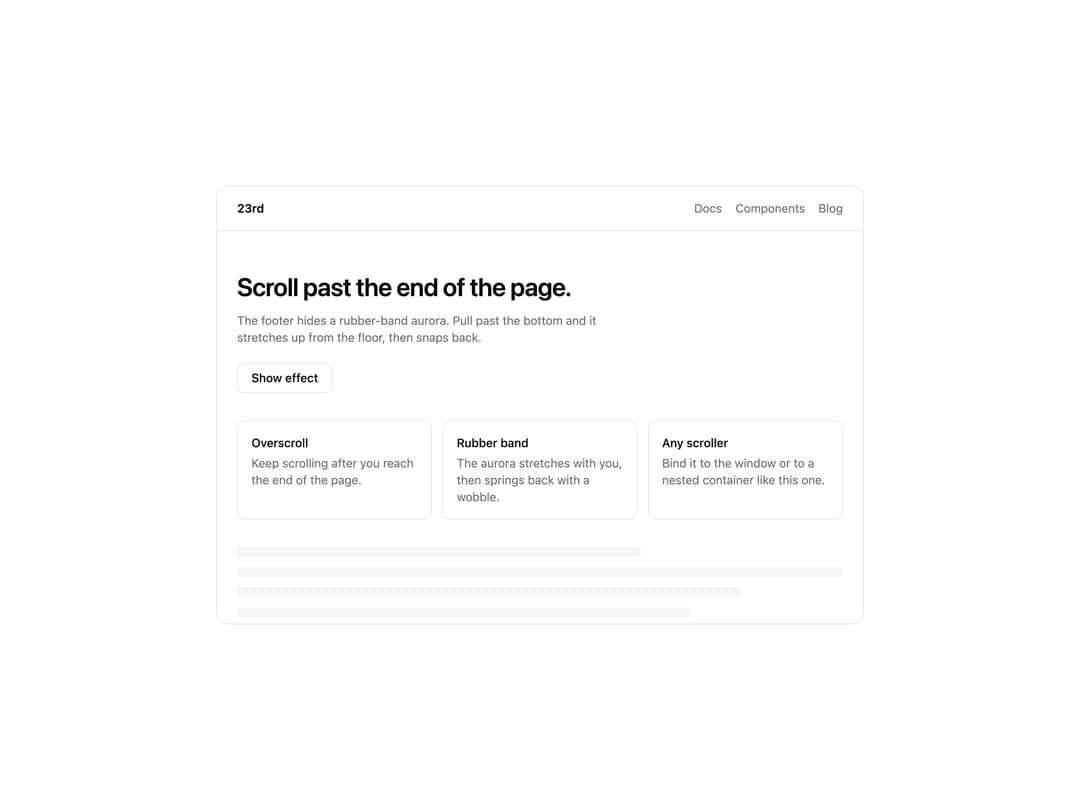
Dia-style rubber overscroll: rainbow aurora stretches up past the bottom, then snaps back.
Built with React and Tailwind. Copy the prompt and paste it into Claude Code, Cursor or Lovable: your agent adds Stretchy Footer to your project and fits it to your theme.
Code
How Stretchy Footer is used: the demo's code. The component's own source comes with a free account.
Usage.tsx
"use client"

import { useRef, useState } from "react"

import {
  playStretchyFooterDemo,
  StretchyFooter,
} from "@/components/ui/stretchy-footer"

const settings = {
  colors: [
    "#FF1AE6",
    "#FF2E5E",
    "#FF8A1A",
    "#FFC81F",
    "#E2E6EC",
    "#8DB6E6",
    "#2F74DC",
    "#1459E3",
    "#1C2566",
  ],
  maxStretch: 280,
  columns: 9,
  blur: 16,
  stiffness: 380,
  flip: false,
  rotated: false,
}

const DEMO_ID = "stretchy-footer-demo"

const NOTES = [
  {
    title: "Overscroll",
    body: "Keep scrolling after you reach the end of the page.",
  },
  {
    title: "Rubber band",
    body: "The aurora stretches with you, then springs back with a wobble.",
  },
  {
    title: "Any scroller",
    body: "Bind it to the window or to a nested container like this one.",
  },
]

export default function StretchyFooterDemo(props: Partial<typeof settings>) {
  const s = { ...settings, ...props }
  const scrollerRef = useRef<HTMLDivElement>(null)
  const [playing, setPlaying] = useState(false)

  async function play() {
    if (playing) return
    setPlaying(true)
    try {
      await playStretchyFooterDemo({
        target: DEMO_ID,
        amount: 0.9,
        holdMs: 900,
        scrollRoot: scrollerRef.current,
      })
    } finally {
      setPlaying(false)
    }
  }

  return (
    <div className="flex min-h-[520px] w-full items-center justify-center bg-background p-4">
      <div className="relative h-[520px] w-full max-w-3xl overflow-hidden rounded-xl border border-border bg-background">
        <StretchyFooter
          demoId={DEMO_ID}
          scrollRef={scrollerRef}
          contentSelector="[data-stretchy-page]"
          colors={s.colors}
          maxStretch={s.maxStretch}
          columns={s.columns}
          blur={s.blur}
          stiffness={s.stiffness}
          flip={s.flip}
          rotate={s.rotated ? 180 : 0}
          className="z-20"
        />

        <div
          ref={scrollerRef}
          className="relative z-10 h-full overflow-y-auto overscroll-contain"
        >
          <div
            data-stretchy-page
            className="flex min-h-[150%] flex-col bg-background text-foreground"
          >
            <header className="flex items-center justify-between border-b border-border px-6 py-4">
              <span className="text-sm font-semibold">23rd</span>
              <nav className="flex gap-4 text-sm text-muted-foreground">
                <span>Docs</span>
                <span>Components</span>
                <span>Blog</span>
              </nav>
            </header>

            <main className="flex flex-1 flex-col gap-8 px-6 py-12">
              <div className="flex flex-col gap-3">
                <h1 className="text-3xl font-semibold tracking-tight text-balance">
                  Scroll past the end of the page.
                </h1>
                <p className="max-w-md text-sm text-muted-foreground">
                  The footer hides a rubber-band aurora. Pull past the bottom
                  and it stretches up from the floor, then snaps back.
                </p>
                <div>
                  <button
                    type="button"
                    onClick={play}
                    disabled={playing}
                    className="mt-2 inline-flex h-9 items-center rounded-md border border-border bg-background px-4 text-sm font-medium text-foreground transition-colors hover:bg-muted disabled:opacity-60"
                  >
                    {playing ? "Playing…" : "Show effect"}
                  </button>
                </div>
              </div>

              <div className="grid gap-3 sm:grid-cols-3">
                {NOTES.map((note) => (
                  <div
                    key={note.title}
                    className="rounded-lg border border-border p-4"
                  >
                    <p className="text-sm font-medium">{note.title}</p>
                    <p className="mt-1 text-sm text-muted-foreground">
                      {note.body}
                    </p>
                  </div>
                ))}
              </div>

              <div className="flex flex-col gap-3">
                <div className="h-3 w-2/3 rounded bg-muted" />
                <div className="h-3 w-full rounded bg-muted" />
                <div className="h-3 w-5/6 rounded bg-muted" />
                <div className="h-3 w-3/4 rounded bg-muted" />
              </div>
            </main>

            <footer className="flex flex-col gap-2 border-t border-border px-6 py-8 sm:flex-row sm:items-center sm:justify-between">
              <span className="text-sm text-muted-foreground">
                © 23rd. Keep scrolling.
              </span>
              <div className="flex gap-4 text-sm text-muted-foreground">
                <span>Privacy</span>
                <span>Terms</span>
                <span>GitHub</span>
              </div>
            </footer>
          </div>
        </div>
      </div>
    </div>
  )
}
More by jay sharma
View all

Live Orb
218
Chrome Button
182
Frame Button
132
Highlight Button
76
ASCII Fluid
73
Motion Button
59
Brutal Button
56
Shader Metal
49
More in Footers
View all
Footer section
1.9K

Footer 7
556
Large Name Footer
193
Footer
446
Footer column
426
Stacked Circular Footer
413

Footer 2
201

Footer
80


