
About
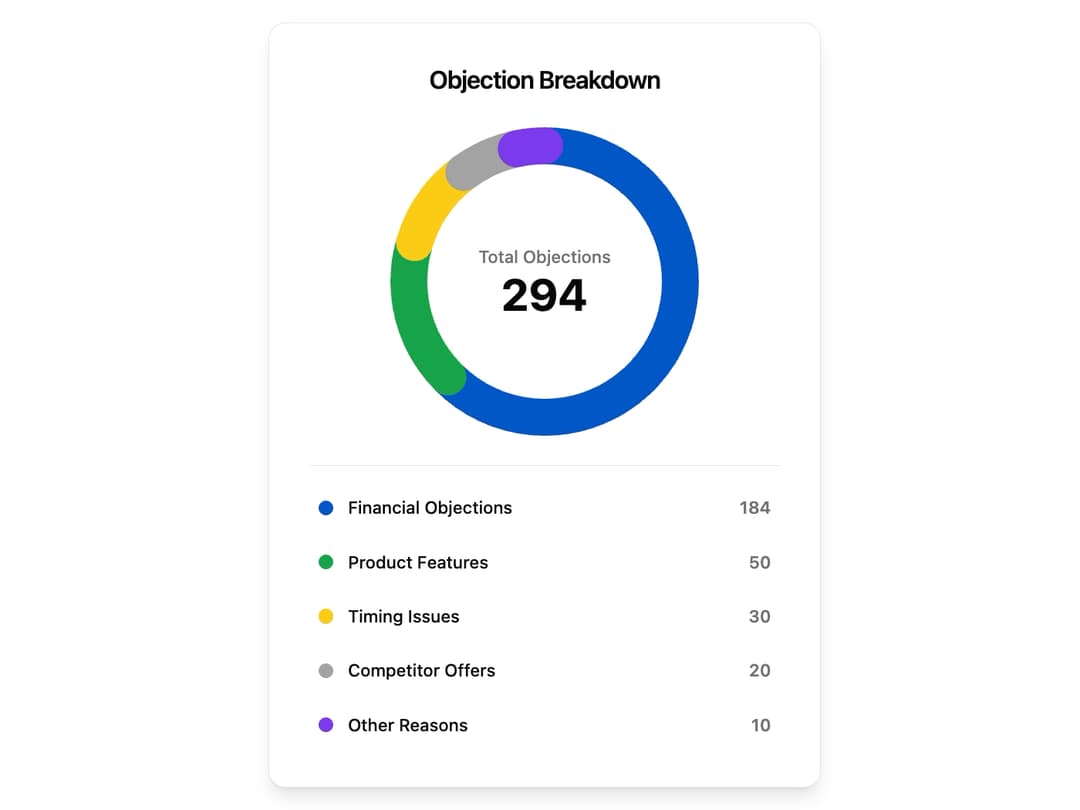
Donut Chart – Visual data distribution widget. Displays categorized insights with a clean circular layout and color-coded segments. Perfect for analytics dashboards and performance summaries.
Built with React and Tailwind. Copy the prompt and paste it into Claude Code, Cursor or Lovable: your agent adds Donut Chart to your project and fits it to your theme.
Code
How Donut Chart is used: the demo's code. The component's own source comes with a free account.
Usage.tsx
// demo.tsx
"use client";

import React, { useState } from "react";
import { DonutChart } from "@/components/ui/donut-chart"; // Adjust path as needed
import { Card } from "@/components/ui/card"; // Assuming shadcn Card component
import { motion, AnimatePresence } from "framer-motion";
import { Circle } from "lucide-react"; // For legend icons
import { cn } from "@/lib/utils"; // <-- FIX: Added the missing import

const financialData = [
  { value: 184, color: "hsl(214.7 95% 40%)", label: "Financial Objections" },
  { value: 50, color: "hsl(142.1 76.2% 36.3%)", label: "Product Features" },
  { value: 30, color: "hsl(47.9 95.8% 53.1%)", label: "Timing Issues" },
  { value: 20, color: "hsl(0 0% 63.9%)", label: "Competitor Offers" },
  { value: 10, color: "hsl(262.1 83.3% 57.8%)", label: "Other Reasons" },
];

const totalFinancialValue = financialData.reduce((sum, d) => sum + d.value, 0);

export default function DonutChartDemo() {
  const [hoveredSegment, setHoveredSegment] = useState<string | null>(null);

  // Find the currently hovered segment data
  const activeSegment = financialData.find(
    (segment) => segment.label === hoveredSegment
  );

  // Determine total value (either hovered or overall)
  const displayValue = activeSegment?.value ?? totalFinancialValue;
  const displayLabel = activeSegment?.label ?? "Total Objections";
  const displayPercentage =
    activeSegment ? (activeSegment.value / totalFinancialValue) * 100 : 100;

  return (
    <Card className="p-6 md:p-8 w-full max-w-md mx-auto flex flex-col items-center justify-center space-y-6 bg-background text-foreground shadow-lg rounded-xl">
      <h2 className="text-xl font-semibold text-center tracking-tight text-foreground">
        Objection Breakdown
      </h2>
      <div className="relative flex items-center justify-center">
        <DonutChart
          data={financialData}
          size={250}
          strokeWidth={30}
          animationDuration={1.2}
          animationDelayPerSegment={0.05}
          highlightOnHover={true}
          centerContent={
            <AnimatePresence mode="wait">
              <motion.div
                key={displayLabel} // Key changes to trigger animation
                initial={{ opacity: 0, scale: 0.9 }}
                animate={{ opacity: 1, scale: 1 }}
                exit={{ opacity: 0, scale: 0.9 }}
                transition={{ duration: 0.2, ease: "circOut" }}
                className="flex flex-col items-center justify-center text-center"
              >
                <p className="text-muted-foreground text-sm font-medium truncate max-w-[150px]">
                  {displayLabel}
                </p>
                <p className="text-4xl font-bold text-foreground">
                  {displayValue}
                </p>
                {/* Only show percentage if a segment is hovered */}
                {activeSegment && (
                    <p className="text-lg font-medium text-muted-foreground">
                        [{displayPercentage.toFixed(0)}%]
                    </p>
                )}
              </motion.div>
            </AnimatePresence>
          }
        >
            {/* This implementation uses a custom 'onSegmentHover' prop
              (which we should add to the main component) or relies on
              the component's internal hover state.

              For simplicity, let's modify the DonutChart component
              to accept an 'onSegmentHover' callback.
            */}
        </DonutChart>
      </div>

      <div className="flex flex-col space-y-2 w-full pt-4 border-t border-border">
        {financialData.map((segment, index) => (
          <motion.div
            key={segment.label}
            initial={{ opacity: 0, x: -20 }}
            animate={{ opacity: 1, x: 0 }}
            transition={{ delay: 1.2 + index * 0.1, duration: 0.4 }}
            className={cn(
              "flex items-center justify-between p-2 rounded-md transition-all duration-200 cursor-pointer",
              hoveredSegment === segment.label && "bg-muted"
            )}
            onMouseEnter={() => setHoveredSegment(segment.label)}
            onMouseLeave={() => setHoveredSegment(null)}
          >
            <div className="flex items-center space-x-3">
              <span
                className="h-3 w-3 rounded-full"
                style={{ backgroundColor: segment.color }}
              ></span>
              <span className="text-sm font-medium text-foreground">
                {segment.label}
              </span>
            </div>
            <span className="text-sm font-semibold text-muted-foreground">
              {segment.value}
            </span>
          </motion.div>
        ))}
      </div>
    </Card>
  );
}
Dependencies
More by Ravi Katiyar
View all

Animated Shader Hero
3.7K
Hero
3.1K
Circular Gallery
2.7K
Minimalist Hero
2.5K
Floating Icons Hero Section
1.9K
Glass Calendar
1.8K
Feature Carousel
1.7K
AI Image Generator Hero
1.4K
More in Cards
View all

Statistics Card 2
264

Course Design Cards
1.1K
Card
70
Stats cards with links
39
The Item one
3

Card Studio
7
Statistics Card 7
292

Item
10
