
About
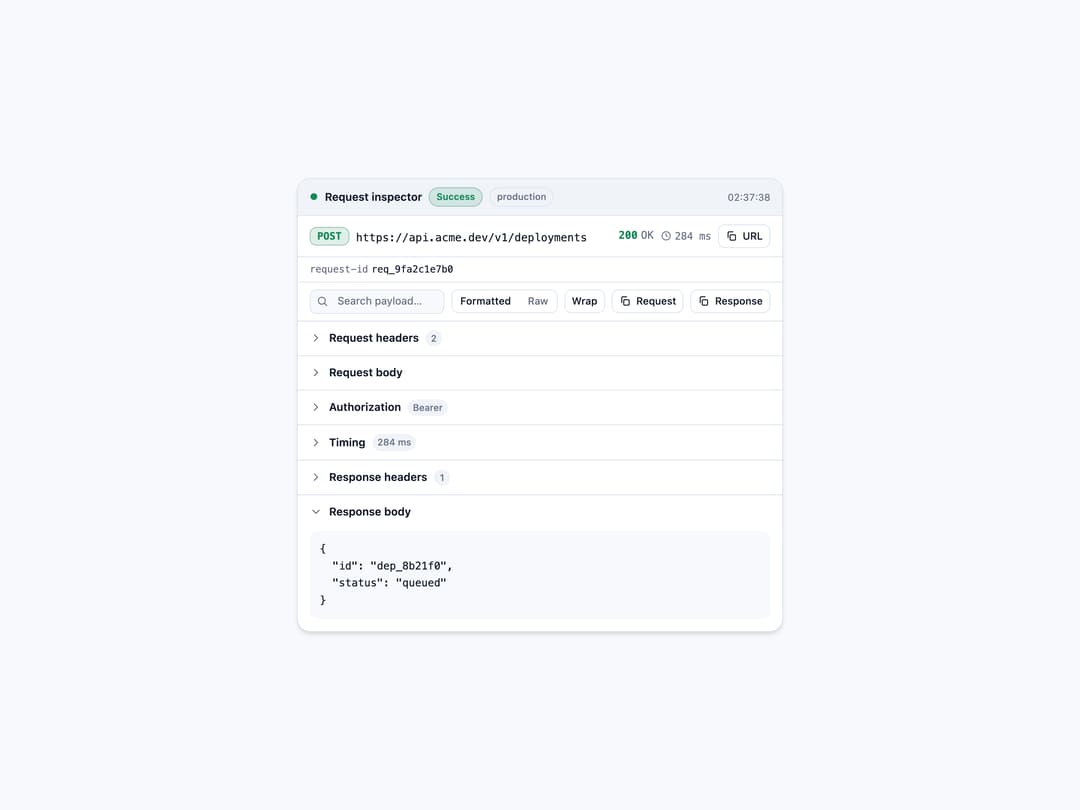
A presentation-only panel for inspecting a single HTTP request/response your app already has, showing method, URL, status, duration, timing phases, headers, query, body, errors and an auth summary with credential redaction built in.
Built with React and Tailwind. Copy the prompt and paste it into Claude Code, Cursor or Lovable: your agent adds API Request Inspector to your project and fits it to your theme.
Code
How API Request Inspector is used: the demo's code. The component's own source comes with a free account.
Usage.tsx
"use client";

import {
  ApiRequestInspector,
  type ApiRequest,
  type ApiResponse,
} from "@/components/ui/api-request-inspector";

export default function ApiRequestInspectorDemo() {
  const request: ApiRequest = {
    method: "POST",
    url: "https://api.acme.dev/v1/deployments",
    environment: "production",
    requestId: "req_9fa2c1e7b0",
    timestamp: Date.now(),
    headers: {
      "Content-Type": "application/json",
      Authorization: "Bearer sk_live_51Hc9f2K8sJd0aQm3",
    },
    body: { project: "web", ref: "main" },
  };

  const response: ApiResponse = {
    status: 200,
    statusText: "OK",
    durationMs: 284,
    headers: { "Content-Type": "application/json" },
    body: { id: "dep_8b21f0", status: "queued" },
    phases: [
      { label: "DNS", durationMs: 12 },
      { label: "TLS", durationMs: 38 },
      { label: "TTFB", durationMs: 168 },
      { label: "Download", durationMs: 66 },
    ],
  };

  return (
    <div className="flex w-full items-center justify-center bg-[var(--color-bg)] p-6">
      <div className="w-full max-w-xl">
        <ApiRequestInspector
          request={request}
          response={response}
          state="success"
          auth={{
            scheme: "Bearer",
            principal: "ci-deploy-bot",
            scopes: ["deployments:write"],
          }}
          redact={["x-internal-id"]}
        />
      </div>
    </div>
  );
}
Dependencies
More by Mehi
View all
Border Beam Panel
926
Compare Reveal
302
Decrypt Text
237
Holo Card
216
Magnetic Dock
156
Luminous Topography
105
Lens Card
83
Copperplate Hatch
59