About
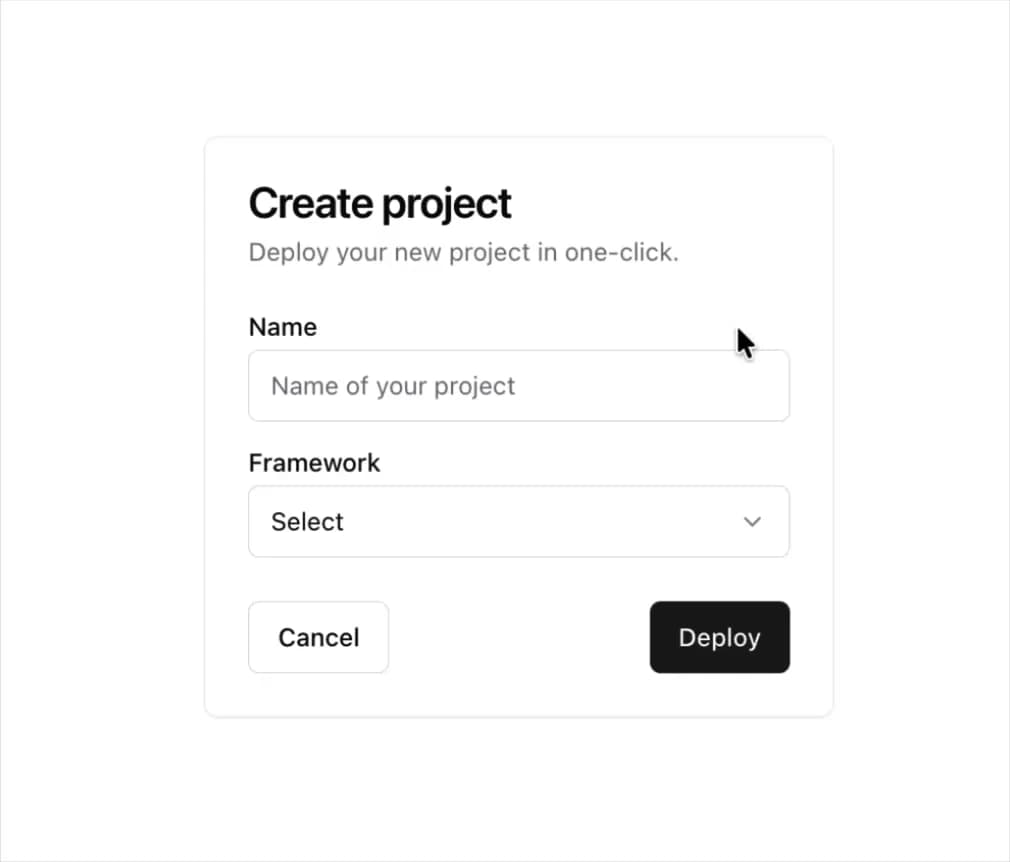
Displays a card with header, content, and footer.
Built with React and Tailwind. Copy the prompt and paste it into Claude Code, Cursor or Lovable: your agent adds Card to your project and fits it to your theme.
Code
How Card is used: the demo's code. The component's own source comes with a free account.
Usage.tsx
import * as React from "react"

import { cn } from "@/lib/utils"
import { BellRing, Check } from "lucide-react";

import {
  Card,
  CardContent,
  CardDescription,
  CardFooter,
  CardHeader,
  CardTitle,
} from "@/components/ui/card"
import { Input } from "@/components/ui/input"
import { Label } from "@/components/ui/label"
import { Button } from "@/components/ui/button";
import {
  Select,
  SelectContent,
  SelectItem,
  SelectTrigger,
  SelectValue,
} from "@/components/ui/select"
import { Switch } from "@/components/ui/switch"

function CardWithForm() {
  return (
    <Card className="w-[350px]">
      <CardHeader>
        <CardTitle>Create project</CardTitle>
        <CardDescription>Deploy your new project in one-click.</CardDescription>
      </CardHeader>
      <CardContent>
        <form>
          <div className="grid w-full items-center gap-4">
            <div className="flex flex-col space-y-1.5">
              <Label htmlFor="name">Name</Label>
              <Input id="name" placeholder="Name of your project" />
            </div>
            <div className="flex flex-col space-y-1.5">
              <Label htmlFor="framework">Framework</Label>
              <Select>
                <SelectTrigger id="framework">
                  <SelectValue placeholder="Select" />
                </SelectTrigger>
                <SelectContent position="popper">
                  <SelectItem value="next">Next.js</SelectItem>
                  <SelectItem value="sveltekit">SvelteKit</SelectItem>
                  <SelectItem value="astro">Astro</SelectItem>
                  <SelectItem value="nuxt">Nuxt.js</SelectItem>
                </SelectContent>
              </Select>
            </div>
          </div>
        </form>
      </CardContent>
      <CardFooter className="flex justify-between">
        <Button variant="outline">Cancel</Button>
        <Button>Deploy</Button>
      </CardFooter>
    </Card>
  )
}

const notifications = [
  {
    title: "Your call has been confirmed.",
    description: "1 hour ago",
  },
  {
    title: "You have a new message!",
    description: "1 hour ago",
  },
  {
    title: "Your subscription is expiring soon!",
    description: "2 hours ago",
  },
]

type CardProps = React.ComponentProps<typeof Card>

function CardDemo({ className, ...props }: CardProps) {
  return (
    <Card className={cn("w-[380px]", className)} {...props}>
      <CardHeader>
        <CardTitle>Notifications</CardTitle>
        <CardDescription>You have 3 unread messages.</CardDescription>
      </CardHeader>
      <CardContent className="grid gap-4">
        <div className=" flex items-center space-x-4 rounded-md border p-4">
          <BellRing />
          <div className="flex-1 space-y-1">
            <p className="text-sm font-medium leading-none">
              Push Notifications
            </p>
            <p className="text-sm text-muted-foreground">
              Send notifications to device.
            </p>
          </div>
          <Switch />
        </div>
        <div>
          {notifications.map((notification, index) => (
            <div
              key={index}
              className="mb-4 grid grid-cols-[25px_1fr] items-start pb-4 last:mb-0 last:pb-0"
            >
              <span className="flex h-2 w-2 translate-y-1 rounded-full bg-sky-500" />
              <div className="space-y-1">
                <p className="text-sm font-medium leading-none">
                  {notification.title}
                </p>
                <p className="text-sm text-muted-foreground">
                  {notification.description}
                </p>
              </div>
            </div>
          ))}
        </div>
      </CardContent>
      <CardFooter>
        <Button className="w-full">
          <Check className="mr-2 h-4 w-4" /> Mark all as read
        </Button>
      </CardFooter>
    </Card>
  )
}

export default { CardWithForm, CardDemo }
Dependencies
More by shadcn
View all

Navigation menu
770
Calendar with time pressets
504
Sidebar
339
Sonner
231
Chart
215
Icons
177
Dropdown Menu
149
Calendar with event slots
116
More in Buttons
View all

Button
14
Button
34
Texture Button
92
Button Save
46
Button
64

Button Group
3

Notification Button
103

Button

