About
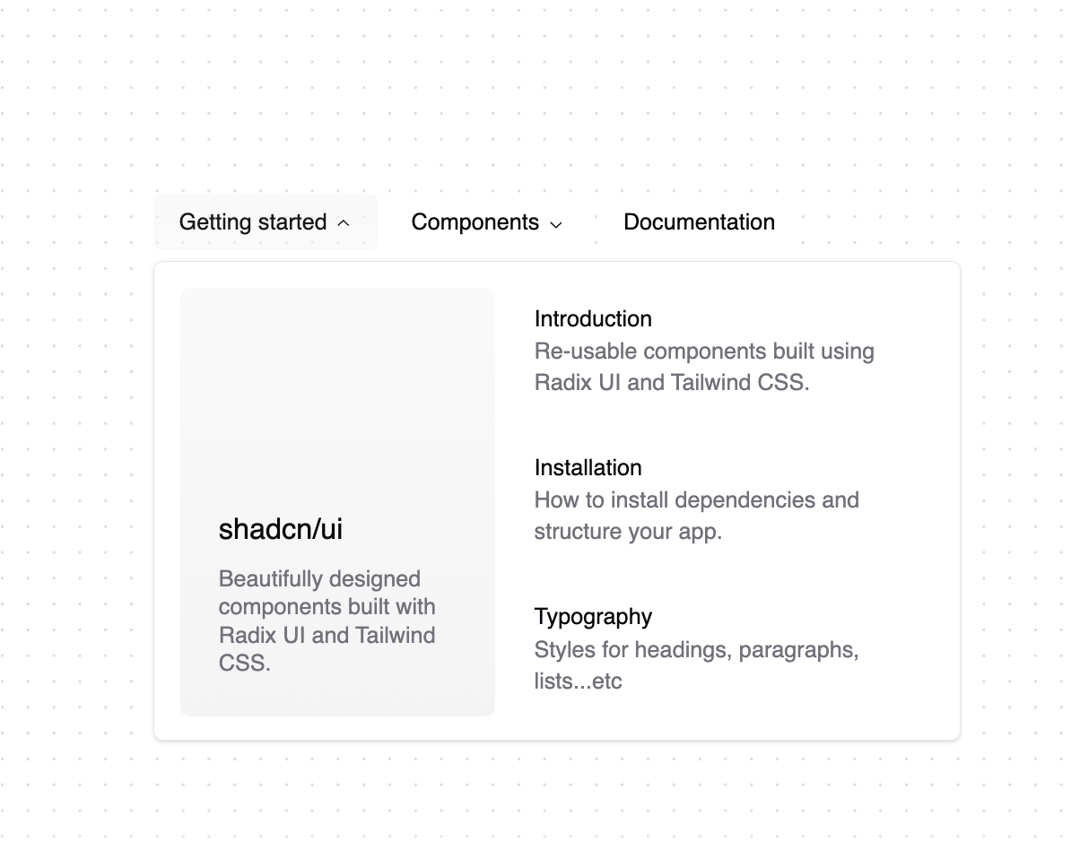
A collection of links for navigating websites.
Built with React and Tailwind. Copy the prompt and paste it into Claude Code, Cursor or Lovable: your agent adds Navigation menu to your project and fits it to your theme.
Code
How Navigation menu is used: the demo's code. The component's own source comes with a free account.
Usage.tsx
"use client"

import * as React from "react"
import Link from "next/link"

import { cn } from "@/lib/utils"
import {
  NavigationMenu,
  NavigationMenuContent,
  NavigationMenuItem,
  NavigationMenuLink,
  NavigationMenuList,
  NavigationMenuTrigger,
  navigationMenuTriggerStyle,
} from "@/components/ui/navigation-menu"

const components: { title: string; href: string; description: string }[] = [
  {
    title: "Alert Dialog",
    href: "/docs/primitives/alert-dialog",
    description:
      "A modal dialog that interrupts the user with important content and expects a response.",
  },
  {
    title: "Hover Card",
    href: "/docs/primitives/hover-card",
    description:
      "For sighted users to preview content available behind a link.",
  },
  {
    title: "Progress",
    href: "/docs/primitives/progress",
    description:
      "Displays an indicator showing the completion progress of a task, typically displayed as a progress bar.",
  },
  {
    title: "Scroll-area",
    href: "/docs/primitives/scroll-area",
    description: "Visually or semantically separates content.",
  },
  {
    title: "Tabs",
    href: "/docs/primitives/tabs",
    description:
      "A set of layered sections of content—known as tab panels—that are displayed one at a time.",
  },
  {
    title: "Tooltip",
    href: "/docs/primitives/tooltip",
    description:
      "A popup that displays information related to an element when the element receives keyboard focus or the mouse hovers over it.",
  },
]

export function NavigationMenuDemo() {
  return (
    <NavigationMenu>
      <NavigationMenuList>
        <NavigationMenuItem>
          <NavigationMenuTrigger>Getting started</NavigationMenuTrigger>
          <NavigationMenuContent>
            <ul className="grid gap-3 p-4 md:w-[400px] lg:w-[500px] lg:grid-cols-[.75fr_1fr]">
              <li className="row-span-3">
                <NavigationMenuLink asChild>
                  <a
                    className="flex h-full w-full select-none flex-col justify-end rounded-md bg-gradient-to-b from-muted/50 to-muted p-6 no-underline outline-none focus:shadow-md"
                    href="/"
                  >
                    <div className="mb-2 mt-4 text-lg font-medium">
                      shadcn/ui
                    </div>
                    <p className="text-sm leading-tight text-muted-foreground">
                      Beautifully designed components built with Radix UI and
                      Tailwind CSS.
                    </p>
                  </a>
                </NavigationMenuLink>
              </li>
              <ListItem href="/docs" title="Introduction">
                Re-usable components built using Radix UI and Tailwind CSS.
              </ListItem>
              <ListItem href="/docs/installation" title="Installation">
                How to install dependencies and structure your app.
              </ListItem>
              <ListItem href="/docs/primitives/typography" title="Typography">
                Styles for headings, paragraphs, lists...etc
              </ListItem>
            </ul>
          </NavigationMenuContent>
        </NavigationMenuItem>
        <NavigationMenuItem>
          <NavigationMenuTrigger>Components</NavigationMenuTrigger>
          <NavigationMenuContent>
            <ul className="grid w-[400px] gap-3 p-4 md:w-[500px] md:grid-cols-2 lg:w-[600px] ">
              {components.map((component) => (
                <ListItem
                  key={component.title}
                  title={component.title}
                  href={component.href}
                >
                  {component.description}
                </ListItem>
              ))}
            </ul>
          </NavigationMenuContent>
        </NavigationMenuItem>
        <NavigationMenuItem>
          <Link href="/docs" legacyBehavior passHref>
            <NavigationMenuLink className={navigationMenuTriggerStyle()}>
              Documentation
            </NavigationMenuLink>
          </Link>
        </NavigationMenuItem>
      </NavigationMenuList>
    </NavigationMenu>
  )
}

const ListItem = React.forwardRef<
  React.ElementRef<"a">,
  React.ComponentPropsWithoutRef<"a">
>(({ className, title, children, ...props }, ref) => {
  return (
    <li>
      <NavigationMenuLink asChild>
        <a
          ref={ref}
          className={cn(
            "block select-none space-y-1 rounded-md p-3 leading-none no-underline outline-none transition-colors hover:bg-accent hover:text-accent-foreground focus:bg-accent focus:text-accent-foreground",
            className
          )}
          {...props}
        >
          <div className="text-sm font-medium leading-none">{title}</div>
          <p className="line-clamp-2 text-sm leading-snug text-muted-foreground">
            {children}
          </p>
        </a>
      </NavigationMenuLink>
    </li>
  )
})
ListItem.displayName = "ListItem"
Dependencies
More by shadcn
View all

Calendar with time pressets
504
Sidebar
339
Sonner
231
Chart
216
Icons
178
Dropdown Menu
149
Calendar with event slots
116
Data Table
114
More in Navigation
View all

Sidebar
234

Tabs
60
Newsletter Signup Footer
16
Progress Bar Stepper
36

Footer 2
201
Navbar with Theme Toggle
43

Navbar
71

Pagination
86
