About
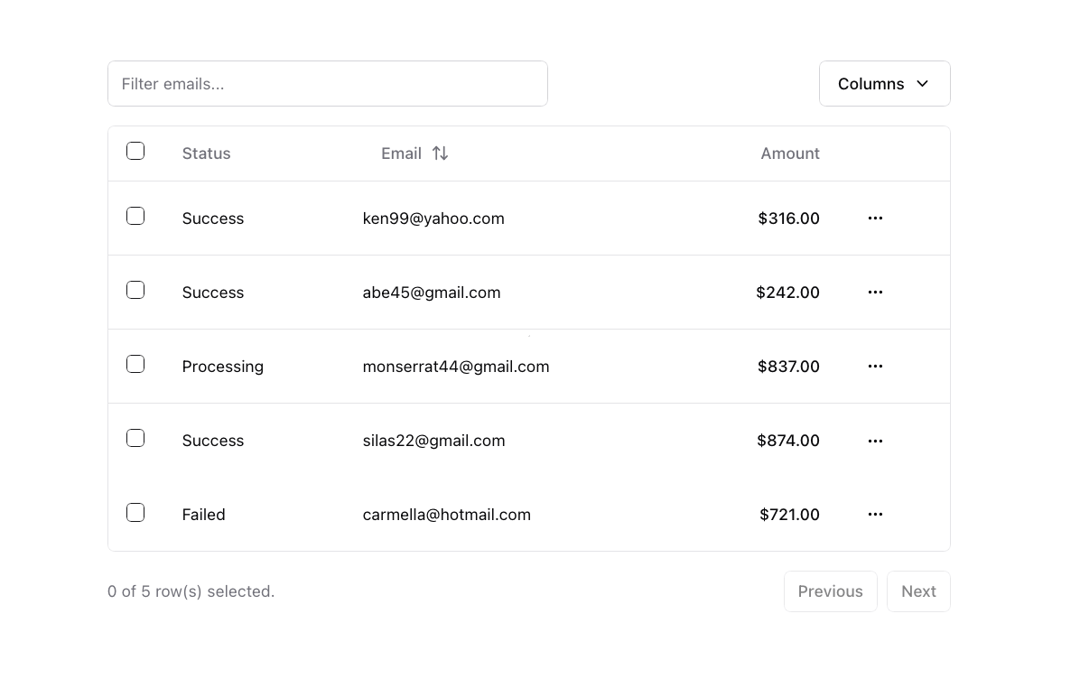
Powerful table and datagrids built using TanStack Table.
Built with React and Tailwind. Copy the prompt and paste it into Claude Code, Cursor or Lovable: your agent adds Data Table to your project and fits it to your theme.
Code
How Data Table is used: the demo's code. The component's own source comes with a free account.
Usage.tsx
"use client"

import * as React from "react"
import {
  ColumnDef,
  ColumnFiltersState,
  SortingState,
  VisibilityState,
  flexRender,
  getCoreRowModel,
  getFilteredRowModel,
  getPaginationRowModel,
  getSortedRowModel,
  useReactTable,
} from "@tanstack/react-table"
import { ArrowUpDown, ChevronDown, MoreHorizontal } from "lucide-react"

import { Button } from "@/components/ui/button"
import { Checkbox } from "@/components/ui/checkbox"
import {
  DropdownMenu,
  DropdownMenuCheckboxItem,
  DropdownMenuContent,
  DropdownMenuItem,
  DropdownMenuLabel,
  DropdownMenuSeparator,
  DropdownMenuTrigger,
} from "@/components/ui/dropdown-menu"
import { Input } from "@/components/ui/input"
import {
  Table,
  TableBody,
  TableCell,
  TableHead,
  TableHeader,
  TableRow,
} from "@/components/ui/table"

const data: Payment[] = [
  {
    id: "m5gr84i9",
    amount: 316,
    status: "success",
    email: "ken99@yahoo.com",
  },
  {
    id: "3u1reuv4",
    amount: 242,
    status: "success",
    email: "Abe45@gmail.com",
  },
  {
    id: "derv1ws0",
    amount: 837,
    status: "processing",
    email: "Monserrat44@gmail.com",
  },
  {
    id: "5kma53ae",
    amount: 874,
    status: "success",
    email: "Silas22@gmail.com",
  },
  {
    id: "bhqecj4p",
    amount: 721,
    status: "failed",
    email: "carmella@hotmail.com",
  },
]

export type Payment = {
  id: string
  amount: number
  status: "pending" | "processing" | "success" | "failed"
  email: string
}

export const columns: ColumnDef<Payment>[] = [
  {
    id: "select",
    header: ({ table }) => (
      <Checkbox
        checked={
          table.getIsAllPageRowsSelected() ||
          (table.getIsSomePageRowsSelected() && "indeterminate")
        }
        onCheckedChange={(value) => table.toggleAllPageRowsSelected(!!value)}
        aria-label="Select all"
      />
    ),
    cell: ({ row }) => (
      <Checkbox
        checked={row.getIsSelected()}
        onCheckedChange={(value) => row.toggleSelected(!!value)}
        aria-label="Select row"
      />
    ),
    enableSorting: false,
    enableHiding: false,
  },
  {
    accessorKey: "status",
    header: "Status",
    cell: ({ row }) => (
      <div className="capitalize">{row.getValue("status")}</div>
    ),
  },
  {
    accessorKey: "email",
    header: ({ column }) => {
      return (
        <Button
          variant="ghost"
          onClick={() => column.toggleSorting(column.getIsSorted() === "asc")}
        >
          Email
          <ArrowUpDown className="ml-2 h-4 w-4" />
        </Button>
      )
    },
    cell: ({ row }) => <div className="lowercase">{row.getValue("email")}</div>,
  },
  {
    accessorKey: "amount",
    header: () => <div className="text-right">Amount</div>,
    cell: ({ row }) => {
      const amount = parseFloat(row.getValue("amount"))

      // Format the amount as a dollar amount
      const formatted = new Intl.NumberFormat("en-US", {
        style: "currency",
        currency: "USD",
      }).format(amount)

      return <div className="text-right font-medium">{formatted}</div>
    },
  },
  {
    id: "actions",
    enableHiding: false,
    cell: ({ row }) => {
      const payment = row.original

      return (
        <DropdownMenu>
          <DropdownMenuTrigger asChild>
            <Button variant="ghost" className="h-8 w-8 p-0">
              <span className="sr-only">Open menu</span>
              <MoreHorizontal className="h-4 w-4" />
            </Button>
          </DropdownMenuTrigger>
          <DropdownMenuContent align="end">
            <DropdownMenuLabel>Actions</DropdownMenuLabel>
            <DropdownMenuItem
              onClick={() => navigator.clipboard.writeText(payment.id)}
            >
              Copy payment ID
            </DropdownMenuItem>
            <DropdownMenuSeparator />
            <DropdownMenuItem>View customer</DropdownMenuItem>
            <DropdownMenuItem>View payment details</DropdownMenuItem>
          </DropdownMenuContent>
        </DropdownMenu>
      )
    },
  },
]

export function DataTableDemo() {
  const [sorting, setSorting] = React.useState<SortingState>([])
  const [columnFilters, setColumnFilters] = React.useState<ColumnFiltersState>(
    [],
  )
  const [columnVisibility, setColumnVisibility] =
    React.useState<VisibilityState>({})
  const [rowSelection, setRowSelection] = React.useState({})

  const table = useReactTable({
    data,
    columns,
    onSortingChange: setSorting,
    onColumnFiltersChange: setColumnFilters,
    getCoreRowModel: getCoreRowModel(),
    getPaginationRowModel: getPaginationRowModel(),
    getSortedRowModel: getSortedRowModel(),
    getFilteredRowModel: getFilteredRowModel(),
    onColumnVisibilityChange: setColumnVisibility,
    onRowSelectionChange: setRowSelection,
    state: {
      sorting,
      columnFilters,
      columnVisibility,
      rowSelection,
    },
  })

  return (
    <div className="w-full">
      <div className="flex items-center py-4">
        <Input
          placeholder="Filter emails..."
          value={(table.getColumn("email")?.getFilterValue() as string) ?? ""}
          onChange={(event) =>
            table.getColumn("email")?.setFilterValue(event.target.value)
          }
          className="max-w-sm"
        />
        <DropdownMenu>
          <DropdownMenuTrigger asChild>
            <Button variant="outline" className="ml-auto">
              Columns <ChevronDown className="ml-2 h-4 w-4" />
            </Button>
          </DropdownMenuTrigger>
          <DropdownMenuContent align="end">
            {table
              .getAllColumns()
              .filter((column) => column.getCanHide())
              .map((column) => {
                return (
                  <DropdownMenuCheckboxItem
                    key={column.id}
                    className="capitalize"
                    checked={column.getIsVisible()}
                    onCheckedChange={(value) =>
                      column.toggleVisibility(!!value)
                    }
                  >
                    {column.id}
                  </DropdownMenuCheckboxItem>
                )
              })}
          </DropdownMenuContent>
        </DropdownMenu>
      </div>
      <div className="rounded-md border">
        <Table>
          <TableHeader>
            {table.getHeaderGroups().map((headerGroup) => (
              <TableRow key={headerGroup.id}>
                {headerGroup.headers.map((header) => {
                  return (
                    <TableHead key={header.id}>
                      {header.isPlaceholder
                        ? null
                        : flexRender(
                            header.column.columnDef.header,
                            header.getContext(),
                          )}
                    </TableHead>
                  )
                })}
              </TableRow>
            ))}
          </TableHeader>
          <TableBody>
            {table.getRowModel().rows?.length ? (
              table.getRowModel().rows.map((row) => (
                <TableRow
                  key={row.id}
                  data-state={row.getIsSelected() && "selected"}
                >
                  {row.getVisibleCells().map((cell) => (
                    <TableCell key={cell.id}>
                      {flexRender(
                        cell.column.columnDef.cell,
                        cell.getContext(),
                      )}
                    </TableCell>
                  ))}
                </TableRow>
              ))
            ) : (
              <TableRow>
                <TableCell
                  colSpan={columns.length}
                  className="h-24 text-center"
                >
                  No results.
                </TableCell>
              </TableRow>
            )}
          </TableBody>
        </Table>
      </div>
      <div className="flex items-center justify-end space-x-2 py-4">
        <div className="flex-1 text-sm text-muted-foreground">
          {table.getFilteredSelectedRowModel().rows.length} of{" "}
          {table.getFilteredRowModel().rows.length} row(s) selected.
        </div>
        <div className="space-x-2">
          <Button
            variant="outline"
            size="sm"
            onClick={() => table.previousPage()}
            disabled={!table.getCanPreviousPage()}
          >
            Previous
          </Button>
          <Button
            variant="outline"
            size="sm"
            onClick={() => table.nextPage()}
            disabled={!table.getCanNextPage()}
          >
            Next
          </Button>
        </div>
      </div>
    </div>
  )
}

export default { DataTableDemo };
Dependencies
More by shadcn
View all

Navigation menu
771
Calendar with time pressets
504
Sidebar
339
Sonner
231
Chart
216
Icons
178
Dropdown Menu
149
Calendar with event slots
116