
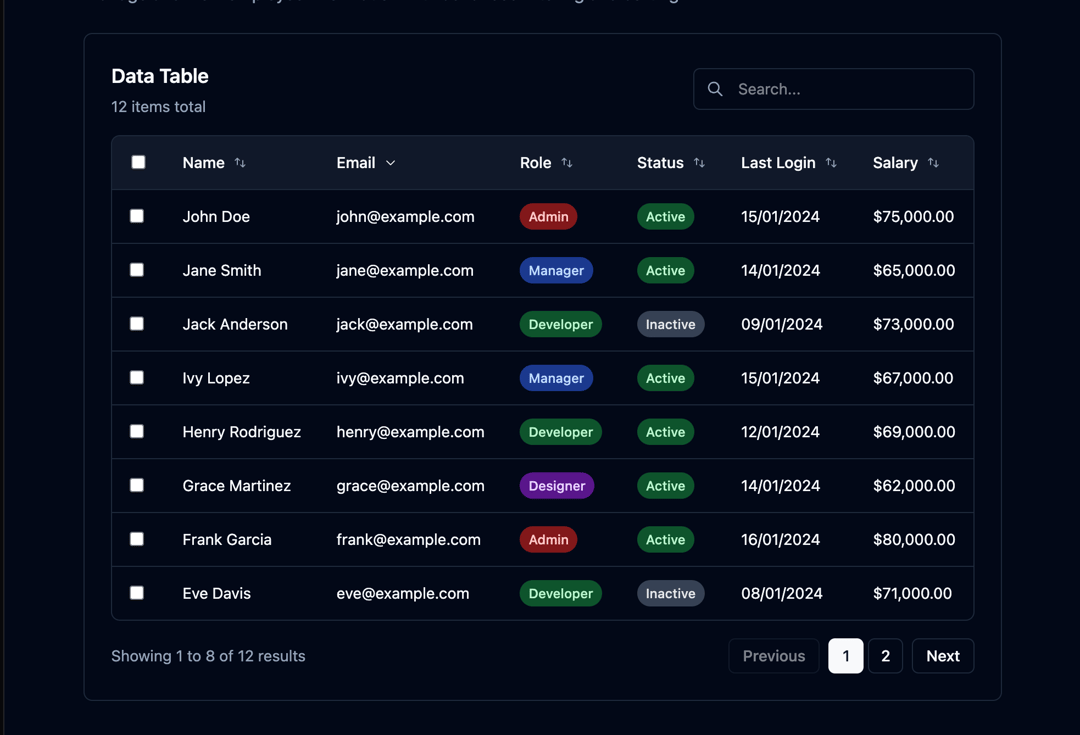
This code implements a highly customizable and efficient data table component. It addresses the common need to display, filter, sort, and paginate large datasets in a user-friendly way. The component handles various data types, including numbers, dates, and currencies, and offers built-in search and sorting functionality. It leverages React's `useState` and `useMemo` hooks for efficient state management and performance optimization. The data table is responsive, adapting its layout seamlessly between desktop and mobile views. Key features include client-side search (filtering data based on user input), sorting functionality (ascending and descending), pagination (displaying data in manageable pages), and row selection. The component is highly configurable through props, allowing developers to customize the displayed columns, page size, search functionality, sorting behavior, and row selection capabilities. Each column can optionally define a custom render function for complex data formatting. Error handling is included for empty datasets, displaying appropriate messages to the user. The included demo showcases its use with sample data and demonstrates the various functionalities. This component is suitable for applications requiring efficient and user-friendly data presentation, such as dashboards, administrative interfaces, or any application needing to display tabular data. Example use cases include displaying lists of users, products, orders, or any other tabular data.
Built with React and Tailwind. Copy the prompt and paste it into Claude Code, Cursor or Lovable: your agent adds Advanced Data Table to your project and fits it to your theme.
Code
How Advanced Data Table is used: the demo's code. The component's own source comes with a free account.
Usage.tsx
import DataTableDemo from "@/components/ui/advanced-data-table";

export default function DemoOne() {
  return <DataTableDemo />;
}
More by Sonu kumar
View all
Dashboard with Collapsible Sidebar
2.4K
Modern Hero
1.4K
Text Parallax Content (scroll)
1.2K
About Us section
1.2K
Modern Animated Hero Section
1.1K
Animated Hero Section
689
Cuisine Selector Chips
585
Bounce card features
571