
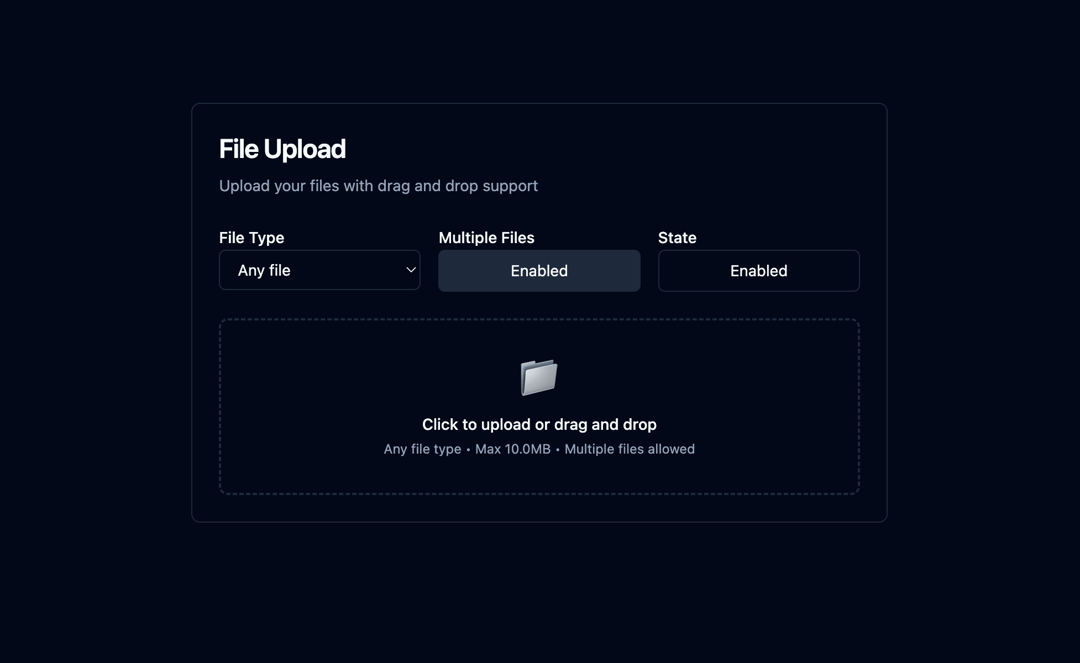
This React component provides a robust and versatile file upload experience, enhancing user interaction with features like drag-and-drop, file validation (size and type), and clear visual feedback. It addresses the common need for controlled file uploads in web applications, ensuring a smooth and user-friendly process. The component works by utilizing React's useState and useRef hooks to manage file state, drag-and-drop interactions, and error handling. It leverages a controlled input element for file selection and employs event handlers to manage file uploads and removals. Files are validated against specified size and type constraints, providing informative error messages to the user. The component also generates unique IDs for each uploaded file, allowing for easy tracking and management. A visual representation of the selected files is displayed, including file icons, names, sizes, and a remove button for each file. Furthermore, the component supports single or multiple file uploads and provides customizable options for accepted file types, maximum file size, and component styling through props. The process begins with the user either clicking the upload area or dragging and dropping files into it. The component then validates the file(s), adding valid files to the state and displaying any errors. The user can remove files individually and the component cleanly removes preview URLs to prevent memory leaks. Use cases include e-commerce platforms (product image uploads), content management systems (document uploads), and any application requiring controlled file uploads with validation. The customizable nature of the component allows seamless integration into various applications. For example, you can restrict uploads to image files only, limit the file size to 10MB, and disable the upload functionality based on application state. Key technologies used include React's functional components, useState and useRef hooks, and useCallback for performance optimization. The component uses a custom function to format file sizes for better readability and another to determine the appropriate file icon based on file type. In addition, it provides callback functions (`onFilesSelect`, `onFilesRemove`) to allow the parent component to handle the selected or updated files. This allows for flexibility in how the uploaded files are processed and utilized. The demo showcases custom styling with color variables and dark mode support.
Built with React and Tailwind. Copy the prompt and paste it into Claude Code, Cursor or Lovable: your agent adds Advanced File Upload to your project and fits it to your theme.
Code
How Advanced File Upload is used: the demo's code. The component's own source comes with a free account.
Usage.tsx
import FileUploadDemo from "@/components/ui/advanced-file-upload";

export default function DemoOne() {
  return <FileUploadDemo />;
}
More by Sonu kumar
View all
Dashboard with Collapsible Sidebar
2.4K
Modern Hero
1.4K
Text Parallax Content (scroll)
1.2K
About Us section
1.2K
Modern Animated Hero Section
1.1K
Animated Hero Section
689
Cuisine Selector Chips
585
Bounce card features
573
More in Forms
View all

Premium Auth
500

Login 1
52

Book A Demo 3
83
Authentication Card
47
Book A Demo 1
69

Contact Card
1K

Login Card
32

Login 2
7
