
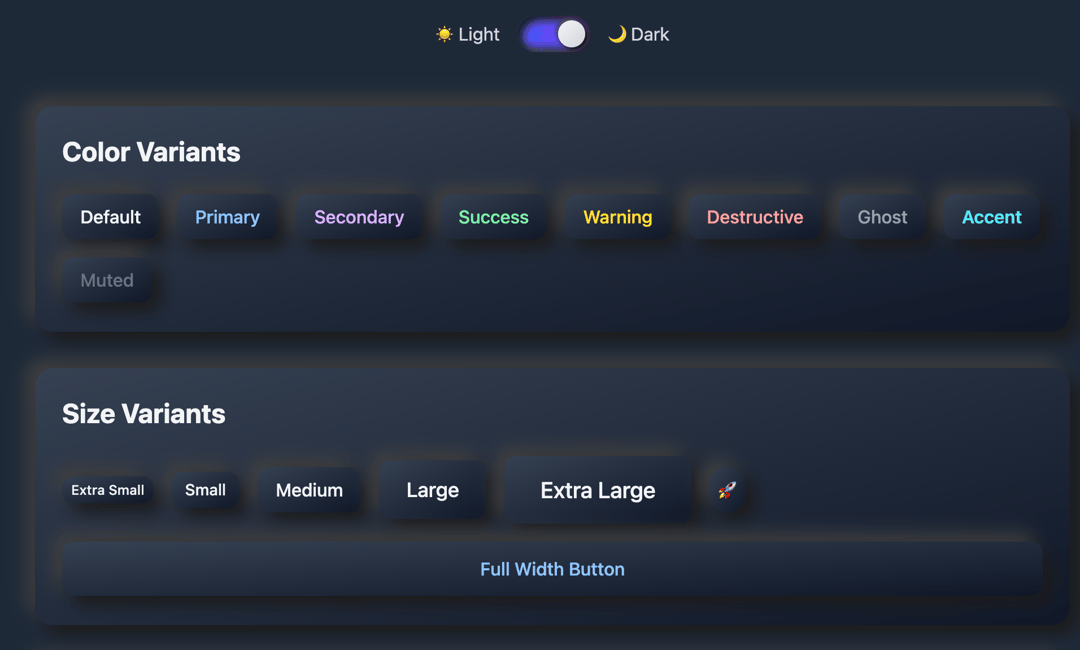
Neomorphism Button Library Overview A modern, comprehensive button component library featuring neomorphism design - the soft UI aesthetic that creates depth through subtle shadows and gradients. Perfect for contemporary applications that need elegant, tactile-feeling interfaces. Key Features 9 Color Variants: default, primary, secondary, success, warning, destructive, ghost, accent, muted 7 Size Options: xs, sm, md, lg, xl, icon, wide (full-width) 6 Shape Styles: rounded, pill, square, circle, soft, sharp 5 Visual Effects: standard (with hover lift), flat, deep, concave, convex Dual Theme Support: Complete light and dark mode variants Interactive States: Smooth hover, press, focus, and disabled states Accessibility: Full keyboard navigation and screen reader support Technical Details Framework: React with hooks (useState) Styling: Tailwind CSS utility classes Dependencies: None (fully self-contained) shadcn/ui Compatible: Uses standard prop patterns and className merging TypeScript Ready: Accepts all standard button HTML props Design Philosophy This component implements authentic neomorphism through: Dual-direction shadows creating the signature "soft extrusion" effect Gradient backgrounds for enhanced depth perception Contextual shadow adjustments for different effects and themes Smooth micro-interactions that respond to user input Consistent visual hierarchy across all variants Use Cases Perfect for: Modern web applications requiring sophisticated UI Dashboard interfaces with professional aesthetics Mobile-first designs where tactile feedback is important Design systems needing consistent, scalable button components Creative projects where visual impact matters Component Props typescriptinterface NeoButtonProps { variant?: 'default' | 'primary' | 'secondary' | 'success' | 'warning' | 'destructive' | 'ghost' | 'accent' | 'muted' size?: 'xs' | 'sm' | 'md' | 'lg' | 'xl' | 'icon' | 'wide' shape?: 'rounded' | 'pill' | 'square' | 'circle' | 'soft' | 'sharp' effect?: 'standard' | 'flat' | 'deep' | 'concave' | 'convex' dark?: boolean disabled?: boolean className?: string children: React.ReactNode } Example Usage jsx// Basic usage <NeoButton variant="primary" size="md"> Click me </NeoButton> // Advanced styling <NeoButton variant="success" size="lg" shape="pill" effect="deep" dark={isDarkMode} > 🚀 Launch App </NeoButton> // Icon button <NeoButton size="icon" shape="circle" effect="concave" > ⚙️ </NeoButton> Visual Effects Explained Standard: Classic neomorphism with subtle lift on hover Flat: Minimal shadows for understated elegance Deep: Dramatic shadows for high visual impact Concave: Inset appearance suggesting pressed surface Convex: Mixed shadows creating complex depth illusion Browser Support Modern browsers with CSS shadow support Mobile optimized for touch interactions High DPI displays with crisp shadow rendering Reduced motion respects user accessibility preferences Installation & Integration Simply copy the component code - no additional dependencies required. Works seamlessly with existing React projects and design systems. AI Integration Notes This component is ideal for AI-assisted development because: Self-contained: No external dependencies to manage Highly configurable: Multiple props allow for diverse styling needs Pattern-based: Consistent API makes it easy for AI to understand and recommend Example-rich: Comprehensive demo shows all possible combinations Documentation-friendly: Clear prop types and usage patterns Performance Lightweight: Pure CSS shadows, no JavaScript animations Efficient: Uses CSS transforms for smooth interactions Scalable: Utility-first approach allows easy customization Memory-friendly: Stateless design with minimal re-renders
Built with React and Tailwind. Copy the prompt and paste it into Claude Code, Cursor or Lovable: your agent adds Futuristic Button Library to your project and fits it to your theme.
Code
How Futuristic Button Library is used: the demo's code. The component's own source comes with a free account.
Usage.tsx
import NeomorphismDemo from "@/components/ui/button-library";

export default function DemoOne() {
  return <NeomorphismDemo />;
}
More by Sonu kumar
View all
Dashboard with Collapsible Sidebar
2.4K
Modern Hero
1.4K
Text Parallax Content (scroll)
1.2K
About Us section
1.2K
Modern Animated Hero Section
1.1K
Animated Hero Section
689
Cuisine Selector Chips
585
Bounce card features
573
More in Buttons
View all
Button Save
46

Button
20

Eclipse Button
5

Button
6

Button
14

Button Group
37

Button
32
Split Button
32

