
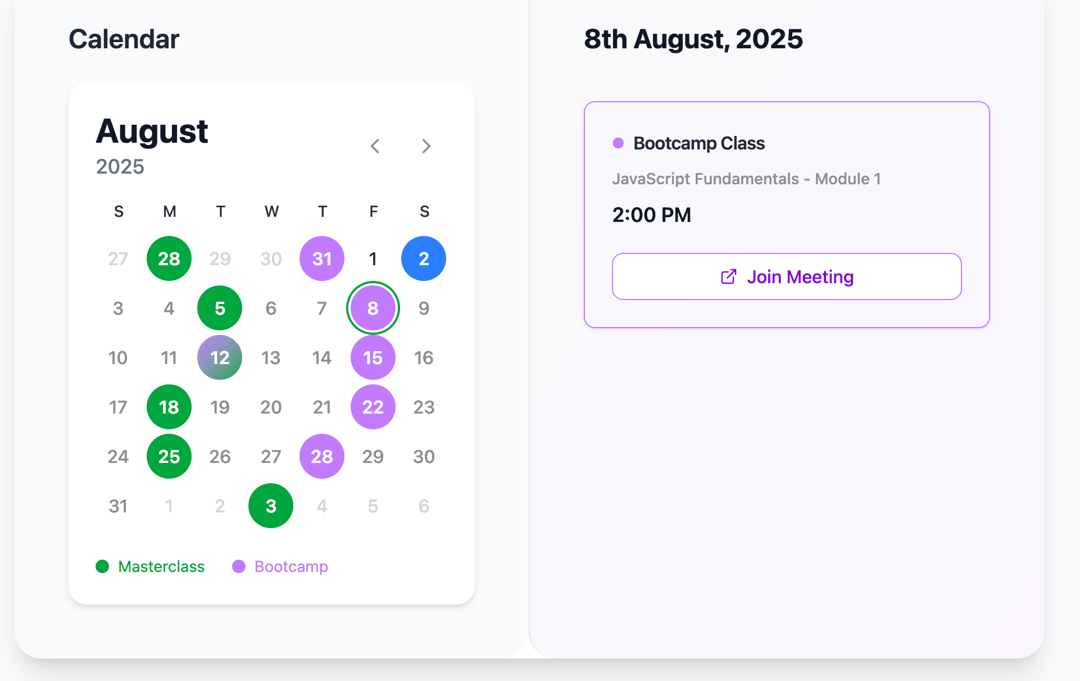
React Calendar Component for Events (Masterclasses & Bootcamps) This CalendarComponent is a fully functional React-based calendar UI that visually displays scheduled events like Masterclasses and Bootcamps, with an intuitive design, date navigation, and detailed event listing panel. Built with Tailwind CSS, Lucide Icons, and custom utilities (instead of libraries like date-fns), this component is responsive and user-friendly. ✅ Key Features 1. Event Calendar View Displays a monthly calendar with: Dynamic month navigation (<<, >> buttons). Colored highlights for days with events. 💚 Green → Masterclass 💜 Purple → Bootcamp Gradient → Both on same day Today’s date is auto-highlighted with blue. 2. Event Sidebar On date selection, the right panel shows: All events on the selected day. Each event includes: Event type (Masterclass / Bootcamp) Title and time A Join Meeting button (opens meeting link in new tab) Graceful handling for days with no events 3. Navigation Users can move to the previous or next month using Chevron icons. Events dynamically change based on the selected month/year. 4. Data Handling Uses a dummyEvents object structured as: ts Copy Edit { "yyyy-mm-dd": Event[] } Efficient date filtering using utility functions (no date-fns/dayjs). 5. Utility Functions Includes clean implementations of: addMonths, addDays startOfMonth, endOfMonth, startOfWeek, endOfWeek formatDate, isSameDay, isSameMonth, isToday, isBefore 🧠 How it Works Matrix Generation: getMonthMatrix() generates a 6x7 grid (weeks × days) to display dates for the current month including previous/next month's overlapping dates. Event Detection: getEventDatesForMonth() returns which days have masterclass or bootcamp events. Event Display: On day selection, events are shown with clickable links styled by type. Meeting links are dynamically enabled or disabled. 🎨 Tech Stack Used React (Functional components + Hooks) Tailwind CSS for styling Lucide-react icons (ChevronLeft, ChevronRight, ExternalLink) Custom date utilities (pure JS) 📂 Potential Use Cases Educational platforms (like cohort-based learning apps) Internal company event schedulers Webinars / Online workshop managers Hybrid team meeting dashboards
Built with React and Tailwind. Copy the prompt and paste it into Claude Code, Cursor or Lovable: your agent adds Calender for event to your project and fits it to your theme.
Code
How Calender for event is used: the demo's code. The component's own source comes with a free account.
Usage.tsx
import CalendarComponent from "@/components/ui/calender-for-event";

export default function DemoOne() {
  return <CalendarComponent />;
}
Dependencies
More by Sonu kumar
View all
Dashboard with Collapsible Sidebar
2.4K
Modern Hero
1.4K
Text Parallax Content (scroll)
1.2K
About Us section
1.2K
Modern Animated Hero Section
1.1K
Animated Hero Section
689
Cuisine Selector Chips
585
Bounce card features
573