
Dock Component with Hover Effects: A Customizable and Interactive Dock for Applications
Navigation
About
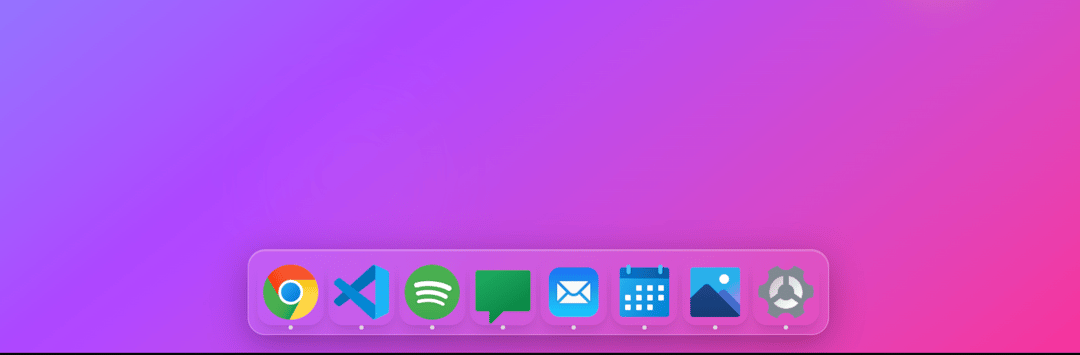
This React component renders a customizable dock with icons that dynamically adjust their size and position based on mouse hover interactions. It uses CSS variables and utility functions for efficient styling and scaling. The dock provides a visually appealing and interactive user experience.
Built with React and Tailwind. Copy the prompt and paste it into Claude Code, Cursor or Lovable: your agent adds Dock Component with Hover Effects: A Customizable and Interactive Dock for Applications to your project and fits it to your theme.
Code
How Dock Component with Hover Effects: A Customizable and Interactive Dock for Applications is used: the demo's code. The component's own source comes with a free account.
Usage.tsx
import React, { useRef } from "react";
import {
  Chrome,
  Code,
  Music,
  MessageCircle,
  Mail,
  Calendar,
  Camera,
  Settings,
  Folder,
  Terminal,
  Globe,
  FileText,
} from "lucide-react";

// Utility functions
type ScaleValueParams = [number, number];

const cn = (...classes: (string | undefined)[]) =>
  classes.filter(Boolean).join(' ');

const scaleValue = function (
  value: number,
  from: ScaleValueParams,
  to: ScaleValueParams
): number {
  const scale = (to[1] - to[0]) / (from[1] - from[0]);
  const capped = Math.min(from[1], Math.max(from[0], value)) - from[0];
  return Math.floor(capped * scale + to[0]);
};

// DockIcon Component
interface DockIconProps {
  className?: string;
  icon: React.ReactNode;
  href: string;
  name: string;
  handleIconHover?: (e: React.MouseEvent<HTMLLIElement>) => void;
  iconSize?: number;
  color?: string;
}

function DockIcon({
  className,
  icon,
  href,
  name,
  handleIconHover,
  iconSize = 60,
  color = "linear-gradient(135deg, #667eea 0%, #764ba2 100%)",
}: DockIconProps) {
  const ref = useRef<HTMLLIElement | null>(null);

  return (
    <>
      <style jsx>{`
        .dock-icon:hover + .dock-icon {
          width: calc(var(--icon-size) * 1.4 + var(--dock-offset-right, 0px));
          height: calc(var(--icon-size) * 1.4 + var(--dock-offset-right, 0px));
          transform: translateY(calc(var(--icon-size) * -0.2));
        }

        .dock-icon:hover + .dock-icon + .dock-icon {
          width: calc(var(--icon-size) * 1.2 + var(--dock-offset-right, 0px));
          height: calc(var(--icon-size) * 1.2 + var(--dock-offset-right, 0px));
          transform: translateY(calc(var(--icon-size) * -0.1));
        }

        .dock-icon:has(+ .dock-icon:hover) {
          width: calc(var(--icon-size) * 1.4 + var(--dock-offset-left, 0px));
          height: calc(var(--icon-size) * 1.4 + var(--dock-offset-left, 0px));
          transform: translateY(calc(var(--icon-size) * -0.2));
        }

        .dock-icon:has(+ .dock-icon + .dock-icon:hover) {
          width: calc(var(--icon-size) * 1.2 + var(--dock-offset-left, 0px));
          height: calc(var(--icon-size) * 1.2 + var(--dock-offset-left, 0px));
          transform: translateY(calc(var(--icon-size) * -0.1));
        }

        .dock-icon:hover {
          width: calc(var(--icon-size) * 1.6);
          height: calc(var(--icon-size) * 1.6);
          transform: translateY(calc(var(--icon-size) * -0.3));
        }
      `}</style>
      <li
        ref={ref}
        style={{
          transition: "all cubic-bezier(0.23, 1, 0.32, 1) 200ms",
          "--icon-size": `${iconSize}px`,
        } as React.CSSProperties}
        onMouseMove={handleIconHover}
        className={cn(
          "dock-icon group/li flex cursor-pointer items-end justify-center transition-all duration-200 ease-out",
          "h-[var(--icon-size)] w-[var(--icon-size)]",
          className
        )}
      >
        <a href={href} className="relative group/icon block w-full h-full">
          <div
            className="relative aspect-square w-full h-full rounded-[22%] overflow-hidden shadow-lg hover:shadow-2xl transition-shadow duration-200 flex items-center justify-center"
            style={{
              background: color,
            }}
          >
            <div className="text-white" style={{ fontSize: iconSize * 0.4 }}>
              {icon}
            </div>
          </div>

          {/* Tooltip */}
          <div className="absolute bottom-full left-1/2 transform -translate-x-1/2 mb-2 opacity-0 group-hover/li:opacity-100 transition-opacity duration-200 pointer-events-none z-50">
            <div className="bg-black/80 backdrop-blur-sm text-white text-sm px-2 py-1 rounded whitespace-nowrap">
              {name}
            </div>
            <div className="absolute top-full left-1/2 transform -translate-x-1/2 w-0 h-0 border-l-4 border-r-4 border-t-4 border-transparent border-t-black/80"></div>
          </div>

          {/* Active indicator dot */}
          <div className="absolute -bottom-1 left-1/2 transform -translate-x-1/2 w-1 h-1 bg-white rounded-full opacity-70 shadow-sm"></div>
        </a>
      </li>
    </>
  );
}

// Dock Component
interface DockProps {
  className?: string;
  children: React.ReactNode;
  maxAdditionalSize?: number;
  iconSize?: number;
}

function Dock({
  className,
  children,
  maxAdditionalSize = 8,
  iconSize = 60,
}: DockProps) {
  const dockRef = useRef<HTMLDivElement | null>(null);

  const handleIconHover = (e: React.MouseEvent<HTMLLIElement>) => {
    if (!dockRef.current) return;
    const mousePos = e.clientX;
    const iconPosLeft = e.currentTarget.getBoundingClientRect().left;
    const iconWidth = e.currentTarget.getBoundingClientRect().width;

    const cursorDistance = (mousePos - iconPosLeft) / iconWidth;
    const offsetPixels = scaleValue(
      cursorDistance,
      [0, 1],
      [maxAdditionalSize * -1, maxAdditionalSize]
    );

    dockRef.current.style.setProperty(
      "--dock-offset-left",
      `${offsetPixels * -1}px`
    );

    dockRef.current.style.setProperty(
      "--dock-offset-right",
      `${offsetPixels}px`
    );
  };

  return (
    <div className="fixed bottom-4 left-1/2 transform -translate-x-1/2 z-50">
      <nav
        ref={dockRef}
        role="navigation"
        aria-label="Dock"
        className={cn(
          "backdrop-blur-lg bg-white/10 border border-white/20 rounded-2xl p-2 shadow-2xl",
          className
        )}
        style={{
          background:
            "linear-gradient(135deg, rgba(255,255,255,0.1) 0%, rgba(255,255,255,0.05) 100%)",
          backdropFilter: "blur(20px)",
          boxShadow:
            "0 8px 32px rgba(0,0,0,0.3), inset 0 1px 0 rgba(255,255,255,0.2)",
        }}
      >
        <ul className="flex items-end gap-1">
          {React.Children.map(children, (child) =>
            React.isValidElement<DockIconProps>(child)
              ? React.cloneElement(child as React.ReactElement<DockIconProps>, {
                  handleIconHover,
                  iconSize,
                })
              : child
          )}
        </ul>
      </nav>
    </div>
  );
}

// Main Demo Component
export default function MacOSDockDemo() {
  const apps = [
    {
      name: "Chrome",
      icon: <Chrome />,
      href: "#",
      color: "linear-gradient(135deg, #4285f4 0%, #34a853 100%)",
    },
    {
      name: "VS Code",
      icon: <Code />,
      href: "#",
      color: "linear-gradient(135deg, #007acc 0%, #005a9e 100%)",
    },
    {
      name: "Spotify",
      icon: <Music />,
      href: "#",
      color: "linear-gradient(135deg, #1db954 0%, #1ed760 100%)",
    },
    {
      name: "Messages",
      icon: <MessageCircle />,
      href: "#",
      color: "linear-gradient(135deg, #007aff 0%, #5856d6 100%)",
    },
    {
      name: "Mail",
      icon: <Mail />,
      href: "#",
      color: "linear-gradient(135deg, #ff3b30 0%, #ff9500 100%)",
    },
    {
      name: "Calendar",
      icon: <Calendar />,
      href: "#",
      color: "linear-gradient(135deg, #ff3b30 0%, #ff2d92 100%)",
    },
    {
      name: "Photos",
      icon: <Camera />,
      href: "#",
      color: "linear-gradient(135deg, #ffcc02 0%, #ff9500 100%)",
    },
    {
      name: "Finder",
      icon: <Folder />,
      href: "#",
      color: "linear-gradient(135deg, #007aff 0%, #00d4ff 100%)",
    },
    {
      name: "Terminal",
      icon: <Terminal />,
      href: "#",
      color: "linear-gradient(135deg, #2d3748 0%, #4a5568 100%)",
    },
    {
      name: "Safari",
      icon: <Globe />,
      href: "#",
      color: "linear-gradient(135deg, #007aff 0%, #00c7be 100%)",
    },
    {
      name: "Notes",
      icon: <FileText />,
      href: "#",
      color: "linear-gradient(135deg, #ffcc02 0%, #ff9500 100%)",
    },
    {
      name: "Settings",
      icon: <Settings />,
      href: "#",
      color: "linear-gradient(135deg, #8e8e93 0%, #636366 100%)",
    },
  ];

  return (
    <div className="min-h-screen bg-gradient-to-br from-blue-400 via-purple-500 to-pink-500 relative overflow-hidden w-full">
      {/* Animated background elements */}
      <div className="absolute inset-0">
        <div className="absolute top-10 left-10 w-32 h-32 bg-white/10 rounded-full blur-xl animate-pulse"></div>
        <div className="absolute top-1/2 right-20 w-24 h-24 bg-yellow-300/20 rounded-full blur-lg animate-bounce"></div>
        <div className="absolute bottom-20 left-1/4 w-40 h-40 bg-pink-300/10 rounded-full blur-2xl animate-pulse"></div>
        <div className="absolute top-1/4 left-1/2 w-20 h-20 bg-green-300/15 rounded-full blur-lg animate-pulse delay-1000"></div>
        <div className="absolute bottom-1/3 right-1/3 w-28 h-28 bg-blue-300/10 rounded-full blur-xl animate-bounce delay-500"></div>
      </div>

      {/* Desktop content */}
      <div className="relative z-10 p-8">
        <h1 className="text-white text-6xl font-thin mb-4 drop-shadow-lg">
          macOS Dock
        </h1>
        <p className="text-white/80 text-lg font-light max-w-md drop-shadow mb-8">
          Hover over the dock icons to see the beautiful macOS-style
          magnification effect in action. Built with Lucide React icons.
        </p>

        <div className="bg-white/10 backdrop-blur-sm rounded-xl p-4 max-w-lg">
          <h3 className="text-white font-medium mb-2">Features:</h3>
          <ul className="text-white/70 text-sm space-y-1">
            <li>• Smooth magnification animations</li>
            <li>• Neighbor icon scaling effects</li>
            <li>• Glassmorphism design</li>
            <li>• Hover tooltips</li>
            <li>• Active indicators</li>
            <li>• Responsive and accessible</li>
          </ul>
        </div>
      </div>

      {/* Dock */}
      <Dock>
        {apps.map((app, index) => (
          <DockIcon
            key={index}
            name={app.name}
            icon={app.icon}
            href={app.href}
            color={app.color}
          />
        ))}
      </Dock>
    </div>
  );
}More by Sonu kumar
View all
Dashboard with Collapsible Sidebar
2.4K
Modern Hero
1.4K
Text Parallax Content (scroll)
1.2K
About Us section
1.2K
Modern Animated Hero Section
1.1K
Animated Hero Section
689
Cuisine Selector Chips
585
Bounce card features
573
More in Navigation
View all

Sidebar
235
Navbar with Theme Toggle
43

Sidebar
339

Tabs
60
Numberless Pagination with Text
11
Oversized 404 Numeral
50
Footer
446
Pagination
43


