About
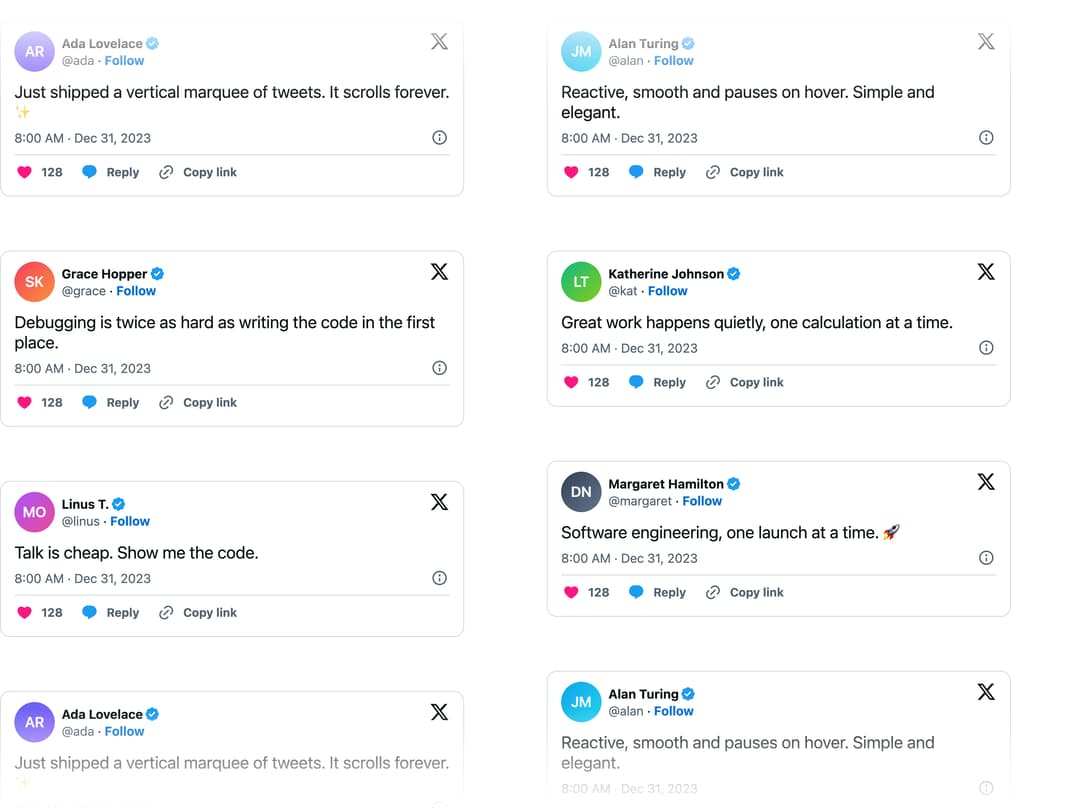
Two columns of tweet cards scrolling vertically in opposite directions with a progressive fade at the top and bottom edges.
Built with React and Tailwind. Copy the prompt and paste it into Claude Code, Cursor or Lovable: your agent adds Vertical Marquee to your project and fits it to your theme.
Code
How Vertical Marquee is used: the demo's code. The component's own source comes with a free account.
Usage.tsx
"use client";

import * as React from "react";
import type { Tweet } from "react-tweet/api";
import {
  VerticalMarquee,
  type TweetItem,
} from "@/components/ui/vertical-marquee";

const settings = {
  speed: 20,
  blurSize: 120,
  gap: 16,
  columns: 2,
};

type Author = {
  name: string;
  screen_name: string;
  avatar: string;
};

function makeTweet(id: string, author: Author, text: string): Tweet {
  return {
    __typename: "Tweet",
    lang: "en",
    favorite_count: 128,
    created_at: "2023-12-31T16:00:00.000Z",
    display_text_range: [0, text.length],
    entities: {
      hashtags: [],
      urls: [],
      user_mentions: [],
      symbols: [],
      media: [],
    } as any,
    id_str: id,
    text,
    user: {
      id_str: id,
      name: author.name,
      screen_name: author.screen_name,
      profile_image_url_https: author.avatar,
      profile_image_shape: "Circle",
      verified: false,
      is_blue_verified: true,
    },
    edit_control: {
      edit_tweet_ids: [id],
      editable_until_msecs: "0",
      is_edit_eligible: false,
      edits_remaining: "0",
    } as any,
    isEdited: false,
    isStaleEdit: false,
    conversation_count: 0,
    news_action_type: "conversation",
  } as Tweet;
}

const avatar = (name: string) =>
  `https://cdn.21st.dev/assets/stock/avatar/${name}.svg`;

const tweets: TweetItem[] = [
  {
    id: "1",
    tweet: makeTweet(
      "1",
      { name: "Ada Lovelace", screen_name: "ada", avatar: avatar("ar") },
      "Just shipped a vertical marquee of tweets. It scrolls forever. ✨",
    ),
  },
  {
    id: "2",
    tweet: makeTweet(
      "2",
      { name: "Alan Turing", screen_name: "alan", avatar: avatar("jm") },
      "Reactive, smooth and pauses on hover. Simple and elegant.",
    ),
  },
  {
    id: "3",
    tweet: makeTweet(
      "3",
      { name: "Grace Hopper", screen_name: "grace", avatar: avatar("sk") },
      "Debugging is twice as hard as writing the code in the first place.",
    ),
  },
  {
    id: "4",
    tweet: makeTweet(
      "4",
      { name: "Katherine Johnson", screen_name: "kat", avatar: avatar("lt") },
      "Great work happens quietly, one calculation at a time.",
    ),
  },
  {
    id: "5",
    tweet: makeTweet(
      "5",
      { name: "Linus T.", screen_name: "linus", avatar: avatar("mo") },
      "Talk is cheap. Show me the code.",
    ),
  },
  {
    id: "6",
    tweet: makeTweet(
      "6",
      {
        name: "Margaret Hamilton",
        screen_name: "margaret",
        avatar: avatar("dn"),
      },
      "Software engineering, one launch at a time. 🚀",
    ),
  },
];

export default function Demo(props: Partial<typeof settings>) {
  const s = { ...settings, ...props };
  return (
    <div className="h-screen w-screen">
      <VerticalMarquee
        tweets={tweets}
        speed={s.speed}
        blurSize={s.blurSize}
        gap={s.gap}
        columns={s.columns as 1 | 2}
      />
    </div>
  );
}
Dependencies
More by unlumen
View all
Motion Navigation Menu
271
Side By Side Slide
228
Scroll Reveal Image
222
Count Up
145
Pixel Liquid Background
106
Glow Button
97
Animated Sidebar
95
Horizontal Depth Fade
78
More in Cards
View all
Stats cards with links
33

Course Design Cards
1.1K

Card
70
Statistics Card 2
264
Statistics Card 10
263

Card
17

Card Studio
9
The Item one
3
