
About
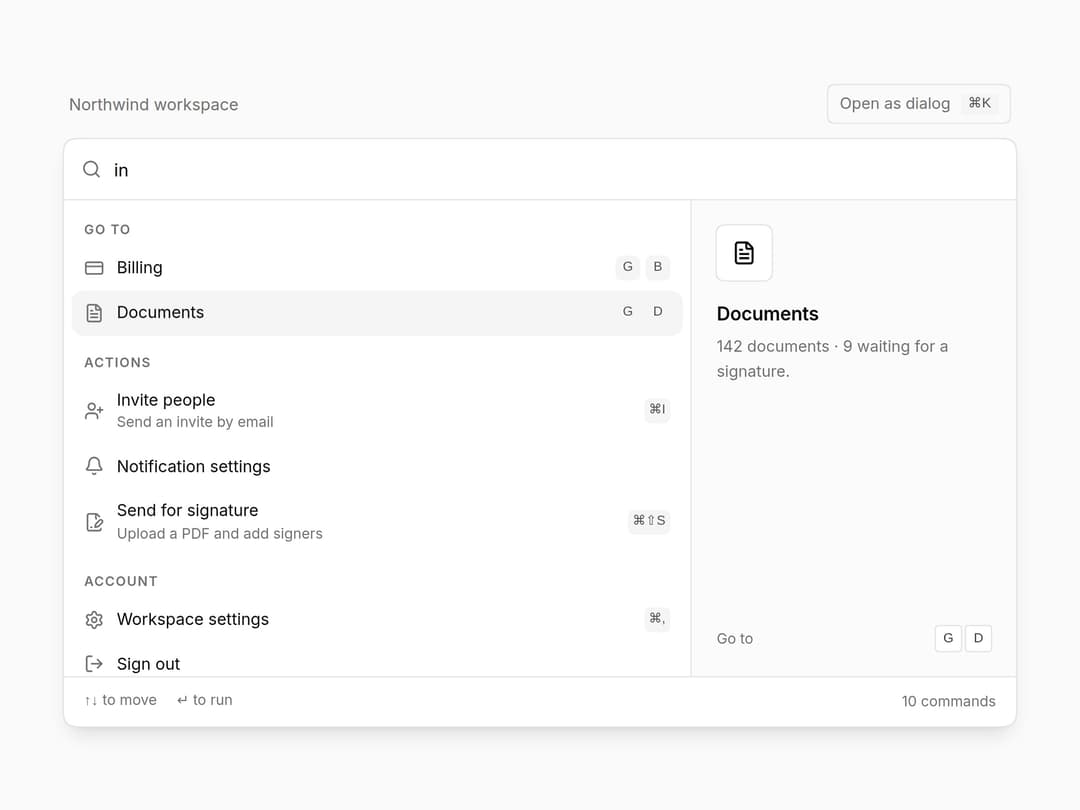
⌘K command palette on cmdk: fuzzy search over labels and keywords, grouped results, shortcuts and hints per item, and a hook that registers ⌘K / Ctrl K for you. Keyboard-complete, light and dark. Part of the Layro System: layro.vercel.app.
Built with React and Tailwind. Copy the prompt and paste it into Claude Code, Cursor or Lovable: your agent adds Command Menu to your project and fits it to your theme.
Code
How Command Menu is used: the demo's code. The component's own source comes with a free account.
Usage.tsx
import * as React from "react";
import {
  Command,
  CommandEmpty,
  CommandGroup,
  CommandInput,
  CommandItem,
  CommandList,
  CommandMenu,
  CommandSeparator,
  useCommandShortcut,
} from "@/components/ui/command-menu-palette";
import { Bell, CreditCard, FileSignature, FileText, Home, LogOut, Moon, Settings, UserPlus, Users } from "lucide-react";

/* The palette parts inline, as a spotlight: search on the left, a preview of
   the highlighted command on the right. Arrow keys move, Enter runs. The same
   items also open as a dialog with ⌘K / Ctrl K. Try "team", "bill" or "sign". */

type Cmd = {
  id: string;
  group: "Go to" | "Actions" | "Account";
  label: string;
  icon: React.ComponentType<{ className?: string }>;
  shortcut?: string;
  hint?: string;
  keywords?: string[];
  detail: string;
};

const COMMANDS: Cmd[] = [
  { id: "overview", group: "Go to", label: "Overview", icon: Home, shortcut: "G O", detail: "Signing activity, open documents and this month's revenue." },
  { id: "documents", group: "Go to", label: "Documents", icon: FileText, shortcut: "G D", keywords: ["contracts", "signing"], detail: "142 documents · 9 waiting for a signature." },
  { id: "members", group: "Go to", label: "Members", icon: Users, shortcut: "G M", keywords: ["team", "people"], detail: "12 members across 3 roles. 2 invites pending." },
  { id: "billing", group: "Go to", label: "Billing", icon: CreditCard, shortcut: "G B", keywords: ["invoices", "plan", "bill"], detail: "Team plan · $89 / month · next invoice 1 Oct." },
  { id: "sign", group: "Actions", label: "Send for signature", icon: FileSignature, shortcut: "⌘⇧S", hint: "Upload a PDF and add signers", detail: "Upload a PDF, place fields and send it to one or more signers." },
  { id: "invite", group: "Actions", label: "Invite people", icon: UserPlus, shortcut: "⌘I", hint: "Send an invite by email", keywords: ["team"], detail: "Invite by email and pick a role. Invites expire after 7 days." },
  { id: "alerts", group: "Actions", label: "Notification settings", icon: Bell, keywords: ["alerts"], detail: "Choose what you hear about: signatures, comments, billing." },
  { id: "theme", group: "Actions", label: "Toggle theme", icon: Moon, keywords: ["dark mode"], detail: "Switch between light and dark." },
  { id: "settings", group: "Account", label: "Workspace settings", icon: Settings, shortcut: "⌘,", detail: "Name, domain, branding and security for Northwind." },
  { id: "signout", group: "Account", label: "Sign out", icon: LogOut, detail: "Sign out of Northwind on this device." },
];
const GROUPS = ["Go to", "Actions", "Account"] as const;

export default function CommandMenuDemo() {
  const [value, setValue] = React.useState("members");
  const [last, setLast] = React.useState<string | null>(null);
  const [open, setOpen] = useCommandShortcut();
  const current = COMMANDS.find((c) => c.id === value) ?? COMMANDS[0];
  const Icon = current.icon;
  const run = (c: Cmd) => () => {
    setLast(c.label);
    setOpen(false);
  };

  const items = (g: (typeof GROUPS)[number]) =>
    COMMANDS.filter((c) => c.group === g).map((c) => (
      <CommandItem key={c.id} value={c.id} keywords={[c.label, ...(c.keywords ?? [])]} icon={<c.icon />} shortcut={c.shortcut} hint={c.hint} onSelect={run(c)}>
        {c.label}
      </CommandItem>
    ));

  return (
    <div className="flex min-h-screen w-full items-center justify-center bg-background p-6">
      <div className="w-full max-w-[760px] min-w-0">
        <div className="mb-3 flex items-center justify-between gap-3 px-1">
          <p className="text-[13px] text-muted-foreground" aria-live="polite">
            {last ? <>Ran <span className="font-medium text-foreground">{last}</span></> : "Northwind workspace"}
          </p>
          <button
            type="button"
            onClick={() => setOpen(true)}
            className="inline-flex h-8 items-center gap-2 rounded-[10px] [corner-shape:squircle] px-2.5 text-[12.5px] text-muted-foreground ring-1 ring-inset ring-input outline-none hover:text-foreground focus-visible:ring-2 focus-visible:ring-ring"
          >
            Open as dialog
            <kbd className="rounded-[5px] [corner-shape:squircle] bg-muted px-1.5 font-sans text-[11px] text-foreground/70">⌘K</kbd>
          </button>
        </div>

        <div className="overflow-hidden rounded-[18px] [corner-shape:squircle] bg-popover shadow-lg ring-1 ring-border">
          <Command value={value} onValueChange={setValue} loop>
            <CommandInput placeholder="Search or jump to…" autoFocus />
            <div className="grid min-w-0 sm:grid-cols-[minmax(0,1fr)_260px]">
              <CommandList className="max-h-[380px]">
                <CommandEmpty>No results.</CommandEmpty>
                <CommandGroup heading="Go to">{items("Go to")}</CommandGroup>
                <CommandSeparator />
                <CommandGroup heading="Actions">{items("Actions")}</CommandGroup>
                <CommandSeparator />
                <CommandGroup heading="Account">{items("Account")}</CommandGroup>
              </CommandList>
              <aside aria-label="Preview" className="hidden border-l border-border bg-muted/40 p-5 sm:flex sm:flex-col">
                <span className="grid size-11 place-items-center rounded-[12px] [corner-shape:squircle] bg-background ring-1 ring-border">
                  <Icon className="size-5" />
                </span>
                <p className="mt-4 text-[15px] font-semibold tracking-[-0.01em]">{current.label}</p>
                <p className="mt-1 text-[12.5px] leading-relaxed text-muted-foreground">{current.detail}</p>
                <div className="mt-auto flex items-center justify-between pt-6 text-[11.5px] text-muted-foreground">
                  <span>{current.group}</span>
                  {current.shortcut && (
                    <span className="flex gap-1">
                      {current.shortcut.split(" ").map((k, i) => (
                        <kbd key={i} className="grid h-5 min-w-5 place-items-center rounded-[5px] [corner-shape:squircle] bg-background px-1 font-sans text-[10.5px] text-foreground/80 ring-1 ring-border">
                          {k}
                        </kbd>
                      ))}
                    </span>
                  )}
                </div>
              </aside>
            </div>
            <div className="flex items-center gap-4 border-t border-border px-4 py-2.5 text-[11.5px] text-muted-foreground">
              <span><kbd className="font-sans">↑↓</kbd> to move</span>
              <span><kbd className="font-sans">↵</kbd> to run</span>
              <span className="ml-auto">{COMMANDS.length} commands</span>
            </div>
          </Command>
        </div>
      </div>

      <CommandMenu open={open} onOpenChange={setOpen}>
        {GROUPS.map((g, i) => (
          <React.Fragment key={g}>
            {i > 0 && <CommandSeparator />}
            <CommandGroup heading={g}>{items(g)}</CommandGroup>
          </React.Fragment>
        ))}
      </CommandMenu>
    </div>
  );
}
Dependencies
More by Mohamed Uvaish
View all

Signature Pad
420
Folder Card
335
Share Dialog
308
Kanban Board
243
Notification Panel
101
Charts & KPI Cards
84
Rich Text Editor
43
Data Table
32