
About
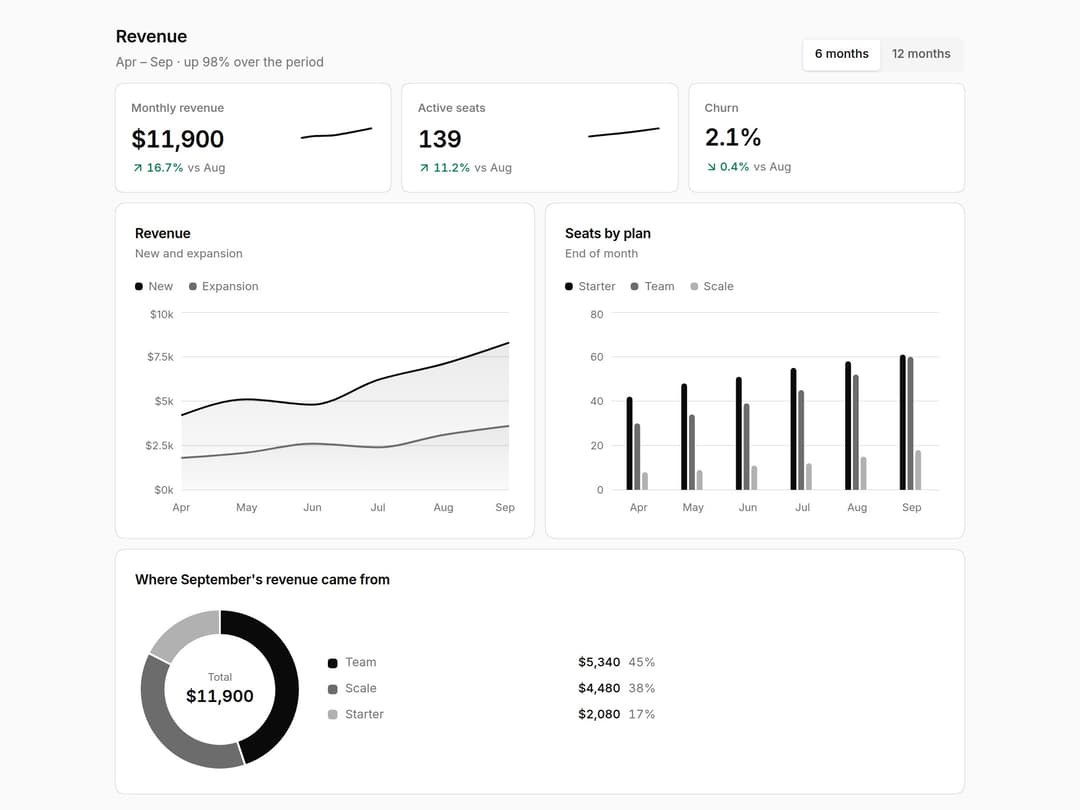
Revenue dashboard kit: KPI cards that know whether up is good, area, bar and donut charts on Recharts, each with a text description and a hidden data table for screen readers. Follows your chart colours. Part of the Layro System: layro.vercel.app
Built with React and Tailwind. Copy the prompt and paste it into Claude Code, Cursor or Lovable: your agent adds Charts & KPI Cards to your project and fits it to your theme.
Code
How Charts & KPI Cards is used: the demo's code. The component's own source comes with a free account.
Usage.tsx
import * as React from "react";
import { AreaTrend, BarCompare, ChartCard, DonutBreakdown, KpiCard } from "@/components/ui/revenue-charts-kpi";

/* Tallyworks revenue, Apr – Sep 2026. Hover a chart for the tooltip; every
   chart also carries a hidden data table for screen readers. The range
   switch swaps the data, and the KPIs follow it. */

const RANGES = {
  "6m": ["Apr", "May", "Jun", "Jul", "Aug", "Sep"],
  "12m": ["Oct", "Nov", "Dec", "Jan", "Feb", "Mar", "Apr", "May", "Jun", "Jul", "Aug", "Sep"],
} as const;
const NEW = [2600, 2900, 3100, 3300, 3500, 3900, 4200, 5100, 4800, 6200, 7100, 8300];
const EXP = [900, 1000, 1100, 1300, 1200, 1500, 1800, 2100, 2600, 2400, 3100, 3600];
const STARTER = [30, 32, 33, 35, 37, 40, 42, 48, 51, 55, 58, 61];
const TEAM = [12, 14, 17, 19, 22, 26, 30, 34, 39, 45, 52, 60];
const SCALE = [3, 3, 4, 5, 5, 7, 8, 9, 11, 12, 15, 18];
const usd = (v: number) => `$${(v / 1000).toFixed(v % 1000 ? 1 : 0)}k`;

export default function ChartsDemo() {
  const [range, setRange] = React.useState<keyof typeof RANGES>("6m");
  const months = RANGES[range];
  const off = 12 - months.length;
  const revenue = months.map((m, i) => ({ month: m, new: NEW[off + i], expansion: EXP[off + i] }));
  const seats = months.map((m, i) => ({ month: m, starter: STARTER[off + i], team: TEAM[off + i], scale: SCALE[off + i] }));
  const first = revenue[0].new + revenue[0].expansion;
  const last = revenue[revenue.length - 1].new + revenue[revenue.length - 1].expansion;
  const prev = revenue[revenue.length - 2].new + revenue[revenue.length - 2].expansion;

  return (
    <div
      className="flex min-h-screen w-full items-center justify-center bg-background p-6"
      style={{
        // Layro's monochrome chart scale: ink, then two lighter steps of it.
        "--chart-1": "var(--foreground)",
        "--chart-2": "color-mix(in oklch, var(--foreground) 55%, var(--background))",
        "--chart-3": "color-mix(in oklch, var(--foreground) 28%, var(--background))",
        "--chart-4": "color-mix(in oklch, var(--foreground) 75%, var(--background))",
        "--chart-5": "color-mix(in oklch, var(--foreground) 40%, var(--background))",
      } as React.CSSProperties}
    >
      <div className="grid w-full max-w-[880px] min-w-0 gap-3">
        <div className="flex flex-wrap items-end justify-between gap-3">
          <div>
            <h2 className="text-[18px] font-semibold tracking-[-0.01em]">Revenue</h2>
            <p className="mt-1 text-[13px] text-muted-foreground">
              {months[0]} – {months[months.length - 1]} · up {Math.round((last / first - 1) * 100)}% over the period
            </p>
          </div>
          <div role="radiogroup" aria-label="Range" className="inline-flex rounded-[10px] [corner-shape:squircle] bg-muted p-0.5">
            {(["6m", "12m"] as const).map((r) => (
              <button
                key={r}
                role="radio"
                aria-checked={range === r}
                onClick={() => setRange(r)}
                className={`h-8 rounded-[8px] [corner-shape:squircle] px-3 text-[12.5px] font-medium outline-none focus-visible:ring-2 focus-visible:ring-ring ${range === r ? "bg-background shadow-sm" : "text-foreground/70 hover:text-foreground"}`}
              >
                {r === "6m" ? "6 months" : "12 months"}
              </button>
            ))}
          </div>
        </div>
        <div className="grid gap-3 sm:grid-cols-3">
          <KpiCard label="Monthly revenue" value={`$${last.toLocaleString()}`} delta={last / prev - 1} period={`vs ${months[months.length - 2]}`} trend={revenue.map((r) => r.new + r.expansion)} />
          <KpiCard label="Active seats" value={String(STARTER[11] + TEAM[11] + SCALE[11])} delta={(STARTER[11] + TEAM[11] + SCALE[11]) / (STARTER[10] + TEAM[10] + SCALE[10]) - 1} period={`vs ${months[months.length - 2]}`} trend={seats.map((s) => s.starter + s.team + s.scale)} />
          <KpiCard label="Churn" value="2.1%" delta={-0.004} good="down" period={`vs ${months[months.length - 2]}`} />
        </div>
        <div className="grid gap-3 lg:grid-cols-2">
          <ChartCard title="Revenue" subtitle="New and expansion">
            <AreaTrend data={revenue} xKey="month" format={usd} description={`Monthly revenue from new and expansion, ${months[0]} to ${months[months.length - 1]}`}
              series={[{ key: "new", label: "New" }, { key: "expansion", label: "Expansion" }]} />
          </ChartCard>
          <ChartCard title="Seats by plan" subtitle="End of month">
            <BarCompare data={seats} xKey="month" description={`Seats by plan at month end, ${months[0]} to ${months[months.length - 1]}`}
              series={[{ key: "starter", label: "Starter" }, { key: "team", label: "Team" }, { key: "scale", label: "Scale" }]} />
          </ChartCard>
          <ChartCard title="Where September's revenue came from" className="lg:col-span-2">
            <DonutBreakdown format={(v) => `$${v.toLocaleString()}`} description="September revenue by plan"
              data={[{ label: "Team", value: 5340 }, { label: "Scale", value: 4480 }, { label: "Starter", value: 2080 }]} />
          </ChartCard>
        </div>
      </div>
    </div>
  );
}
Dependencies
More by Mohamed Uvaish
View all

Signature Pad
420
Folder Card
336
Share Dialog
308
Kanban Board
249
Notification Panel
102
Rich Text Editor
44
Command Menu
34
Data Table
32
More in Dashboards
View all
Dashboard with Collapsible Sidebar
2.4K

Sidebar
234

SaaS Template
2.4K

Chat template
598
Stats Bento
1.1K

Financial Bento Grid
71

Statistics Card 2
264

Course Design Cards
1.1K

