
About
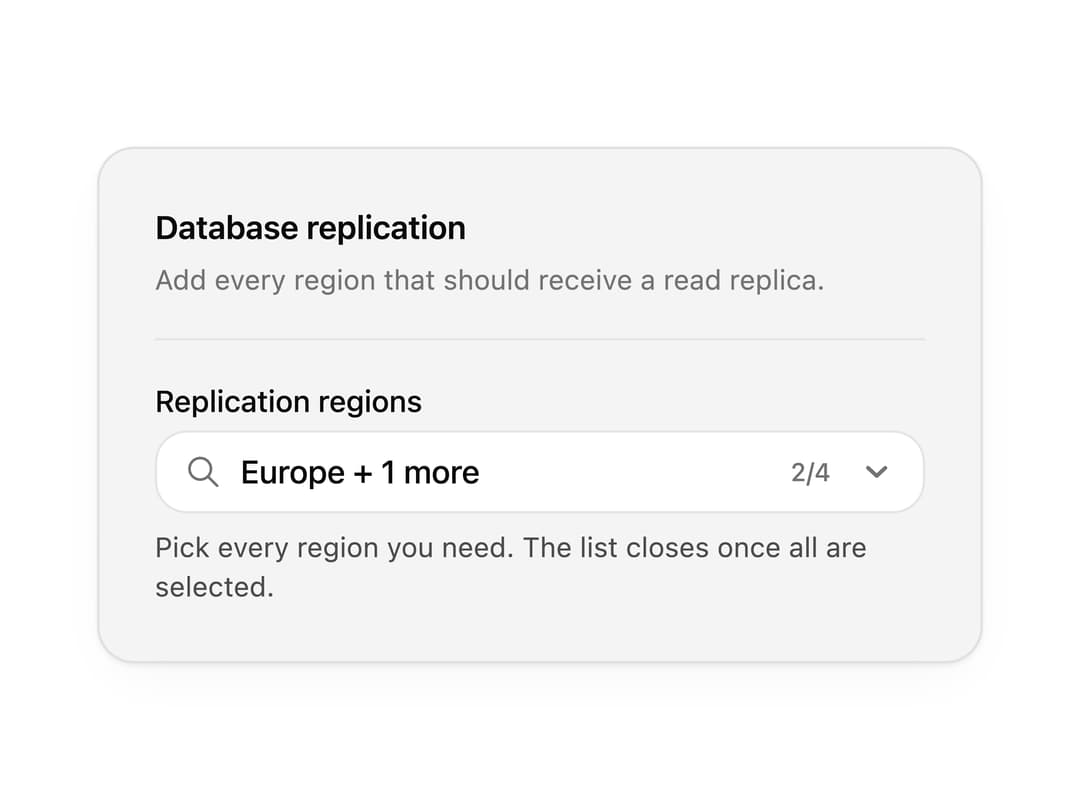
A searchable combobox with autocomplete, grouped results, multiple selection and empty states. Use it for country pickers, assignee selectors and any long option list.
Built with React and Tailwind. Copy the prompt and paste it into Claude Code, Cursor or Lovable: your agent adds Combobox to your project and fits it to your theme.
Code
How Combobox is used: the demo's code. The component's own source comes with a free account.
Usage.tsx
"use client";

import * as React from "react";
import { IconCloud, IconGlobe, IconMapPin } from "@tabler/icons-react";
import { Combobox, type ComboboxOption } from "@/components/ui/combobox";

import { clsx, type ClassValue } from "clsx";
import { twMerge } from "tailwind-merge";

function cn(...inputs: ClassValue[]) {
  return twMerge(clsx(inputs));
}

const primitivePreviewCardSurfaceFrameClass = cn(
  "relative isolate overflow-hidden rounded-2xl",
  "border",
);

const primitivePreviewCardSurfaceLightClass = cn(
  "border-black/[0.08] bg-[#f4f4f5]",
  "[box-shadow:0_1px_2px_rgba(0,0,0,.06),0_8px_24px_-12px_rgba(0,0,0,.08)]",
);

const primitivePreviewCardSurfaceClass = cn(
  primitivePreviewCardSurfaceFrameClass,
  primitivePreviewCardSurfaceLightClass,
  // Full static `dark:bg-[#0a0a0b]` kept for Tailwind content scan - same as
  // PRIMITIVE_PREVIEW_CANVAS_DARK_BG / PRIMITIVE_PREVIEW_CANVAS_DARK.
  "dark:border-white/[0.06] dark:bg-[#0a0a0b] dark:[box-shadow:0_1px_2px_rgba(0,0,0,.4),0_8px_24px_-12px_rgba(0,0,0,.6)]",
);

const wensityCardSurfaceClass = primitivePreviewCardSurfaceClass;

function PreviewPanel({
  children,
  className,
  title,
  subtitle,
}: {
  children: React.ReactNode;
  className?: string;
  title?: string;
  subtitle?: string;
}) {
  return (
    <div
      className={cn(
        wensityCardSurfaceClass,
        "w-full max-w-md p-5 sm:p-6",
        className,
      )}
    >
      {title ? (
        <div className="mb-5 border-b border-[var(--border)] pb-4">
          <p className="text-sm font-semibold tracking-[-0.015em] text-[var(--foreground)]">
            {title}
          </p>
          {subtitle ? (
            <p className="mt-1 text-[12px] leading-[1.5] text-[var(--muted-foreground)]">
              {subtitle}
            </p>
          ) : null}
        </div>
      ) : null}
      {children}
    </div>
  );
}

const replicationRegionOptions: ComboboxOption[] = [
  {
    value: "iad",
    label: "US East",
    description: "Virginia, primary for North America.",
    leading: <IconMapPin stroke={1.75} />,
  },
  {
    value: "fra",
    label: "Europe",
    description: "Frankfurt - EU data residency.",
    leading: <IconGlobe stroke={1.75} />,
  },
  {
    value: "sin",
    label: "Asia Pacific",
    description: "Singapore - APAC failover.",
    leading: <IconCloud stroke={1.75} />,
  },
  {
    value: "syd",
    label: "Australia",
    description: "Sydney - Oceania coverage.",
    leading: <IconGlobe stroke={1.75} />,
  },
];

function ReplicationRegionsField({
  comboboxSize,
  showLabel = true,
}: {
  comboboxSize?: "sm" | "md" | "lg";
  showLabel?: boolean;
}) {
  const [regions, setRegions] = React.useState<string[]>(["fra", "sin"]);
  const allSelected = regions.length >= replicationRegionOptions.length;

  return (
    <Combobox
      multiple
      comboboxSize={comboboxSize}
      label={showLabel ? "Replication regions" : undefined}
      placeholder="Search regions to add…"
      value={regions}
      onValueChange={(next) => setRegions(Array.isArray(next) ? next : [])}
      options={replicationRegionOptions}
      emptySelectionLabel="No replication regions selected."
      status={allSelected ? "success" : "default"}
      success={
        allSelected ? "All replication regions are active for this database." : undefined
      }
      hint={
        showLabel && !allSelected
          ? "Pick every region you need. The list closes once all are selected."
          : undefined
      }
    />
  );
}

export function ComboboxPreview() {
  return (
    <PreviewPanel
      className="max-w-sm"
      title="Database replication"
      subtitle="Add every region that should receive a read replica."
    >
      <ReplicationRegionsField />
    </PreviewPanel>
  );
}

export default function Demo() {
  return <ComboboxPreview />;
}
Dependencies
More by Wensity Labs
View all

Sidebar
235
Calendar
173
Button
76
Color Picker
64
Image Comparison Slider
55
AI Prompt Input
50
Text Morphing
37
Navigation Menu
36
More in Forms
View all

Premium Auth
500

Login 1
52

Book A Demo 3
83
Authentication Card
47
Book A Demo 1
69

Contact Card
1K

Login Card
32

Login 2
7
