
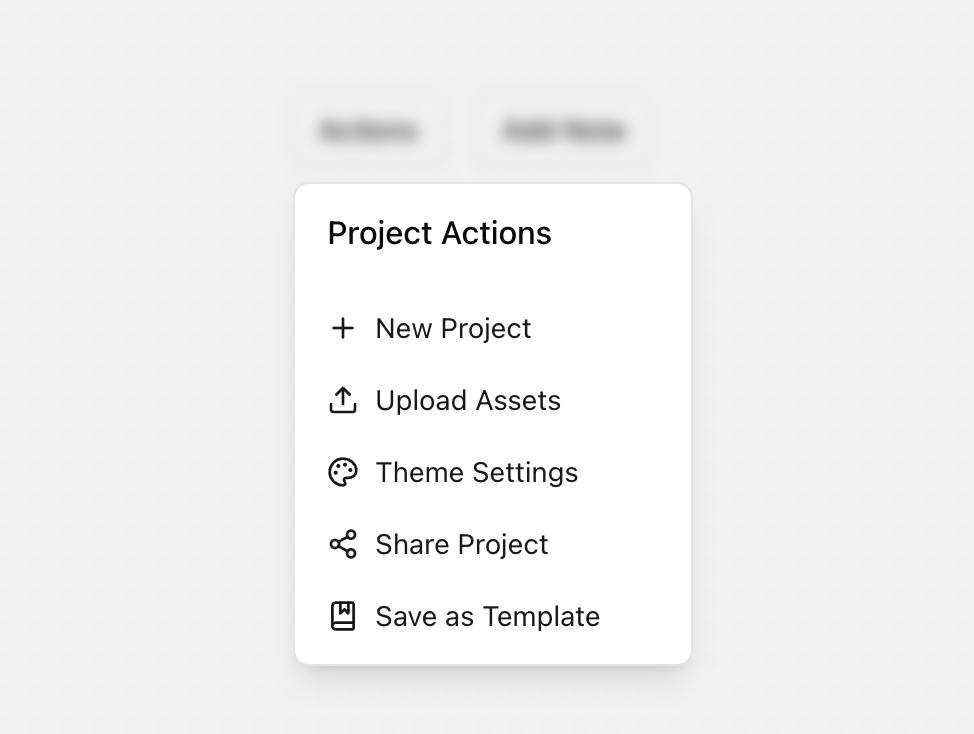
A versatile floating action panel component with support for multiple triggers and modes. Features: • Multiple trigger buttons with different modes • Smooth animations using Framer Motion • Backdrop blur effect • Keyboard navigation and accessibility • Dark mode support • Responsive design • Form handling for note-taking • TypeScript support Notes: • Built with Framer Motion for smooth animations • Uses Lucide React for consistent iconography • Supports multiple panel modes (actions and notes) • Includes keyboard navigation (Escape key to close) • Click outside the panel to close • Fully typed with TypeScript • Customizable styling using Tailwind CSS • Mobile-friendly design
Built with React and Tailwind. Copy the prompt and paste it into Claude Code, Cursor or Lovable: your agent adds Floating Action Panel to your project and fits it to your theme.
Code
How Floating Action Panel is used: the demo's code. The component's own source comes with a free account.
Usage.tsx
"use client"

import * as React from "react"
import {
  Plus,
  Upload,
  Palette,
  Share2,
  BookMarked,
} from "lucide-react"
import {
  FloatingActionPanelRoot,
  FloatingActionPanelTrigger,
  FloatingActionPanelContent,
  FloatingActionPanelButton,
  FloatingActionPanelForm,
  FloatingActionPanelTextarea,
} from "@/components/ui/floating-action-panel"

function FloatingActionPanelDemo() {
  const handleNoteSubmit = (note: string) => {
    console.log("Submitted note:", note)
  }

  return (
    <div className="flex min-h-[350px] items-center justify-center gap-4 mb-8">
      <FloatingActionPanelRoot>
        {({ mode }) => (
          <>
            <div className="flex items-center space-x-4">
              <FloatingActionPanelTrigger title="Project Actions" mode="actions">
                Actions
              </FloatingActionPanelTrigger>

              <FloatingActionPanelTrigger title="Add Project Note" mode="note">
                Add Note
              </FloatingActionPanelTrigger>
            </div>

            <FloatingActionPanelContent>
              {mode === "actions" ? (
                <div className="space-y-1 p-2">
                  <FloatingActionPanelButton onClick={() => console.log("New Project")}>
                    <Plus className="h-4 w-4" />
                    New Project
                  </FloatingActionPanelButton>
                  <FloatingActionPanelButton onClick={() => console.log("Upload Assets")}>
                    <Upload className="h-4 w-4" />
                    Upload Assets
                  </FloatingActionPanelButton>
                  <FloatingActionPanelButton onClick={() => console.log("Theme Settings")}>
                    <Palette className="h-4 w-4" />
                    Theme Settings
                  </FloatingActionPanelButton>
                  <FloatingActionPanelButton onClick={() => console.log("Share")}>
                    <Share2 className="h-4 w-4" />
                    Share Project
                  </FloatingActionPanelButton>
                  <FloatingActionPanelButton onClick={() => console.log("Save Template")}>
                    <BookMarked className="h-4 w-4" />
                    Save as Template
                  </FloatingActionPanelButton>
                </div>
              ) : (
                <FloatingActionPanelForm onSubmit={handleNoteSubmit} className="p-2">
                  <FloatingActionPanelTextarea
                    className="mb-2 h-24"
                    id="project-note"
                  />
                  <div className="flex justify-end">
                    <button type="submit" className="flex items-center gap-2 rounded-md px-2 py-1.5 text-sm text-zinc-900 hover:bg-zinc-100 dark:text-zinc-50 dark:hover:bg-zinc-800">
                      Save Note
                    </button>
                  </div>
                </FloatingActionPanelForm>
              )}
            </FloatingActionPanelContent>
          </>
        )}
      </FloatingActionPanelRoot>
    </div>
  )
}

export { FloatingActionPanelDemo };
Dependencies
More by Prism UI
View all
Display Cards
5.4K
Pricing
3.8K
Expandable Card
340
Hero Badge
158
useExpandable
135
Logo Carousel
132
Icons
128
Popover
104
More in Buttons
View all
Button Save
46

Button
20

Eclipse Button
5

Button
6

Button
14

Button Group
37

Button
32
Split Button
32

