
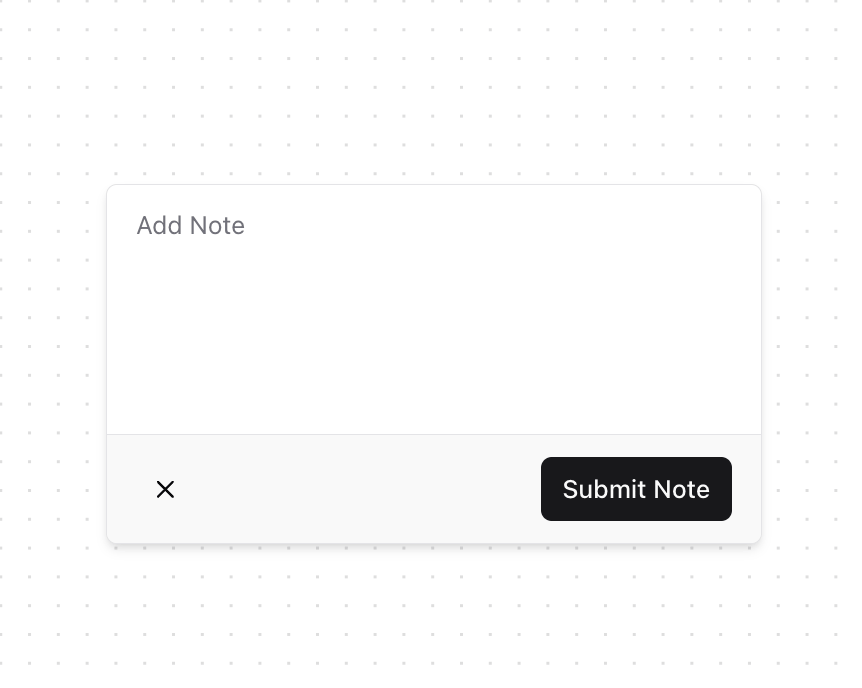
A versatile popover component for displaying contextual content, forms, and interactive menus with smooth animations. Features: • Smooth open and close animations • Form handling with textarea • Menu-style interactions • Command palette functionality • Project status displays • Click outside detection • Keyboard navigation • Dark mode support • Custom trigger variants • Flexible content layouts • Compound component pattern • Accessibility features Notes: • Built with Framer Motion for smooth animations • Utilizes React Context for state management • Handles click outside and escape key events • Employs a responsive design with a mobile-first approach • Includes TypeScript support with proper types • Integrates seamlessly with Shadcn UI components • Supports custom styling and theming • Optimized for performance with proper hooks usage
Built with React and Tailwind. Copy the prompt and paste it into Claude Code, Cursor or Lovable: your agent adds Popover to your project and fits it to your theme.
Code
How Popover is used: the demo's code. The component's own source comes with a free account.
Usage.tsx
"use client";

import * as React from "react"
import {
  PopoverRoot,
  PopoverTrigger,
  PopoverContent,
  PopoverForm,
  PopoverLabel,
  PopoverTextarea,
  PopoverFooter,
  PopoverBody,
  PopoverHeader,
  PopoverCloseButton,
  PopoverSubmitButton,
  PopoverButton,
} from "@/components/ui/popover";

import { Input } from "@/components/ui/input";
import { Badge } from "@/components/ui/badge";
import { Separator } from "@/components/ui/separator";
import {
  Search,
  PlusCircle,
  Calendar,
  Bell,
  Command,
  FileText,
  Users,
  Inbox,
  ArrowRight,
  Loader2,
  Settings,
  Share,
  MessageSquare,
} from "lucide-react";

function PopoverFormExample() {
  return (
    <PopoverRoot>
      <PopoverTrigger>Add Note</PopoverTrigger>
      <PopoverContent className="h-[200px] w-[364px]">
        <PopoverForm onSubmit={(note) => console.log("Note submitted:", note)}>
          <PopoverLabel>Add Note</PopoverLabel>
          <PopoverTextarea />
          <PopoverFooter>
            <PopoverCloseButton />
            <PopoverSubmitButton>Submit Note</PopoverSubmitButton>
          </PopoverFooter>
        </PopoverForm>
      </PopoverContent>
    </PopoverRoot>
  );
}

function PopoverMenu() {
  return (
    <PopoverRoot>
      <PopoverTrigger variant="outline">More options</PopoverTrigger>
      <PopoverContent>
        <PopoverHeader>Options</PopoverHeader>
        <PopoverBody>
          <PopoverButton onClick={() => console.log("Settings clicked")}>
            <Settings className="h-4 w-4" />
            Settings
          </PopoverButton>
          <PopoverButton onClick={() => console.log("Share clicked")}>
            <Share className="h-4 w-4" />
            Share
          </PopoverButton>
          <PopoverButton onClick={() => console.log("Message clicked")}>
            <MessageSquare className="h-4 w-4" />
            Send Message
          </PopoverButton>
        </PopoverBody>
      </PopoverContent>
    </PopoverRoot>
  );
}

function PopoverCommand() {
  const [searchQuery, setSearchQuery] = React.useState("");
  const [isLoading, setIsLoading] = React.useState(false);

  React.useEffect(() => {
    if (searchQuery) {
      setIsLoading(true);
      const timer = setTimeout(() => {
        setIsLoading(false);
      }, 500);
      return () => clearTimeout(timer);
    }
  }, [searchQuery]);

  const quickActions = [
    {
      category: "Common Actions",
      items: [
        { icon: PlusCircle, label: "New Document", shortcut: "⌘N" },
        { icon: Calendar, label: "Schedule Meeting", shortcut: "⌘K S" },
        { icon: Bell, label: "Notifications", shortcut: "⌘K N", badge: "3" },
      ],
    },
    {
      category: "Tools",
      items: [
        { icon: FileText, label: "All Documents", shortcut: "⌘D" },
        { icon: Users, label: "Team Members", shortcut: "⌘T" },
        { icon: Inbox, label: "Inbox", shortcut: "⌘I", badge: "5" },
      ],
    },
  ];

  return (
    <PopoverRoot>
      <PopoverTrigger variant="outline" className="min-w-[180px]">
        <div className="flex items-center justify-between gap-2">
          <span>Quick Actions</span>
          <kbd className="pointer-events-none hidden h-5 select-none items-center gap-1 rounded border bg-muted px-1.5 font-mono text-[10px] font-medium opacity-100 sm:flex">
            ⌘K
          </kbd>
        </div>
      </PopoverTrigger>
      <PopoverContent className="w-[440px] p-0">
        <div className="flex items-center gap-2 border-b px-3 py-2">
          <Search className="h-4 w-4 text-muted-foreground" />
          <Input
            className="h-8 border-0 bg-transparent p-0 focus-visible:ring-0"
            placeholder="Search actions..."
            value={searchQuery}
            onChange={(e) => setSearchQuery(e.target.value)}
          />
          {isLoading && <Loader2 className="h-4 w-4 animate-spin" />}
        </div>
        <PopoverBody className="p-0">
          {quickActions.map((group, groupIndex) => (
            <div key={group.category}>
              {groupIndex > 0 && <Separator className="my-2" />}
              <div className="p-2">
                <h4 className="mb-2 px-2 text-sm font-medium text-muted-foreground">
                  {group.category}
                </h4>
                <div className="space-y-1">
                  {group.items.map((item) => (
                    <PopoverButton
                      key={item.label}
                      onClick={() => console.log(`Clicked: ${item.label}`)}
                      className="relative w-full justify-between px-2 py-1.5 text-sm font-normal"
                    >
                      <div className="flex items-center gap-3">
                        <item.icon className="h-4 w-4 text-muted-foreground" />
                        <span>{item.label}</span>
                        {item.badge && (
                          <Badge
                            variant="secondary"
                            className="ml-auto h-5 px-1.5 text-xs"
                          >
                            {item.badge}
                          </Badge>
                        )}
                      </div>
                      <div className="flex items-center gap-2">
                        <kbd className="pointer-events-none hidden h-5 select-none items-center gap-1 rounded border bg-muted px-1.5 font-mono text-[10px] font-medium opacity-100 sm:flex">
                          {item.shortcut}
                        </kbd>
                        <ArrowRight className="h-4 w-4 text-muted-foreground" />
                      </div>
                    </PopoverButton>
                  ))}
                </div>
              </div>
            </div>
          ))}
        </PopoverBody>
        <div className="border-t p-2">
          <div className="flex items-center gap-2 rounded-sm bg-muted px-2 py-1.5">
            <div className="flex items-center gap-1 text-xs text-muted-foreground">
              <Command className="h-3 w-3" />
              <span>Command Menu</span>
            </div>
            <Separator orientation="vertical" className="h-4" />
            <div className="flex items-center gap-1">
              <kbd className="pointer-events-none hidden h-5 select-none items-center gap-1 rounded border bg-background px-1.5 font-mono text-[10px] font-medium opacity-100 sm:flex">
                ⌘
              </kbd>
              <kbd className="pointer-events-none hidden h-5 select-none items-center gap-1 rounded border bg-background px-1.5 font-mono text-[10px] font-medium opacity-100 sm:flex">
                K
              </kbd>
            </div>
          </div>
        </div>
      </PopoverContent>
    </PopoverRoot>
  );
}

export { PopoverFormExample, PopoverMenu, PopoverCommand };
Dependencies
More by Prism UI
View all
Display Cards
5.4K
Pricing
3.8K
Expandable Card
340
Floating Action Panel
198
Hero Badge
158
useExpandable
135
Logo Carousel
132
Icons
128
More in Forms
View all

Premium Auth
500

Login 2
7
Authentication Card
47

Login 1
52

Contact Card
1K
Login Form
6

Form
16

Book A Demo 3
83
