
About
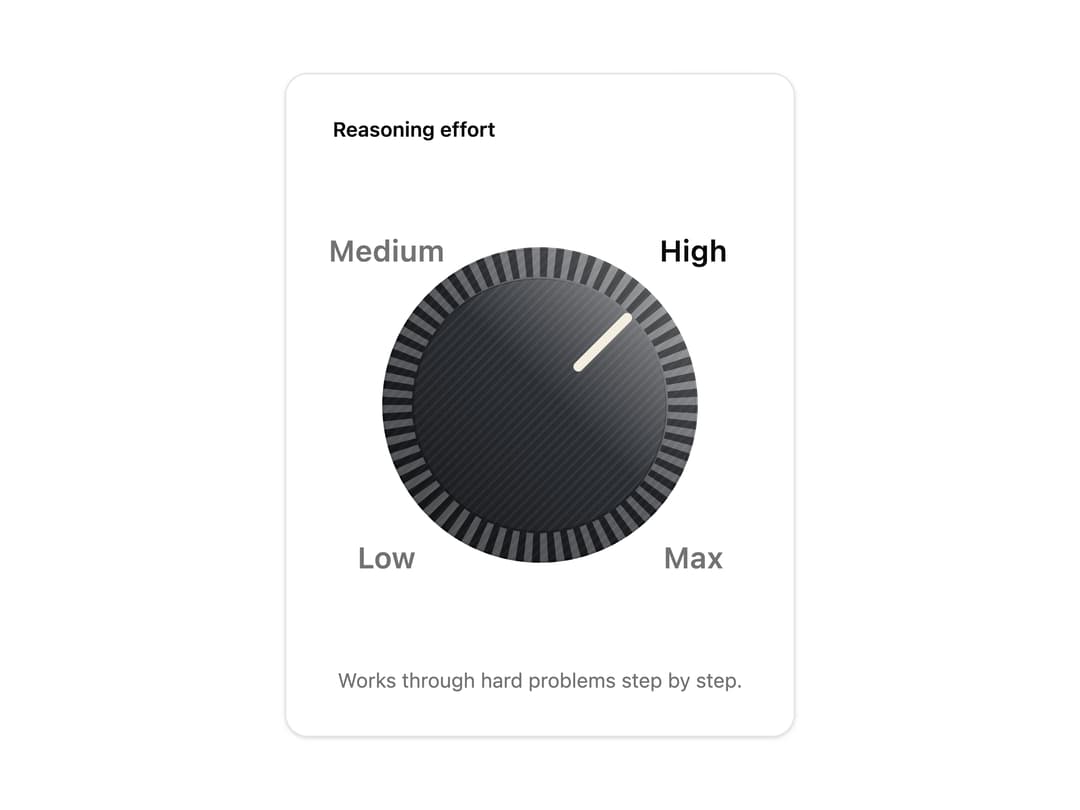
A rotary switch that clicks into fixed positions and stops hard at both ends. For a few ordered settings where the order matters: reasoning effort, quality presets, verbosity. Skeuomorphic, accessible, Base UI. Part of Bevel: bevel-ui.vercel.app
Built with React and Tailwind. Copy the prompt and paste it into Claude Code, Cursor or Lovable: your agent adds Detent knob to your project and fits it to your theme.
Code
How Detent knob is used: the demo's code. The component's own source comes with a free account.
Usage.tsx
"use client"

import * as React from "react"
import {
  DetentKnob,
  DetentKnobStop,
} from "@/components/ui/detent-knob"

const what: Record<string, string> = {
  low: "Quick answers. Fastest and cheapest.",
  medium: "Thinks before answering. The default.",
  high: "Works through hard problems step by step.",
  max: "Takes as long as it needs.",
}

/** How hard the model thinks, on a knob that clicks into each setting. Drag, scroll or use the arrow keys. */
export function DetentKnobEffort() {
  const [effort, setEffort] = React.useState("high")
  return (
    <div className="flex w-[22rem] flex-col items-center gap-5 rounded-2xl border bg-card px-8 py-7 shadow-sm">
      <p className="self-start text-sm font-semibold">Reasoning effort</p>
      <div className="scale-[1.7] py-12">
        <DetentKnob
          aria-label="Reasoning effort"
          value={effort}
          onValueChange={setEffort}
        >
          <DetentKnobStop value="low">Low</DetentKnobStop>
          <DetentKnobStop value="medium">Medium</DetentKnobStop>
          <DetentKnobStop value="high">High</DetentKnobStop>
          <DetentKnobStop value="max">Max</DetentKnobStop>
        </DetentKnob>
      </div>
      <p className="text-center text-sm text-muted-foreground">
        {what[effort]}
      </p>
    </div>
  )
}

export default DetentKnobEffort
Dependencies
More by Hitesh
View all
Wallet
8
Kbd
4
Number wheel
4
Badge
2
Icon key
1
Gauge and dial
Ledger
Preset keys