About
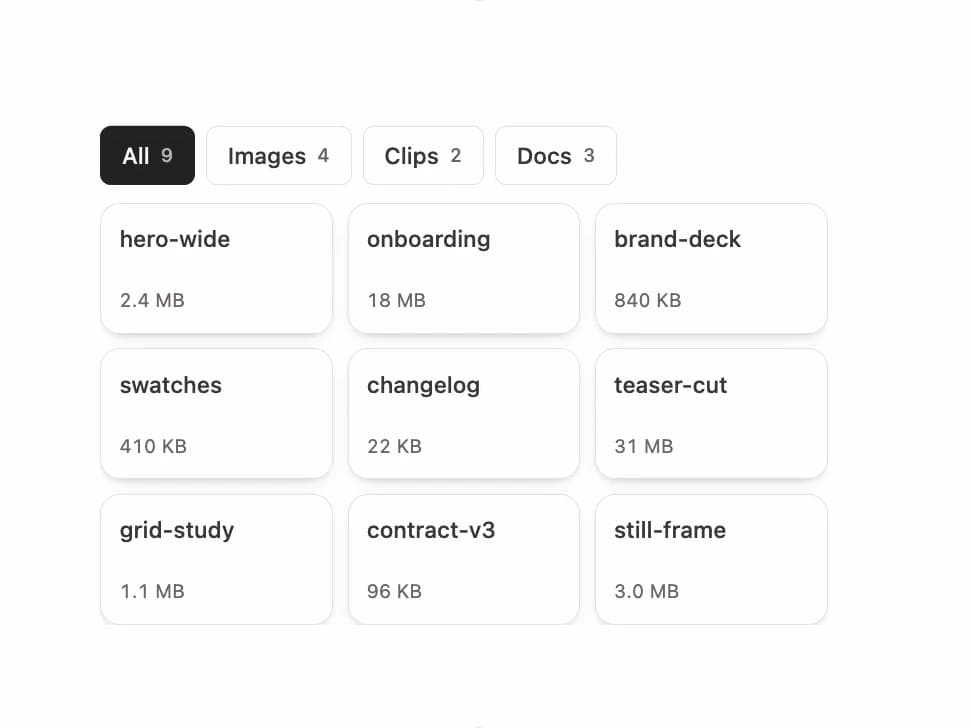
An accessible, animated grid that filters its items with segmented radio chips, showing live per-filter counts and smoothly reflowing cells as the selection changes.
Built with React and Tailwind. Copy the prompt and paste it into Claude Code, Cursor or Lovable: your agent adds Filter Grid to your project and fits it to your theme.
Code
How Filter Grid is used: the demo's code. The component's own source comes with a free account.
Usage.tsx
"use client";

import { FilterGrid, type FilterDefinition } from "@/components/ui/filter-grid";
import { useState } from "react";

type Asset = {
  id: string;
  name: string;
  kind: "image" | "clip" | "doc";
  size: string;
};

const ASSETS: Asset[] = [
  { id: "hero-wide", name: "hero-wide", kind: "image", size: "2.4 MB" },
  { id: "onboarding", name: "onboarding", kind: "clip", size: "18 MB" },
  { id: "brand-deck", name: "brand-deck", kind: "doc", size: "840 KB" },
  { id: "swatches", name: "swatches", kind: "image", size: "410 KB" },
  { id: "changelog", name: "changelog", kind: "doc", size: "22 KB" },
  { id: "teaser-cut", name: "teaser-cut", kind: "clip", size: "31 MB" },
  { id: "grid-study", name: "grid-study", kind: "image", size: "1.1 MB" },
  { id: "contract-v3", name: "contract-v3", kind: "doc", size: "96 KB" },
  { id: "still-frame", name: "still-frame", kind: "image", size: "3.0 MB" },
];

const FILTERS: FilterDefinition<Asset>[] = [
  { id: "all", label: "All", match: () => true },
  { id: "image", label: "Images", match: (a) => a.kind === "image" },
  { id: "clip", label: "Clips", match: (a) => a.kind === "clip" },
  { id: "doc", label: "Docs", match: (a) => a.kind === "doc" },
];

export default function FilterGridDemo() {
  const [kind, setKind] = useState("all");

  return (
    <div className="mx-auto w-full max-w-md p-6">
      <FilterGrid
        label="Asset type"
        items={ASSETS}
        filters={FILTERS}
        value={kind}
        onValueChange={setKind}
        getKey={(a) => a.id}
        columns={3}
        rowHeight={72}
        maxRows={4}
        renderItem={(a) => (
          <div className="flex h-full flex-col justify-between">
            <p className="truncate text-[12.5px] font-medium text-stone-700 dark:text-stone-200">
              {a.name}
            </p>
            <p className="text-[10.5px] tabular-nums text-stone-500 dark:text-stone-400">
              {a.size}
            </p>
          </div>
        )}
      />
    </div>
  );
}
Dependencies
More by Özer
View all

Password Strength
1.3K
OTP Input
802
Loading Button
601
Progress Bar
588
Reorder List
310
Task Steps
276
Hold to Confirm
250
Reading Progress
169
More in Galleries
View all
Thumbnail image viewer
43

Animated Gallery
1.4K

Hero Section 6
881
Editorial Collage Hero
430
Layout Grid
826
3D Parallax Unfurling Gallery
981

Image Gallery
90

File Upload
18


