
About
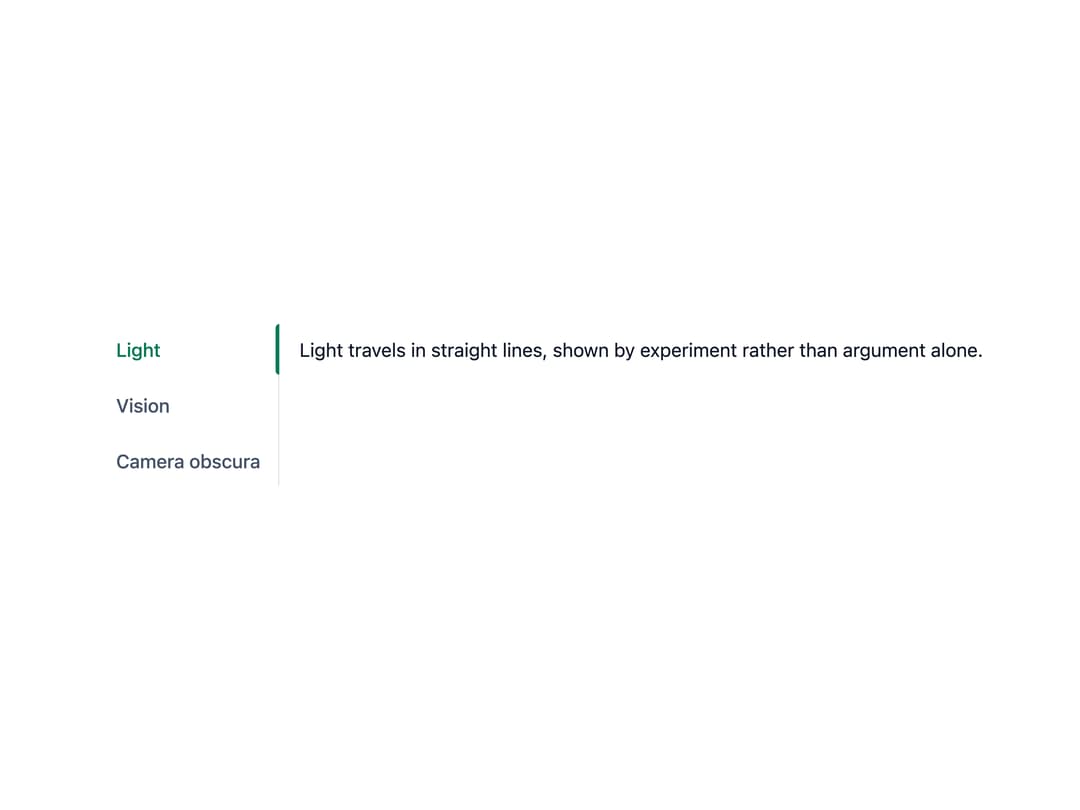
A compound tabs component with a sliding active-tab indicator, a gliding hover highlight, roving-tabindex keyboard navigation and scroll-fade edges, for switching between panels of related content.
Built with React and Tailwind. Copy the prompt and paste it into Claude Code, Cursor or Lovable: your agent adds Tabs to your project and fits it to your theme.
Code
How Tabs is used: the demo's code. The component's own source comes with a free account.
Usage.tsx
"use client";

import Tabs from "@/components/ui/tabs";

// No value: the first enabled tab is selected, already in the server-rendered HTML.
export default function TabsVerticalDemo() {
  return (
    <Tabs orientation="vertical" activation="manual">
      <Tabs.List label="Ibn al-Haytham's Book of Optics">
        <Tabs.Tab value="light">Light</Tabs.Tab>
        <Tabs.Tab value="vision">Vision</Tabs.Tab>
        <Tabs.Tab value="camera">Camera obscura</Tabs.Tab>
      </Tabs.List>
      <Tabs.Panel value="light">
        Light travels in straight lines, shown by experiment rather than
        argument alone.
      </Tabs.Panel>
      <Tabs.Panel value="vision">
        We see because light enters the eye, not because the eye sends out rays.
      </Tabs.Panel>
      <Tabs.Panel value="camera">
        A dark room with a small hole projects an inverted image of the world
        outside.
      </Tabs.Panel>
    </Tabs>
  );
}
More by ebnsina
View all
Countdown Timer
20
Video Player
15
Alarm Clock
14
Voice Note
12
Split Button
11
Sortable List
9
Stopwatch
5
Code Block
4
More in Navigation
View all

Sidebar
225

Tabs
52
Navbar with Theme Toggle
40

Breadcrumb
12
Nav List Card
30
Pagination Ant
3

Pagination
85
Pagination
9


