
About
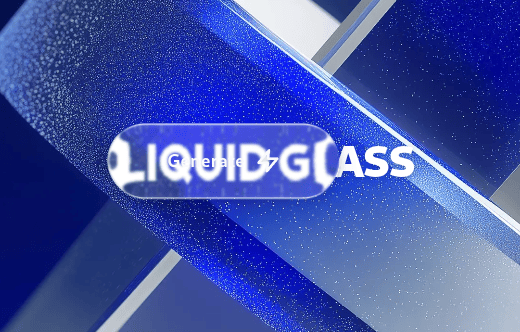
One to One recreation of mac/ios27 liquid glass for the web. works across cross platform. include button and liquid glass surface component
Built with React and Tailwind. Copy the prompt and paste it into Claude Code, Cursor or Lovable: your agent adds Liquid Glass to your project and fits it to your theme.
Code
How Liquid Glass is used: the demo's code. The component's own source comes with a free account.
Usage.tsx
"use client";

import React, { useEffect, useRef, useState } from "react";
import { motion, useMotionValue, useSpring } from "framer-motion";
// 21st.dev sandbox: import { LiquidGlass, LiquidGlassButton } from "@/components/ui/liquid-glass";
import { LiquidGlass, LiquidGlassButton } from "@/components/ui/liquid-glass";

const ZapIcon = (props: React.SVGProps<SVGSVGElement>) => (
  <svg
    xmlns="http://www.w3.org/2000/svg"
    width="20"
    height="20"
    viewBox="0 0 24 24"
    fill="none"
    stroke="currentColor"
    strokeWidth="2.5"
    strokeLinecap="round"
    strokeLinejoin="round"
    {...props}
  >
    <polygon points="13 2 3 14 12 14 11 22 21 10 12 10 13 2" />
  </svg>
);

  const backgroundImages = [
    "https://cdn.21st.dev/assets/mirror/d5/d56de56c3f32850936a8d16e79073aa674066ed81f7b8370b363d85429c3f207.webp", // Original Apple Tahoe Scene
    "https://cdn.21st.dev/assets/mirror/b7/b7256668042183b1a11020a982f90d0ea2a79ab34a7404cd5854008983139d9e.webp", // Original Aave Labs Glass Scene
    "https://cdn.21st.dev/assets/mirror/4b/4bd1173e135b9637d1b7ce8d0c5d04a1177f2aae095dd3854368934903da8b65.jpg",
  ];

export default function GlassButtonDemo() {
  const containerRef = useRef<HTMLDivElement>(null);
  const buttonWrapperRef = useRef<HTMLDivElement>(null);
  const [bgIndex, setBgIndex] = useState(0);

  // Pointer position of the floating button, in container coordinates.
  const cursorX = useMotionValue(0);
  const cursorY = useMotionValue(0);
  const smoothX = useSpring(cursorX, { damping: 25, stiffness: 150, mass: 0.5 });
  const smoothY = useSpring(cursorY, { damping: 25, stiffness: 150, mass: 0.5 });

  useEffect(() => {
    const container = containerRef.current;
    const button = buttonWrapperRef.current;
    if (!container || !button) return;

    // Start centred.
    const c = container.getBoundingClientRect();
    const b = button.getBoundingClientRect();
    cursorX.set(c.width / 2 - b.width / 2);
    cursorY.set(c.height / 2 - b.height / 2);

    const handleMouseMove = (e: MouseEvent) => {
      const cr = container.getBoundingClientRect();
      const br = button.getBoundingClientRect();
      cursorX.set(e.clientX - cr.left - br.width / 2);
      cursorY.set(e.clientY - cr.top - br.height / 2);
    };

    window.addEventListener("mousemove", handleMouseMove);
    return () => window.removeEventListener("mousemove", handleMouseMove);
  }, [cursorX, cursorY]);

  return (
    <div
      ref={containerRef}
      onClick={() => setBgIndex((i) => (i + 1) % backgroundImages.length)}
      className="relative flex h-screen w-screen cursor-pointer select-none overflow-hidden bg-black"
    >
      {/* Backdrop: a plain element. Glass refracts whatever is painted behind it. */}
      <div
        className="absolute inset-0 bg-cover bg-center transition-[background-image] duration-500"
        style={{ backgroundImage: `url(${backgroundImages[bgIndex]})` }}
      />

      {/* Ordinary content. Glass placed on top of it refracts it. */}
      <div className="pointer-events-none absolute inset-0 flex flex-col items-center justify-center">
        <h1 className="text-4xl font-black tracking-tight text-white drop-shadow-sm md:text-7xl">
          LIQUID GLASS
        </h1>
      </div>

      {/* Surface glass: a fixed-position panel that refracts the scene behind it. */}
      <LiquidGlass
        material="clear"
        appearance="dark"
        refraction={32}
        bezel={32}
        blur={2}
        saturation={1.4}
        brightness={1.05}
        dispersion={0}
        fallbackBlur={10}
        mode="auto"
        interactive={false}
        motion="full"
        fluid={false}
        className="absolute bottom-8 left-8 max-w-xs p-6"
        onClick={(e) => e.stopPropagation()}
      >
        <div className="text-lg font-bold">Any surface</div>
        <p className="mt-1 text-sm">
          Cards, toolbars and panels refract the content behind them. No wrapper needed.
        </p>
      </LiquidGlass>

      {/* Floating button, follows the pointer. */}
      <motion.div
        ref={buttonWrapperRef}
        className="pointer-events-auto absolute left-0 top-0 z-10"
        style={{ x: smoothX, y: smoothY }}
      >
        <LiquidGlassButton interactive>
          <span>Generate</span>
          <ZapIcon className="h-5 w-5 fill-black/10" />
        </LiquidGlassButton>
      </motion.div>
    </div>
  );
}
Dependencies
More by Hossain Jahed
View all

Spotlight Card
8.7K
Cinematic landing Hero
5.6K
Motion Footer
5.6K
Sign In
4.6K
AI prompt Box
3K
Glassmorphism Trust Hero
2.8K
Limelight Nav
2K
Ai chat input
1.7K
More in Buttons
View all

Button
5

App Store Button
453

Button
47

Eclipse Button
39
Texture Button
92

Button
4
Split Button
14

Button
32

