
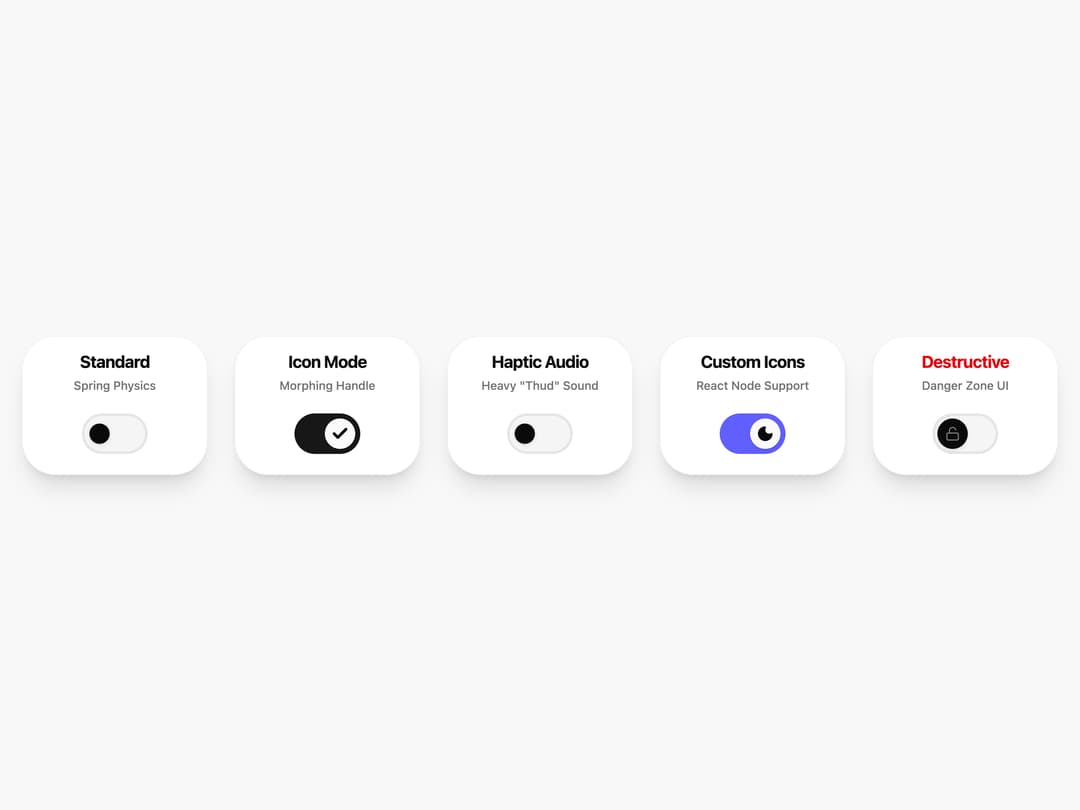
The definitive Google Material Design 3 (M3) Switch component for React & Tailwind CSS. This implementation captures the exact tactile feel of Android toggles using Spring Physics (overshoot animation) and Morphing Handle logic. It goes beyond visual replication by including a built-in Synthetic Audio Engine (Web Audio API) for real-time haptic feedback (mechanical thud or plastic click). Key Features: True M3 Physics: Custom cubic-bezier spring curves for the signature "overshoot" effect. Haptic Audio: Zero-dependency sound generation (no mp3 assets required). Smart Morphing: Handle changes size and shape based on state (Unchecked, Checked, Pressed). Advanced Customization: Support for Custom Icons (React Nodes), Destructive variants, and Compact sizes. Accessibility: Enforced 48px touch targets meeting WCAG AAA standards. A "Holy Grail" component for developers who want the premium feel of native mobile toggles without installing heavy UI libraries.
Built with React and Tailwind. Copy the prompt and paste it into Claude Code, Cursor or Lovable: your agent adds Material Design 3 Switch to your project and fits it to your theme.
Code
How Material Design 3 Switch is used: the demo's code. The component's own source comes with a free account.
Usage.tsx
import React, { useState } from "react";
import { Switch } from "@/components/ui/material-design-3-switch";
import { Moon, Sun, Lock, Unlock } from "lucide-react";

export default function SwitchShowcase() {
  const [standard, setStandard] = useState(false);
  const [icons, setIcons] = useState(true);
  const [haptic, setHaptic] = useState(false);
  const [custom, setCustom] = useState(true);
  const [danger, setDanger] = useState(false);

  return (
    <div className="min-h-screen w-full flex flex-wrap items-center justify-center gap-8 bg-muted/30 py-18 font-sans">

      {/* CARD 1: Standard M3 Switch */}
      <div className="group relative w-full max-w-[220px] aspect-[4/3] bg-card text-card-foreground rounded-[40px] shadow-xl flex flex-col items-center border border-border/50">
        <div className="absolute top-4 text-center space-y-1 px-4">
          <h3 className="text-xl font-bold tracking-tight">Standard</h3>
          <p className="text-muted-foreground text-sm font-medium">Spring Physics</p>
        </div>

        <div className="scale-[1.5] absolute bottom-6">
          <Switch
            checked={standard}
            onCheckedChange={setStandard}
          />
        </div>
      </div>

      {/* CARD 2: Icon Mode */}
      <div className="group relative w-full max-w-[220px] aspect-[4/3] bg-card text-card-foreground rounded-[40px] shadow-xl flex flex-col items-center border border-border/50">
         <div className="absolute top-4 text-center space-y-1 px-4">
          <h3 className="text-xl font-bold tracking-tight">Icon Mode</h3>
          <p className="text-muted-foreground text-sm font-medium">Morphing Handle</p>
        </div>

        <div className="scale-[1.5] absolute bottom-6">
          <Switch
            checked={icons}
            onCheckedChange={setIcons}
            showIcons={true}
          />
        </div>
      </div>

      {/* CARD 3: Haptic Audio */}
      <div className="group relative w-full max-w-[220px] aspect-[4/3] bg-card text-card-foreground rounded-[40px] shadow-xl flex flex-col items-center border border-border/50">
         <div className="absolute top-4 text-center space-y-1 px-4">
          <h3 className="text-xl font-bold tracking-tight">Haptic Audio</h3>
          <p className="text-muted-foreground text-sm font-medium">Heavy "Thud" Sound</p>
        </div>

        <div className="scale-[1.5] absolute bottom-6">
          <Switch
            checked={haptic}
            onCheckedChange={setHaptic}
            haptic="heavy" // Triggers the synthetic audio engine
          />
        </div>
      </div>

      {/* CARD 4: Custom Icons */}
      <div className="group relative w-full max-w-[220px] aspect-[4/3] bg-card text-card-foreground rounded-[40px] shadow-xl flex flex-col items-center border border-border/50">
         <div className="absolute top-4 text-center space-y-1 px-4">
          <h3 className="text-xl font-bold tracking-tight">Custom Icons</h3>
          <p className="text-muted-foreground text-sm font-medium">React Node Support</p>
        </div>

        <div className="scale-[1.5] absolute bottom-6">
          <Switch
            checked={custom}
            onCheckedChange={setCustom}
            haptic="light"
            checkedIcon={<Moon className="w-3.5 h-3.5 fill-current" />}
            uncheckedIcon={<Sun className="w-3.5 h-3.5 fill-current" />}
            className="peer-checked:bg-indigo-500 peer-checked:border-indigo-500"
          />
        </div>
      </div>

      {/* CARD 5: Destructive Variant */}
      <div className="group relative w-full max-w-[220px] aspect-[4/3] bg-card text-card-foreground rounded-[40px] shadow-xl flex flex-col items-center border border-border/50">
         <div className="absolute top-4 text-center space-y-1 px-4">
          <h3 className="text-xl font-bold tracking-tight text-destructive">Destructive</h3>
          <p className="text-muted-foreground text-sm font-medium">Danger Zone UI</p>
        </div>

        <div className="scale-[1.5] absolute bottom-6">
          <Switch
            checked={danger}
            onCheckedChange={setDanger}
            variant="destructive"
            showIcons={true}
            checkedIcon={<Lock className="w-3 h-3" />}
            uncheckedIcon={<Unlock className="w-3 h-3" />}
          />
        </div>
      </div>

    </div>
  );
}
Dependencies
More by Hossain Jahed
View all

Spotlight Card
8.8K
Cinematic landing Hero
5.6K
Motion Footer
5.6K
Sign In
4.6K
AI prompt Box
3K
Glassmorphism Trust Hero
2.8K
Limelight Nav
2K
Ai chat input
1.7K
More in Cards
View all

Statistics Card 2
264

Course Design Cards
1.1K
Card
70
Stats cards with links
39
The Item one
3

Card Studio
7
Statistics Card 7
292

Item
10
