
About
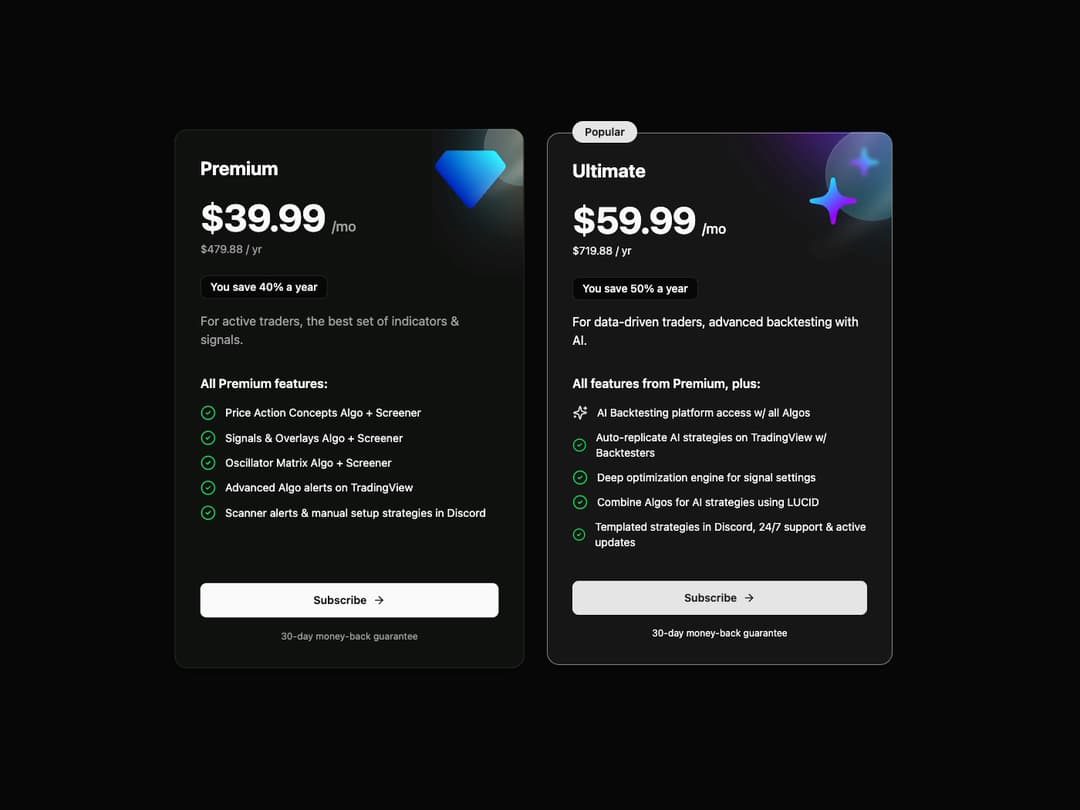
Pricing Card This component displays a subscription plan's details, including features, pricing, and a call-to-action. It's designed to be flexible, with a isPopular prop to highlight a specific plan.
Built with React and Tailwind. Copy the prompt and paste it into Claude Code, Cursor or Lovable: your agent adds Pricing Card to your project and fits it to your theme.
Code
How Pricing Card is used: the demo's code. The component's own source comes with a free account.
Usage.tsx
import * as React from "react";
import { PricingCard } from "@/components/ui/pricing-card";
import { motion } from "framer-motion";

// Data for the Premium plan
const premiumPlan = {
  planName: "Premium",
  price: "39.99",
  annualPrice: "479.88",
  savings: "40%",
  description: "For active traders, the best set of indicators & signals.",
  iconUrl: "https://www.luxalgo.com/images/graphics/top_right_cobalt_diamond.svg",
  features: [
    { text: "Price Action Concepts Algo + Screener" },
    { text: "Signals & Overlays Algo + Screener" },
    { text: "Oscillator Matrix Algo + Screener" },
    { text: "Advanced Algo alerts on TradingView" },
    { text: "Scanner alerts & manual setup strategies in Discord" },
  ],
};

// Data for the Ultimate plan
const ultimatePlan = {
  planName: "Ultimate",
  price: "59.99",
  annualPrice: "719.88",
  savings: "50%",
  description: "For data-driven traders, advanced backtesting with AI.",
  iconUrl: "https://www.luxalgo.com/images/graphics/top_right_purple_stars.svg",
  isPopular: true,
  features: [
    { text: "AI Backtesting platform access w/ all Algos", special: true },
    { text: "Auto-replicate AI strategies on TradingView w/ Backtesters" },
    { text: "Deep optimization engine for signal settings" },
    { text: "Combine Algos for AI strategies using LUCID" },
    { text: "Templated strategies in Discord, 24/7 support & active updates" },
  ],
};

// Animation variants for the container
const containerVariants = {
  hidden: { opacity: 0 },
  visible: {
    opacity: 1,
    transition: {
      staggerChildren: 0.3,
    },
  },
};

// Animation variants for the card items
const itemVariants = {
  hidden: { y: 20, opacity: 0 },
  visible: { y: 0, opacity: 1 },
};

export default function PricingPageDemo() {
  return (
    <div className="flex min-h-screen w-full items-center justify-center bg-background p-4">
      <motion.div
        className="grid grid-cols-1 items-stretch gap-8 lg:grid-cols-2"
        variants={containerVariants}
        initial="hidden"
        animate="visible"
      >
        <motion.div variants={itemVariants}>
          <PricingCard {...premiumPlan} />
        </motion.div>

        <motion.div variants={itemVariants}>
          <PricingCard {...ultimatePlan} />
        </motion.div>
      </motion.div>
    </div>
  );
}
Dependencies
More by Kavi Katiyar
View all

3D Card
982
Bento Product Features
831
Testimonial Slider
716
Card
608
Order Confirmation Card
504
Project Detail View
408
Animated Card
394
State
393
More in Pricing
View all
Pricing Section
582

Pricing Card
535

Pricing Cards
31

Pricing Section
173
pricing section
158
Single Pricing Card
795

Pricing
125
Glowing Pricing Tiers
45


