
About
Built with React and Tailwind. Copy the prompt and paste it into Claude Code, Cursor or Lovable: your agent adds Bento Product Features to your project and fits it to your theme.
Code
How Bento Product Features is used: the demo's code. The component's own source comes with a free account.
Usage.tsx
import * as React from "react";
import {
  Card,
  CardContent,
  CardDescription,
  CardFooter,
  CardHeader,
  CardTitle,
} from "@/components/ui/card";
import { Badge } from "@/components/ui/badge";
import { Button } from "@/components/ui/button";
import { Switch } from "@/components/ui/switch";
import { BentoGridShowcase } from "@/components/ui/bento-product-features";
import {
  Settings2,
  Command,
  Plus,
} from "lucide-react";

// --- Helper Components for the Demo ---
// These components represent the content for each slot.

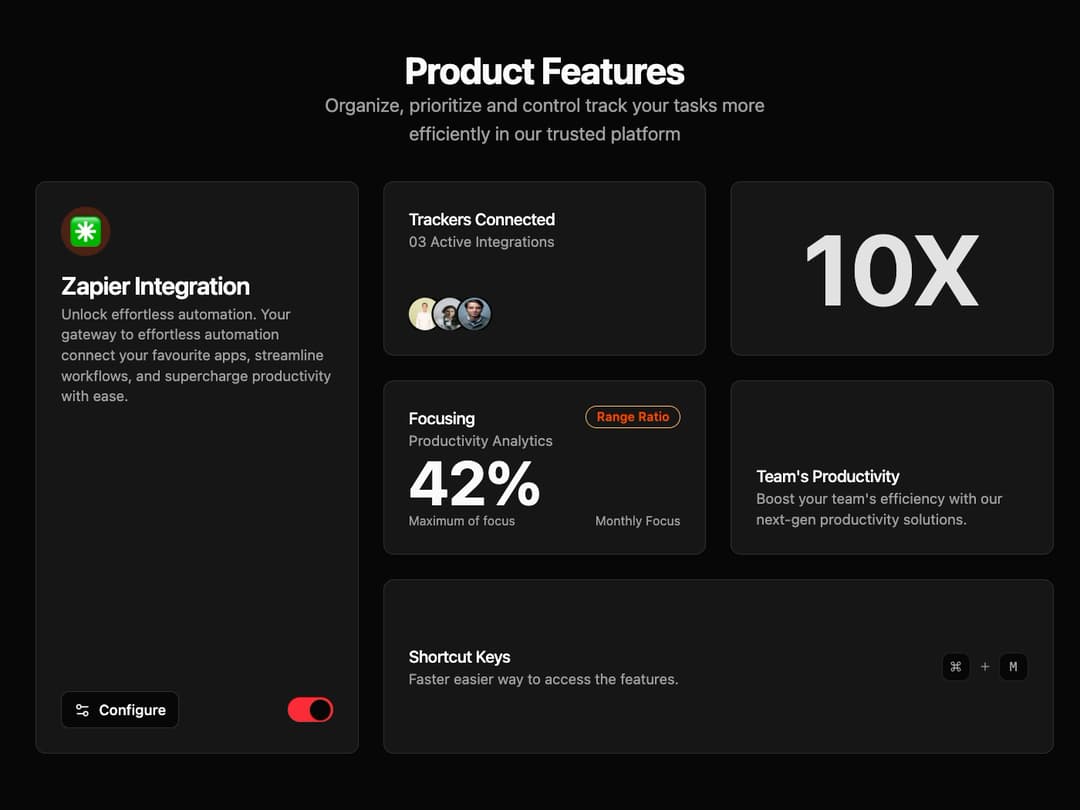
const IntegrationCard = () => (
  <Card className="flex h-full flex-col">
    <CardHeader>
      <div className="mb-4 flex h-12 w-12 items-center justify-center rounded-full bg-orange-100 dark:bg-orange-900/50">
        <span className="text-3xl" role="img" aria-label="sparkles">
          ✳️
        </span>
      </div>
      <CardTitle>Zapier Integration</CardTitle>
      <CardDescription>
        Unlock effortless automation. Your gateway to effortless automation
        connect your favourite apps, streamline workflows, and supercharge
        productivity with ease.
      </CardDescription>
    </CardHeader>
    <CardFooter className="mt-auto flex items-center justify-between">
      <Button variant="outline" size="sm">
        <Settings2 className="mr-2 h-4 w-4" />
        Configure
      </Button>
      <Switch
        className="data-[state=checked]:bg-red-500"
        aria-label="Toggle integration"
      />
    </CardFooter>
  </Card>
);

const TrackersCard = () => (
  <Card className="h-full">
    <CardContent className="flex h-full flex-col justify-between p-6">
      <div>
        <CardTitle className="text-base font-medium">
          Trackers Connected
        </CardTitle>
        <CardDescription>03 Active Integrations</CardDescription>
      </div>
      <div className="flex -space-x-2 overflow-hidden">
        <img
          className="inline-block h-8 w-8 rounded-full ring-2 ring-background"
          src="https://cdn.21st.dev/assets/mirror/59/5926d7983d8b49d335297de31e17ff824d4ca1da7ccad81d69d05768cb9e8f36.jpg"
          alt="User 1"
        />
        <img
          className="inline-block h-8 w-8 rounded-full ring-2 ring-background"
          src="https://cdn.21st.dev/assets/mirror/54/5443ccf8560145188f5b2ff194679bba640203451821e29aeda4ebf1008bc099.jpg"
          alt="User 2"
        />
        <img
          className="inline-block h-8 w-8 rounded-full ring-2 ring-background"
          src="https://cdn.21st.dev/assets/mirror/7f/7ff1d828c4e5fdf44425010688bb32d0a843384f2e43b32a3196206a12963708.jpg"
          alt="User 3"
        />
      </div>
    </CardContent>
  </Card>
);

const FocusCard = () => (
  <Card className="h-full">
    <CardContent className="flex h-full flex-col justify-between p-6">
      <div className="flex items-start justify-between">
        <div>
          <CardTitle className="text-base font-medium">Focusing</CardTitle>
          <CardDescription>Productivity Analytics</CardDescription>
        </div>
        <Badge variant="outline" className="border-orange-300 text-orange-600">
          Range Ratio
        </Badge>
      </div>
      <div>
        <span className="text-6xl font-bold">42%</span>
      </div>
      <div className="flex justify-between text-xs text-muted-foreground">
        <span>Maximum of focus</span>
        <span>Monthly Focus</span>
      </div>
    </CardContent>
  </Card>
);

const StatisticCard = () => (
  <Card className="relative h-full w-full overflow-hidden">
    {/* Dotted background */}
    <div
      className="absolute inset-0 opacity-20"
      style={{
        backgroundImage: "radial-gradient(hsl(var(--foreground)) 1px, transparent 1px)",
        backgroundSize: "16px 16px",
      }}
    />
    <CardContent className="relative z-10 flex h-full items-center justify-center p-6">
      <span className="text-8xl font-bold text-foreground/90">10X</span>
    </CardContent>
  </Card>
);

const ProductivityCard = () => (
  <Card className="h-full">
    <CardContent className="flex h-full flex-col justify-end p-6">
      <CardTitle className="text-base font-medium">
        Team's Productivity
      </CardTitle>
      <CardDescription>
        Boost your team's efficiency with our next-gen productivity solutions.
      </CardDescription>
    </CardContent>
  </Card>
);

const ShortcutsCard = () => (
  <Card className="h-full">
    <CardContent className="flex h-full flex-wrap items-center justify-between gap-4 p-6">
      <div>
        <CardTitle className="text-base font-medium">Shortcut Keys</CardTitle>
        <CardDescription>
          Faster easier way to access the features.
        </CardDescription>
      </div>
      <div className="flex items-center gap-2">
        {/* Styled div replacing Kbd */}
        <div className="flex h-7 w-7 items-center justify-center rounded-md border bg-background font-mono text-xs font-medium text-muted-foreground">
          <Command className="h-3 w-3" />
        </div>
        <Plus className="h-3 w-3 text-muted-foreground" />
        {/* Styled div replacing Kbd */}
        <div className="flex h-7 w-7 items-center justify-center rounded-md border bg-background font-mono text-xs font-medium text-muted-foreground">
          M
        </div>
      </div>
    </CardContent>
  </Card>
);

// --- The Default Demo ---
export default function BentoGridShowcaseDemo() {
  return (
    <div className="w-full p-4 md:p-10">
      <div className="mb-8">
        <h1 className="text-center text-4xl font-bold tracking-tight">
          Product Features
        </h1>
        <p className="text-center text-lg text-muted-foreground">
          Organize, prioritize and control track your tasks more
          <br />
          efficiently in our trusted platform
        </p>
      </div>

      <BentoGridShowcase
        integration={<IntegrationCard />}
        trackers={<TrackersCard />}
        statistic={<StatisticCard />}
        focus={<FocusCard />}
        productivity={<ProductivityCard />}
        shortcuts={<ShortcutsCard />}
      />
    </div>
  );
}
Dependencies
More by Kavi Katiyar
View all

3D Card
981
Testimonial Slider
716
Card
608
Order Confirmation Card
504
Project Detail View
408
State
393
Animated Card
393
Performance Benchmark Card
387
More in Features
View all

Features 8
3.1K

Feature Sections
107

Grid Feature Cards
1.9K

Feature 72
122
Features 2
322
Features 4
368
Feature Modern
9
Features Card
201

