
About
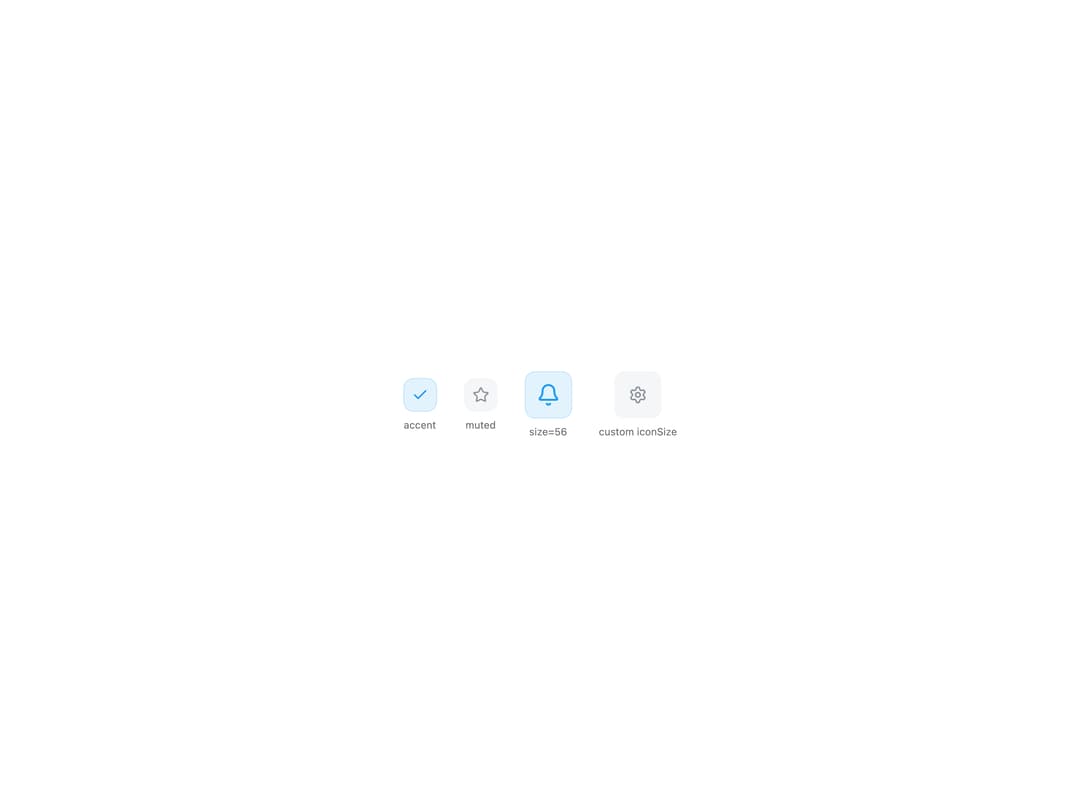
A small rounded square that frames a single Iconify icon in a tinted "accent" or neutral "muted" surface, used for feature list bullets, stat rows, and card headers.
Built with React and Tailwind. Copy the prompt and paste it into Claude Code, Cursor or Lovable: your agent adds Icon Block to your project and fits it to your theme.
Code
How Icon Block is used: the demo's code. The component's own source comes with a free account.
Usage.tsx
import IconBlock from "@/components/ui/icon-block";

export default function IconBlockDemo() {
  return (
    <div className="flex min-h-[320px] w-full flex-wrap items-center justify-center gap-8 bg-background p-10 text-foreground">
      <div className="flex flex-col items-center gap-2">
        <IconBlock icon="lucide:check" />
        <span className="text-xs text-muted-foreground">accent</span>
      </div>
      <div className="flex flex-col items-center gap-2">
        <IconBlock icon="lucide:star" variant="muted" />
        <span className="text-xs text-muted-foreground">muted</span>
      </div>
      <div className="flex flex-col items-center gap-2">
        <IconBlock icon="lucide:bell" size={56} />
        <span className="text-xs text-muted-foreground">size=56</span>
      </div>
      <div className="flex flex-col items-center gap-2">
        <IconBlock
          icon="lucide:settings"
          variant="muted"
          size={56}
          iconSize={22}
        />
        <span className="text-xs text-muted-foreground">custom iconSize</span>
      </div>
    </div>
  );
}
Dependencies
More by lailai0916
View all
Window Panel
6
Dialog
1
Window Bar
Tabs

Scrollable Data Table
Skip Link

Site Header

Skeleton
More in Cards
View all
Stats cards with links
33

Course Design Cards
1.1K

Card
70
Statistics Card 10
263
Statistics Card 2
264

Card
17

Card Studio
9
File Card Collections
1K

