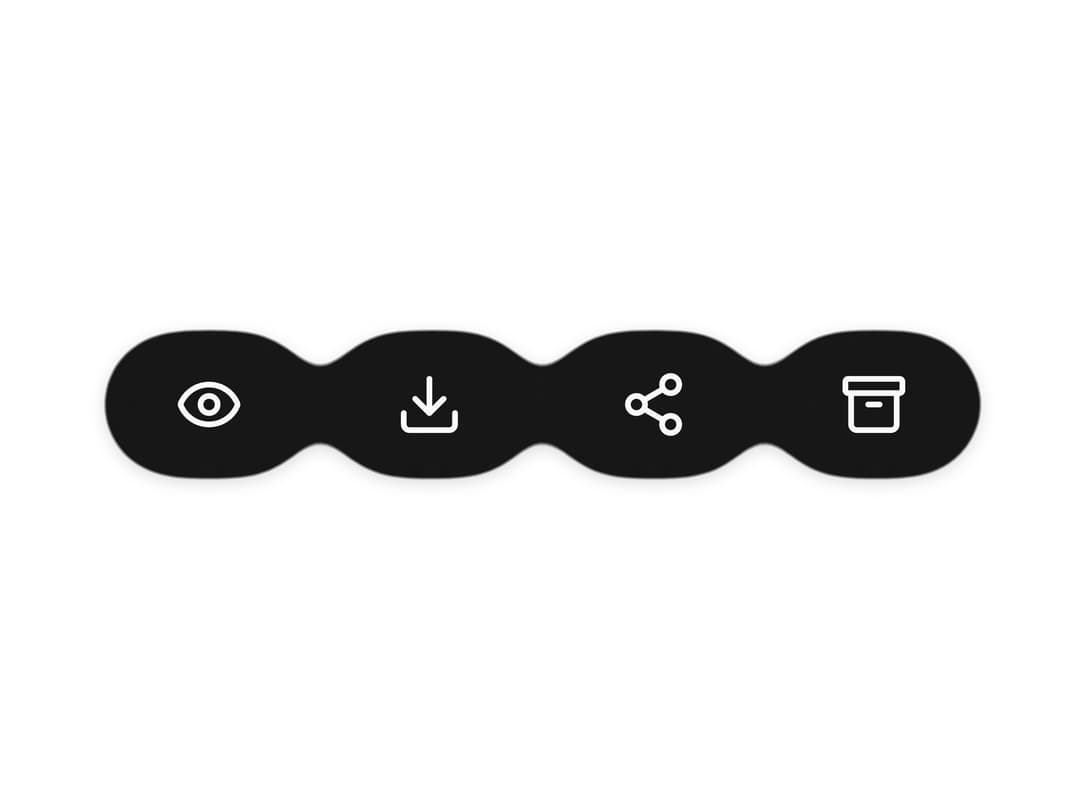
About
An animated action rail that expands to reveal text labels on hover/focus/touch, with a compact collapsed variant and an optional gooey metaball motion style, for grouping related row/toolbar actions like review, download, share, and delete.
Built with React and Tailwind. Copy the prompt and paste it into Claude Code, Cursor or Lovable: your agent adds Multi Button to your project and fits it to your theme.
Code
How Multi Button is used: the demo's code. The component's own source comes with a free account.
Usage.tsx
"use client";

import {
  MultiButton,
  type MultiButtonItem,
} from "@/components/ui/multi-button";
import { Archive, Download, Eye, Share2 } from "lucide-react";

const actions: MultiButtonItem[] = [
  { id: "review", icon: Eye, label: "Review" },
  { id: "download", icon: Download, label: "Download" },
  { id: "share", icon: Share2, label: "Share" },
  { id: "archive", icon: Archive, label: "Archive" },
];

export default function GooeyMultiButtonDemo() {
  return (
    <div className="flex w-full items-center justify-center py-16">
      <MultiButton
        items={actions}
        gooey
        highlightColor="var(--primary-foreground)"
        size="lg"
      />
    </div>
  );
}
Dependencies
More by lucasbassetti
View all

Magic Button
8
Mask Button
7
Animated Tooltip
6
Progress Fold Button
3
Bento Grid
More in Buttons
View all
Button Save
46

Button
20

Eclipse Button
5

Button
6

Button
14

Button Group
37

Button
32
Split Button
32

