About
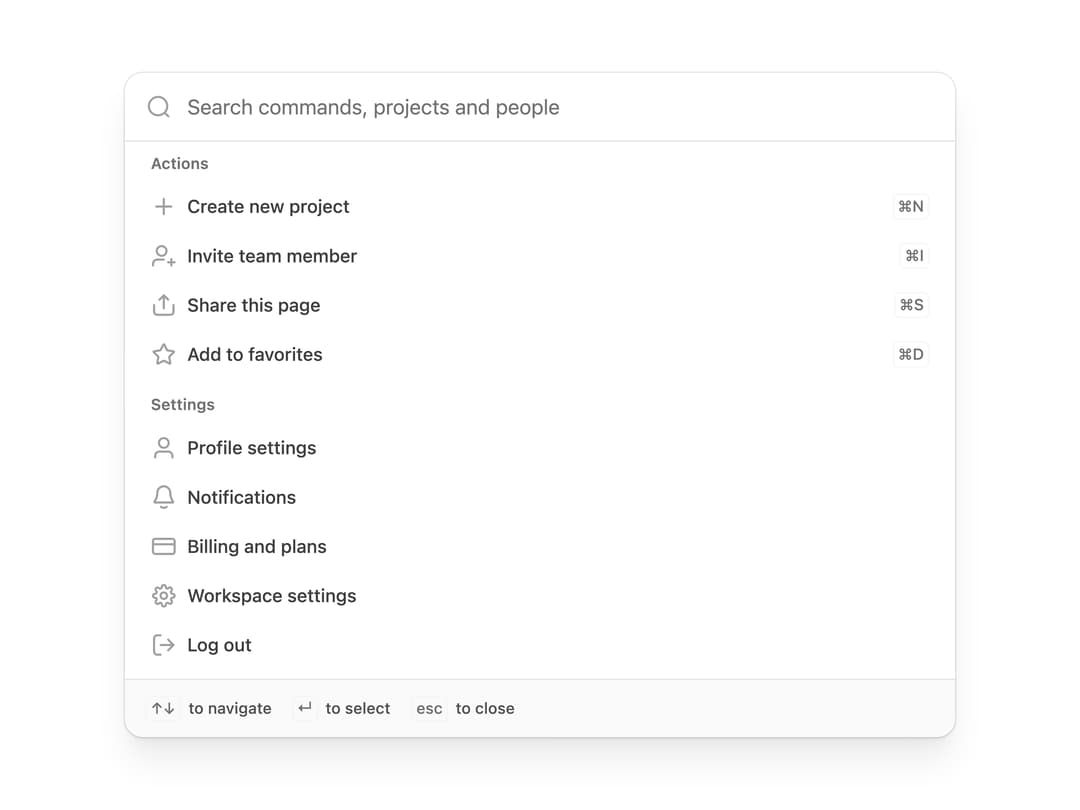
A searchable ⌘K-style command palette for filtering and selecting actions, settings or people from a keyboard-first popover or inline list.
Built with React and Tailwind. Copy the prompt and paste it into Claude Code, Cursor or Lovable: your agent adds Command Menu to your project and fits it to your theme.
Code
How Command Menu is used: the demo's code. The component's own source comes with a free account.
Usage.tsx
"use client";

import { CommandMenu } from "@/components/ui/command-menu";
import {
  Bell01,
  CreditCard01,
  LogOut01,
  Plus,
  Settings01,
  Share01,
  Star01,
  User01,
  UserPlus01,
} from "@untitledui/icons";

const actions = [
  {
    id: "new-project",
    label: "Create new project",
    description: "Start from a blank canvas or a template.",
    icon: Plus,
    shortcut: "⌘N",
  },
  {
    id: "invite",
    label: "Invite team member",
    description: "Send an invite by email or share a link.",
    icon: UserPlus01,
    shortcut: "⌘I",
  },
  {
    id: "share",
    label: "Share this page",
    description: "Copy a public link to this page.",
    icon: Share01,
    shortcut: "⌘S",
  },
  {
    id: "favourite",
    label: "Add to favorites",
    description: "Keep this project at the top of your sidebar.",
    icon: Star01,
    shortcut: "⌘D",
  },
];

const settings = [
  { id: "profile", label: "Profile settings", icon: User01 },
  { id: "notifications", label: "Notifications", icon: Bell01 },
  { id: "billing", label: "Billing and plans", icon: CreditCard01 },
  { id: "workspace", label: "Workspace settings", icon: Settings01 },
  { id: "logout", label: "Log out", icon: LogOut01 },
];

export default function CommandMenuDemo() {
  return (
    <div className="flex w-full justify-center p-4">
      <CommandMenu layout="inline" className="max-w-160">
        <CommandMenu.Search placeholder="Search commands, projects and people" />

        <CommandMenu.List
          className="max-h-120"
          renderEmptyState={() => (
            <CommandMenu.Empty description="Try a different command." />
          )}
        >
          <CommandMenu.Group label="Actions">
            {actions.map((action) => (
              <CommandMenu.Item
                key={action.id}
                id={action.id}
                label={action.label}
                icon={action.icon}
                shortcut={action.shortcut}
              />
            ))}
          </CommandMenu.Group>

          <CommandMenu.Group label="Settings">
            {settings.map((setting) => (
              <CommandMenu.Item
                key={setting.id}
                id={setting.id}
                label={setting.label}
                icon={setting.icon}
              />
            ))}
          </CommandMenu.Group>
        </CommandMenu.List>

        <CommandMenu.Footer>
          <span className="text-tertiary flex items-center gap-1.5 text-xs font-medium">
            <CommandMenu.Shortcut>↑↓</CommandMenu.Shortcut> to navigate
          </span>
          <span className="text-tertiary flex items-center gap-1.5 text-xs font-medium">
            <CommandMenu.Shortcut>↵</CommandMenu.Shortcut> to select
          </span>
          <span className="text-tertiary flex items-center gap-1.5 text-xs font-medium">
            <CommandMenu.Shortcut>esc</CommandMenu.Shortcut> to close
          </span>
        </CommandMenu.Footer>
      </CommandMenu>
    </div>
  );
}
Dependencies
More by properui
View all

Loading Indicator
7
Breadcrumbs
Toggle
Tags
Progress Indicators
Radio Buttons
Button
Badge