
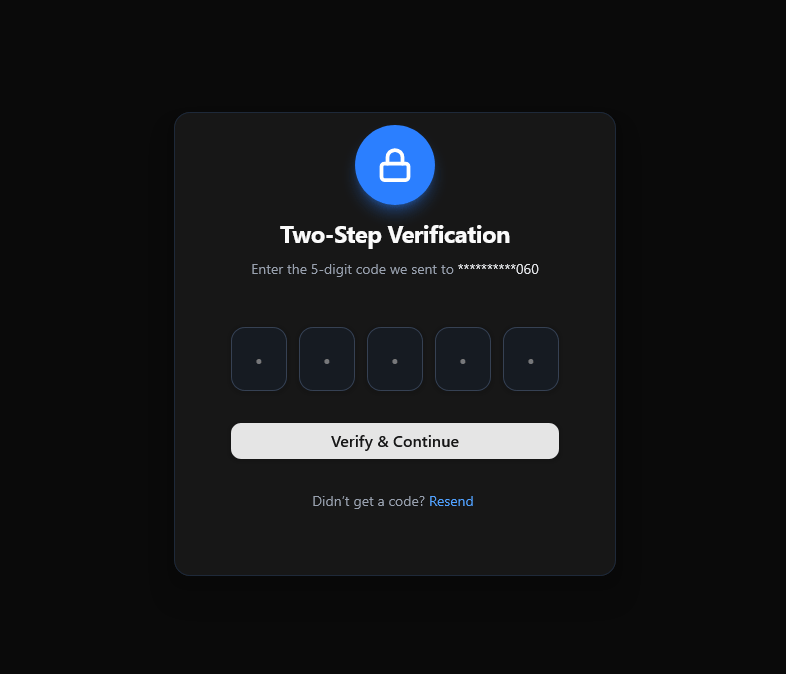
The TwoStepVerification component provides a sleek and secure interface for users to complete a two-factor authentication (2FA) process. Designed with modern UI principles and styled using shadcn/ui, it ensures both usability and trustworthiness. This component typically displays input fields for verification codes sent via email, SMS, or authenticator apps, along with clear visual feedback for errors or success states. It can include features like a countdown timer for code expiration, a “Resend Code” button, and subtle animations to enhance user experience.
Built with React and Tailwind. Copy the prompt and paste it into Claude Code, Cursor or Lovable: your agent adds TwoStepVerification to your project and fits it to your theme.
Code
How TwoStepVerification is used: the demo's code. The component's own source comes with a free account.
Usage.tsx
'use client';

import TwoStepVerification from "@/components/ui/two-step-verification";

export default function TwoStepDemoPage() {
  return (
    <div className="min-h-screen flex items-center justify-center p-6">
      <TwoStepVerification />
    </div>
  );
}
Dependencies
More by ruhith
View all
LoadingLines
145
Health Stat Card
138
LoadingRadar
119
LoadingBottle
114
BarLoader
90
Loader
71
BouncingCirclesLoader
50
LoaderProgressiveBar
49