
About
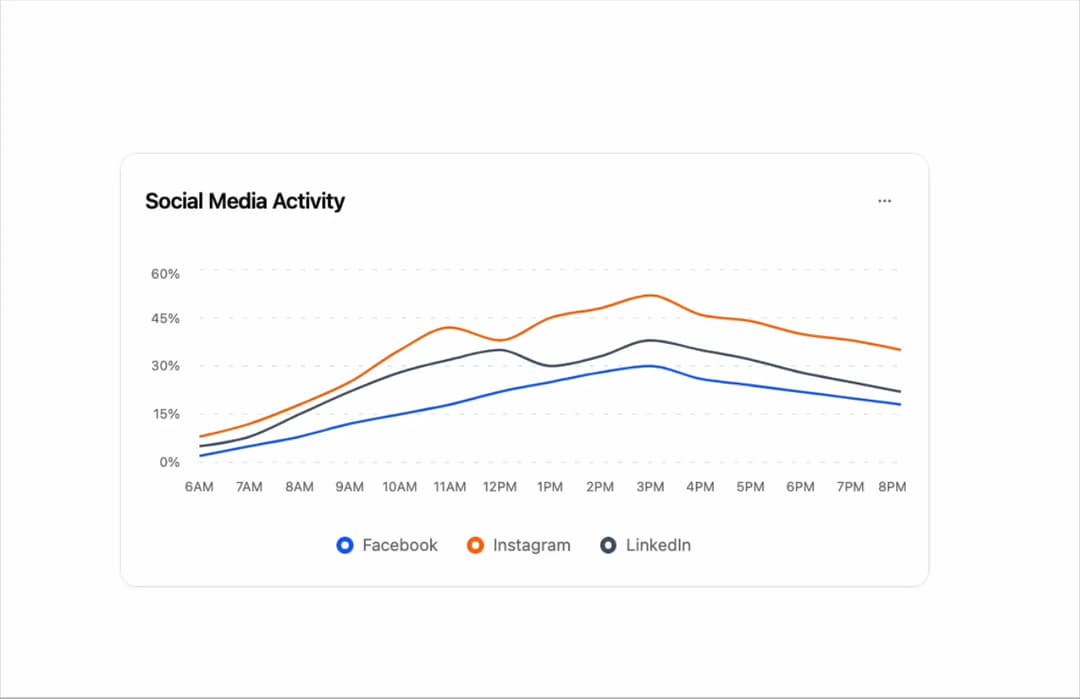
Line charts designed to present key metrics and insights. Each chart features unique layouts, data visualizations, and styling options. Perfect for dashboards, admin panels, and analytics pages.
Built with React and Tailwind. Copy the prompt and paste it into Claude Code, Cursor or Lovable: your agent adds Line Charts 4 to your project and fits it to your theme.
Code
How Line Charts 4 is used: the demo's code. The component's own source comes with a free account.
Usage.tsx
'use client';

import React from 'react';
import { Button } from '@/components/ui/button-1';
import { Card, CardContent, CardHeader, CardTitle, CardToolbar } from '@/components/ui/card';
import { ChartConfig, ChartContainer, ChartTooltip, ChartTooltipContent } from '@/components/ui/line-charts-4';
import {
  DropdownMenu,
  DropdownMenuContent,
  DropdownMenuItem,
  DropdownMenuSeparator,
  DropdownMenuTrigger,
} from '@/components/ui/dropdown-menu';
import { Calendar, Download, Filter, MoreHorizontal, RefreshCw, Share2 } from 'lucide-react';
import { CartesianGrid, Line, LineChart, XAxis, YAxis } from 'recharts';

// Social media engagement data throughout the day (percentage)
const engagementData = [
  { time: '6AM', facebook: 2, instagram: 8, linkedin: 5 },
  { time: '7AM', facebook: 5, instagram: 12, linkedin: 8 },
  { time: '8AM', facebook: 8, instagram: 18, linkedin: 15 },
  { time: '9AM', facebook: 12, instagram: 25, linkedin: 22 },
  { time: '10AM', facebook: 15, instagram: 35, linkedin: 28 },
  { time: '11AM', facebook: 18, instagram: 42, linkedin: 32 },
  { time: '12PM', facebook: 22, instagram: 38, linkedin: 35 },
  { time: '1PM', facebook: 25, instagram: 45, linkedin: 30 },
  { time: '2PM', facebook: 28, instagram: 48, linkedin: 33 },
  { time: '3PM', facebook: 30, instagram: 52, linkedin: 38 },
  { time: '4PM', facebook: 26, instagram: 46, linkedin: 35 },
  { time: '5PM', facebook: 24, instagram: 44, linkedin: 32 },
  { time: '6PM', facebook: 22, instagram: 40, linkedin: 28 },
  { time: '7PM', facebook: 20, instagram: 38, linkedin: 25 },
  { time: '8PM', facebook: 18, instagram: 35, linkedin: 22 },
];

// Use custom or Tailwind standard colors: https://tailwindcss.com/docs/colors
const chartConfig = {
  facebook: {
    label: 'Facebook',
    color: 'var(--color-blue-600)',
  },
  instagram: {
    label: 'Instagram',
    color: 'var(--color-orange-500)',
  },
  linkedin: {
    label: 'LinkedIn',
    color: 'var(--color-slate-600)',
  },
} satisfies ChartConfig;

// Custom Tooltip
interface TooltipProps {
  active?: boolean;
  payload?: Array<{
    dataKey: string;
    value: number;
    color: string;
  }>;
  label?: string;
}

const ChartLabel = ({ label, color }: { label: string; color: string }) => {
  return (
    <div className="flex items-center gap-1.5">
      <div className="size-3.5 border-4 rounded-full bg-background" style={{ borderColor: color }}></div>
      <span className="text-muted-foreground">{label}</span>
    </div>
  );
};

const CustomTooltip = ({ active, payload, label }: TooltipProps) => {
  if (active && payload && payload.length) {
    return (
      <div className="rounded-lg border bg-popover p-3 shadow-sm shadow-black/5 min-w-[150px]">
        <div className="text-xs font-medium text-muted-foreground tracking-wide mb-2.5">{label}</div>
        <div className="space-y-2">
          {payload.map((entry, index) => {
            const config = chartConfig[entry.dataKey as keyof typeof chartConfig];
            return (
              <div key={index} className="flex items-center gap-2 text-xs">
                <ChartLabel label={config?.label + ':'} color={entry.color} />
                <span className="font-semibold text-popover-foreground">{entry.value}%</span>
              </div>
            );
          })}
        </div>
      </div>
    );
  }
  return null;
};

// Chart Legend Component
const ChartLegend = ({ label, color }: { label: string; color: string }) => {
  return (
    <div className="flex items-center gap-2">
      <div
        className="size-3.5 border-4 rounded-full bg-background border-border"
        style={{ borderColor: `${color}` }}
      ></div>
      <span className="text-sm text-muted-foreground">{label}</span>
    </div>
  );
};

export default function LineChart4() {
  return (
    <div className="w-full max-w-5xl min-h-screen flex items-center justify-center p-6 lg:p-8">
      <Card className="w-full max-w-2xl">
        <CardHeader className="border-0 pt-6 pb-4">
          <CardTitle className="text-lg font-semibold">Social Media Activity</CardTitle>
          <CardToolbar>
            <DropdownMenu>
              <DropdownMenuTrigger asChild>
                <Button variant="ghost" size="sm" className="h-8 w-8 p-0">
                  <MoreHorizontal className="h-4 w-4" />
                </Button>
              </DropdownMenuTrigger>
              <DropdownMenuContent align="end">
                <DropdownMenuItem>
                  <Download className="h-4 w-4" />
                  Export Data
                </DropdownMenuItem>
                <DropdownMenuItem>
                  <Calendar className="h-4 w-4" />
                  Change Date
                </DropdownMenuItem>
                <DropdownMenuItem>
                  <Filter className="h-4 w-4" />
                  Filter Platforms
                </DropdownMenuItem>
                <DropdownMenuItem>
                  <RefreshCw className="h-4 w-4" />
                  Refresh
                </DropdownMenuItem>
                <DropdownMenuSeparator />
                <DropdownMenuItem>
                  <Share2 className="h-4 w-4" />
                  Share Report
                </DropdownMenuItem>
              </DropdownMenuContent>
            </DropdownMenu>
          </CardToolbar>
        </CardHeader>

        <CardContent className="ps-0 pe-4.5 pb-6">
          <ChartContainer
            config={chartConfig}
            className="h-[200px] w-full mb-6 [&_.recharts-curve.recharts-tooltip-cursor]:stroke-initial"
          >
            <LineChart
              data={engagementData}
              margin={{
                top: 5,
                right: 5,
                left: 5,
                bottom: 5,
              }}
            >
              <CartesianGrid
                strokeDasharray="4 8"
                stroke="var(--input)"
                strokeOpacity={1}
                horizontal={true}
                vertical={false}
              />

              <XAxis
                dataKey="time"
                axisLine={false}
                tickLine={false}
                tick={{ fontSize: 11, fill: 'var(--text-muted-foreground)' }}
                tickMargin={10}
              />

              <YAxis
                axisLine={false}
                tickLine={false}
                tick={{ fontSize: 11, fill: 'var(--text-muted-foreground)' }}
                tickFormatter={(value) => `${value}%`}
                domain={[0, 60]}
                tickMargin={10}
              />

              <ChartTooltip content={<CustomTooltip />} cursor={{ strokeDasharray: '3 3', stroke: 'var(--input)' }} />

              {/* Facebook Line */}
              <Line dataKey="facebook" type="monotone" stroke="var(--color-facebook)" strokeWidth={2} dot={false} />

              {/* Instagram Line */}
              <Line dataKey="instagram" type="monotone" stroke="var(--color-instagram)" strokeWidth={2} dot={false} />

              {/* LinkedIn Line */}
              <Line dataKey="linkedin" type="monotone" stroke="var(--color-linkedin)" strokeWidth={2} dot={false} />
            </LineChart>
          </ChartContainer>

          {/* Legend */}
          <div className="flex items-center justify-center gap-6">
            <ChartLegend label="Facebook" color={chartConfig.facebook.color} />
            <ChartLegend label="Instagram" color={chartConfig.instagram.color} />
            <ChartLegend label="LinkedIn" color={chartConfig.linkedin.color} />
          </div>
        </CardContent>
      </Card>
    </div>
  );
}
Dependencies
More by Sean Hello
View all

3D Testimonails
3.3K
Line Charts 9
637
Alert
492
Area Charts 1
385
Line Charts 6
384
Scroll Area
376
Area Charts 2
317
Navigation Menu
305
More in Cards
View all
Statistics Card 2
264

Course Design Cards
1.1K
Card
70
Stats cards with links
39
The Item one
3

Card Studio
7
Statistics Card 7
292

Item
10
