
About
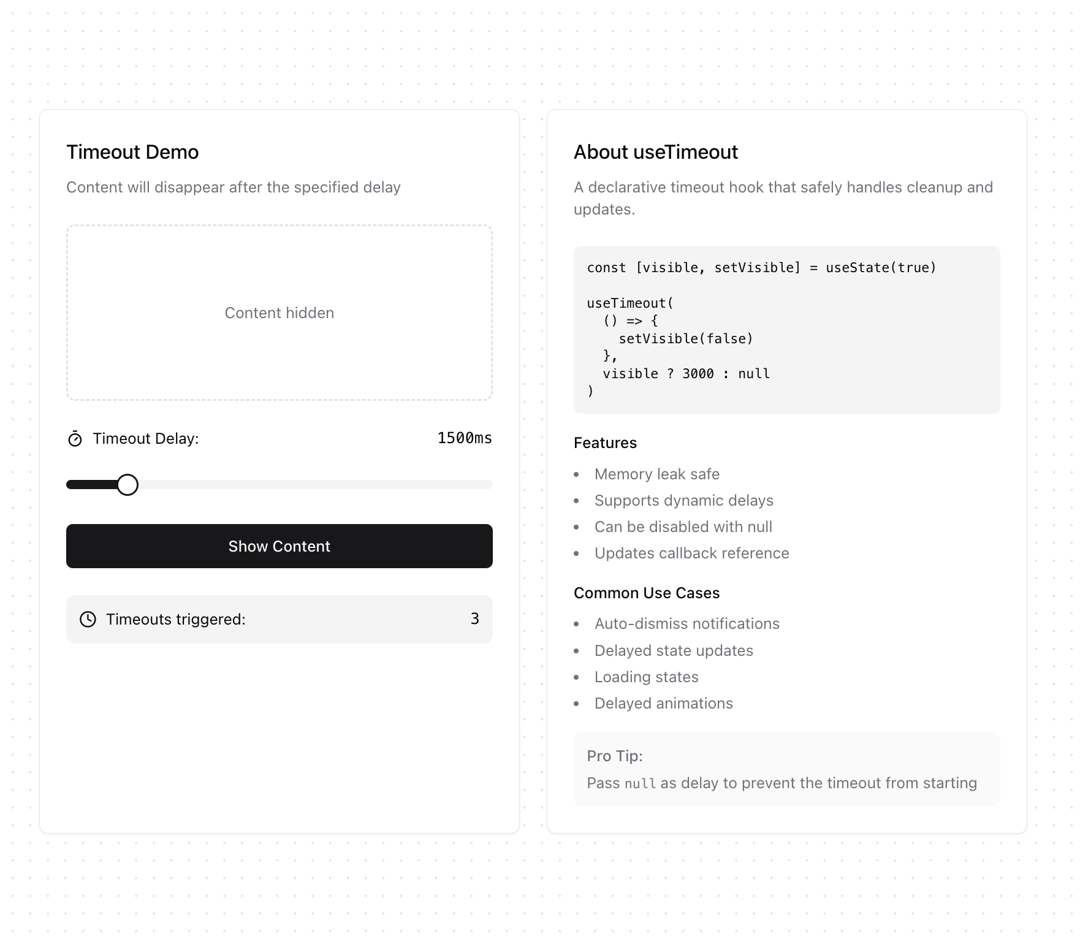
Run a callback function after a specified delay with useTimeout, supporting dynamic updates and cleanup on unmount.
Built with React and Tailwind. Copy the prompt and paste it into Claude Code, Cursor or Lovable: your agent adds useTimeout to your project and fits it to your theme.
Code
How useTimeout is used: the demo's code. The component's own source comes with a free account.
Usage.tsx
'use client'

import { useTimeout } from "@/components/hooks/use-timeout"
import { Button } from "@/components/ui/button"
import { Card } from "@/components/ui/card"
import { Slider } from "@/components/ui/slider"
import { useState } from "react"
import { Timer, RefreshCw, Clock, AlertCircle } from "lucide-react"

export function UseTimeoutDemo() {
  const [isVisible, setIsVisible] = useState(false)
  const [delay, setDelay] = useState(3000)
  const [timeoutCount, setTimeoutCount] = useState(0)

  useTimeout(
    () => {
      if (isVisible) {
        setIsVisible(false)
        setTimeoutCount(prev => prev + 1)
      }
    },
    isVisible ? delay : null
  )

  return (
    <div className="grid grid-cols-2 gap-6 max-w-4xl mx-auto">
      {/* Left Column - Interactive Demo */}
      <Card className="p-6">
        <div className="space-y-6">
          <div className="space-y-2">
            <h3 className="text-lg font-medium">Timeout Demo</h3>
            <p className="text-sm text-muted-foreground">
              Content will disappear after the specified delay
            </p>
          </div>

          {/* Content Display */}
          <div className="min-h-[160px] flex items-center justify-center p-6 rounded-lg border-2 border-dashed">
            {isVisible ? (
              <div className="text-center space-y-2">
                <AlertCircle className="h-8 w-8 mx-auto text-yellow-500 animate-pulse" />
                <p className="text-sm">
                  This content will disappear in <span className="font-mono">{delay}ms</span>
                </p>
              </div>
            ) : (
              <p className="text-sm text-muted-foreground">Content hidden</p>
            )}
          </div>

          {/* Controls */}
          <div className="space-y-4">
            <div className="space-y-3">
              <div className="flex items-center justify-between text-sm">
                <div className="flex items-center gap-2">
                  <Timer className="h-4 w-4" />
                  <span>Timeout Delay:</span>
                </div>
                <span className="font-mono">{delay}ms</span>
              </div>

              <Slider
                value={[delay]}
                onValueChange={([newDelay]) => setDelay(newDelay)}
                min={1000}
                max={5000}
                step={500}
                className="py-4"
              />
            </div>

            <Button
              className="w-full"
              onClick={() => setIsVisible(true)}
              disabled={isVisible}
            >
              Show Content
            </Button>
          </div>

          <div className="flex items-center justify-between text-sm bg-muted p-3 rounded-lg">
            <div className="flex items-center gap-2">
              <Clock className="h-4 w-4" />
              <span>Timeouts triggered:</span>
            </div>
            <span className="font-mono">{timeoutCount}</span>
          </div>
        </div>
      </Card>

      {/* Right Column - Documentation */}
      <Card className="p-6">
        <div className="space-y-6">
          <div>
            <h3 className="text-lg font-medium mb-2">About useTimeout</h3>
            <p className="text-sm text-muted-foreground">
              A declarative timeout hook that safely handles cleanup and updates.
            </p>
          </div>

          <div className="space-y-4">
            <pre className="bg-muted p-3 rounded-md text-xs">
{`const [visible, setVisible] = useState(true)

useTimeout(
  () => {
    setVisible(false)
  },
  visible ? 3000 : null
)`}
            </pre>

            <div className="space-y-4">
              <div>
                <h4 className="text-sm font-medium mb-2">Features</h4>
                <ul className="list-disc list-inside space-y-1 text-sm text-muted-foreground">
                  <li>Memory leak safe</li>
                  <li>Supports dynamic delays</li>
                  <li>Can be disabled with null</li>
                  <li>Updates callback reference</li>
                </ul>
              </div>

              <div>
                <h4 className="text-sm font-medium mb-2">Common Use Cases</h4>
                <ul className="list-disc list-inside space-y-1 text-sm text-muted-foreground">
                  <li>Auto-dismiss notifications</li>
                  <li>Delayed state updates</li>
                  <li>Loading states</li>
                  <li>Delayed animations</li>
                </ul>
              </div>

              <div className="text-sm text-muted-foreground p-3 bg-muted/50 rounded-lg">
                <p className="font-medium mb-1">Pro Tip:</p>
                Pass <code className="text-xs">null</code> as delay to prevent the timeout from starting
              </div>
            </div>
          </div>
        </div>
      </Card>
    </div>
  )
}
Dependencies
More by Ghribi Ouassim
View all
useCopyToClipboard
70
useToggle
35
useDebounceCallback
23
useInterval
12
useCounter
10
useIsomorphicLayoutEffect
10
useUnmount
10
useBoolean
8
More in Cards
View all
Stats cards with links
33

Course Design Cards
1.1K

Card
70
Statistics Card 2
264
Statistics Card 10
263

Card
17

Card Studio
9
The Item one
3
