
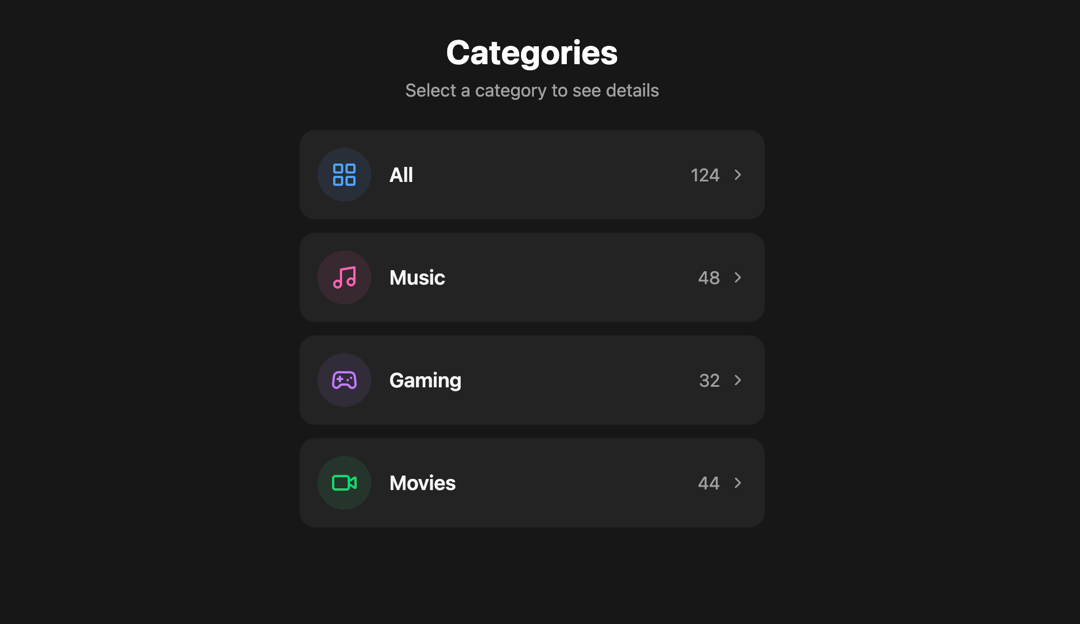
This React component renders a Category Selector UI with a modern, animated interface. Users can browse through different categories (e.g., Music, Gaming, Movies) and upon clicking a category, the UI transitions into a detailed view of that category. It emphasizes smooth UX, component architecture, accessibility, and performance optimizations. 🏗️ Component Structure The app is organized into the following major parts: App – Root component managing state and rendering either list or detail view. ListView – Displays a list of category cards. CategoryItem – Individual clickable category card. DetailsView – Full-screen detail panel for a selected category. categoriesData – Mock category dataset containing metadata (icon, title, count, colors). ⚙️ Functionality and Behavior 🔁 State Management Maintains a single state variable: selectedCategory (initially null). If null, displays the category list. If a category is selected, transitions to the detail view. 🎞️ Animation (Framer Motion) Smooth layout transitions between list and detail views using layoutId. AnimatePresence handles enter/exit animations between components. Delayed transitions for text fade-ins (opacity, y) ensure a refined appearance. motion.div and motion.button are used for animated containers and buttons. 🎨 Styling (TailwindCSS) Uses TailwindCSS utility classes for layout, padding, typography, colors. Dark-themed UI with neutral-* background/text colors. Category cards have dynamic color accents derived from category.color and iconBgColor. Layout is fully responsive and centered with padding and max-width constraints. 🧩 Icons and Reusability Icons are dynamically rendered using the React.ElementType prop (category.icon). CategoryItem uses React.memo to avoid unnecessary re-renders. Detail view shows enlarged icon, title, item count, and description placeholder. 🔐 Accessibility Every interactive element is: Focusable (focus:outline-none) Keyboard-navigable Aria-labeled (aria-label on back button) Buttons have visible focus-visible:ring styling for a11y compliance. 📦 Category Data Model Each Category object contains: id: Unique identifier icon: Icon component from Lucide title: Display title count: Number of items color: Tailwind class for icon color iconBgColor: Tailwind class for icon background This allows full customization per category and separation of concerns. 📁 Component Responsibilities Component Responsibility App Holds selected category state, switches views ListView Renders all category cards using CategoryItem CategoryItem Renders a single clickable, animated card with icon, title, and item count DetailsView Displays detailed category view with transition from list card layout 💡 Best Practices Followed ✅ Component Memoization – React.memo on CategoryItem optimizes render performance. ✅ Declarative Animations – Framer Motion for easy-to-understand transitions. ✅ Consistent Styling – TailwindCSS classes are clean, organized, and scoped per element. ✅ Accessible UI – Buttons are accessible with keyboard and screen readers. ✅ Single Responsibility Principle – Each component does only one thing and does it well. ✅ Mock Data Usage – categoriesData simplifies dev/testing and enables easy future backend integration. 🧪 Extensibility and Customization Ideas ✅ Add click-through content in DetailsView, like playlists, game stats, or videos. ✅ Connect to an API to dynamically fetch categories or content. ✅ Allow category search or filter by adding an input field in ListView. ✅ Add light/dark mode switch support. ✅ Improve DetailsView with sub-navigation or tabs. 🧠 Use Cases Media App: Organize and explore different types of media. Dashboard Interface: Display different dashboard categories (e.g., Sales, Marketing, Tech). E-commerce Filters: Category filter for products. Entertainment Platform: Browse types of entertainment content. ✅ Summary This component is a highly interactive and animated category selection interface that is built with modern best practices. It demonstrates: Clean and scalable component architecture. Beautiful and smooth animated transitions with Framer Motion. Fully accessible and mobile-friendly layout. Use of dynamic icon rendering and custom color theming.
Built with React and Tailwind. Copy the prompt and paste it into Claude Code, Cursor or Lovable: your agent adds Category Selector to your project and fits it to your theme.
Code
How Category Selector is used: the demo's code. The component's own source comes with a free account.
Usage.tsx
import { Component } from "@/components/ui/category-selector";

export default function DemoOne() {
  return <Component />;
}
Dependencies
More by Sonu kumar
View all
Dashboard with Collapsible Sidebar
2.4K
Modern Hero
1.4K
Text Parallax Content (scroll)
1.2K
About Us section
1.2K
Modern Animated Hero Section
1.1K
Animated Hero Section
689
Cuisine Selector Chips
585
Bounce card features
573
More in Cards
View all
Stats cards with links
33

Course Design Cards
1.1K

Card
70
Statistics Card 2
264
Statistics Card 10
263

Card
17

Card Studio
9
The Item one
3
