
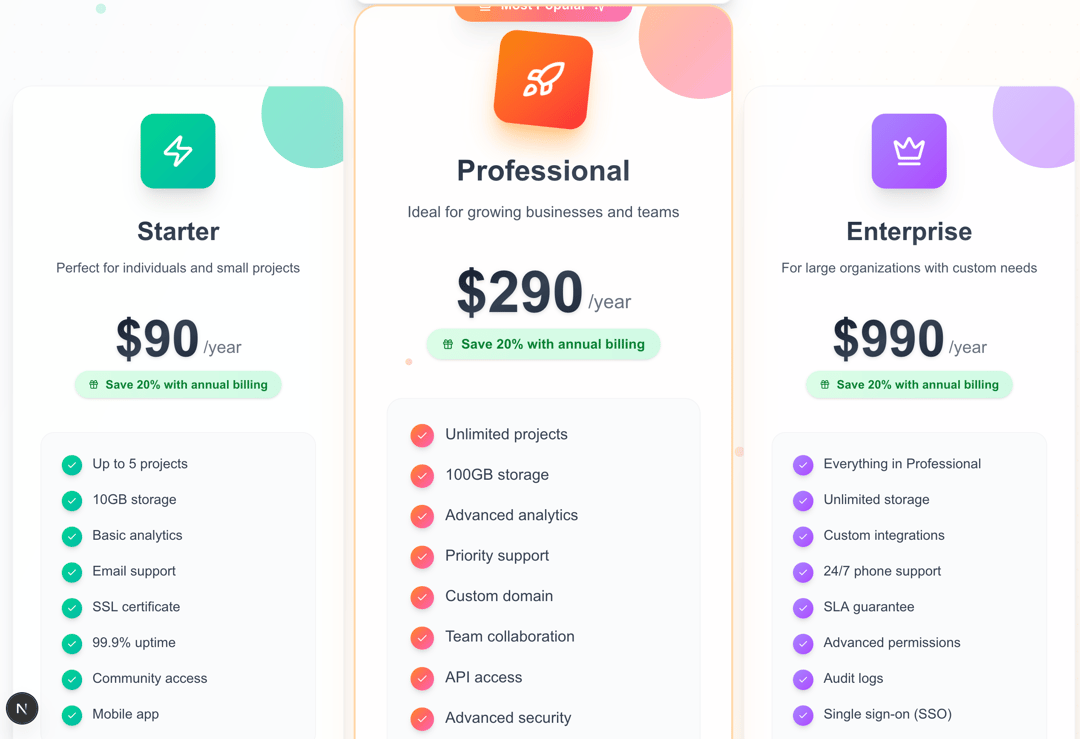
Elevate Your Product Page: Introducing Our Dynamic React Pricing Component! 🚀 Crafting a pricing section that's both visually stunning and highly effective just got easier. We're excited to share our latest React component, designed to transform your product's pricing page into an engaging, conversion-optimized experience. What makes this component stand out? ✨ Modern & Responsive Design: Built with Tailwind CSS, it's meticulously crafted to look exquisite and function flawlessly across all devices – from mobile phones to large desktops. No more compromises on responsiveness! 💡 Interactive & Engaging UI: Smooth Animations: Subtle fadeInUp, slideInLeft, and float animations bring life to your pricing plans without being distracting. Dynamic Toggle: A custom toggle switch allows users to effortlessly switch between monthly and annual billing, highlighting potential savings with a lively "Save 20%" badge. Eye-catching Popular Plan: A distinct "Most Popular" badge and a subtle scale effect draw attention to your recommended plan. Intuitive Selection: Users can click on a plan card to highlight it, providing clear visual feedback. Mouse Follower Effect: A delicate particle follows the user's cursor, adding a touch of magic and interactivity. 💎 Feature-Rich & Customizable: Configurable Plans: Easily define your pricing tiers with customizable names, descriptions, prices, icons, features, and button texts. Accent Colors & Gradients: Each plan can have its own unique accent color and beautiful gradient background, creating a vibrant and distinct look. Trust Indicators: A dedicated section showcases key trust elements like "30-day money back" and "24/7 support," building confidence. Engaging Stats: Highlight your success with an animated stats section, showcasing user numbers, uptime, and support availability.
Built with React and Tailwind. Copy the prompt and paste it into Claude Code, Cursor or Lovable: your agent adds Dynamic Pricing Component to your project and fits it to your theme.
Code
How Dynamic Pricing Component is used: the demo's code. The component's own source comes with a free account.
Usage.tsx
import PricingComponent from "@/components/ui/dynamic-pricing-component";

const DemoOne = () => {
  return <PricingComponent />;
};

export { DemoOne };
Dependencies
More by Sonu kumar
View all
Dashboard with Collapsible Sidebar
2.4K
Modern Hero
1.4K
Text Parallax Content (scroll)
1.2K
About Us section
1.2K
Modern Animated Hero Section
1.1K
Animated Hero Section
689
Cuisine Selector Chips
585
Bounce card features
571
More in Pricing
View all
Pricing Section
578

Pricing Section
173

Pricing Card
364
Single Pricing Card
794

Pricing Cards
86
Glowing Pricing Tiers
41
pricing section
157
Colorful-Pricing
84


