
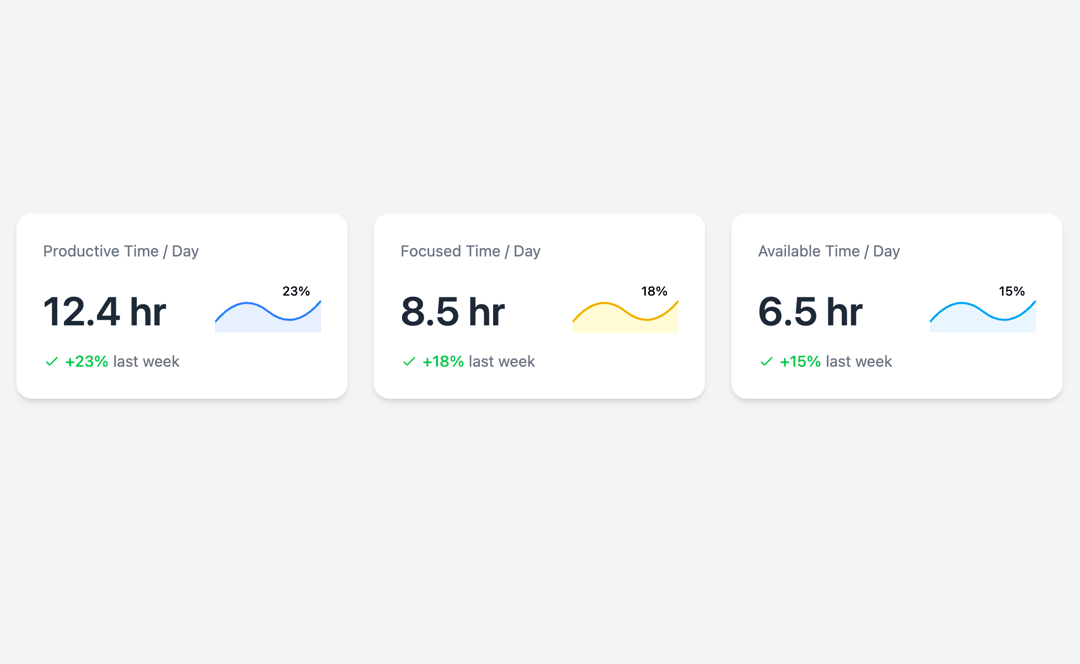
This component is the root of the application, responsible for rendering the entire layout of the time metric cards and managing the theme. Key Features: Theme Management: It utilizes React's useState hook to manage the isDarkMode state, which determines the current theme (light or dark). Theme Toggle: A "Toggle Light/Dark Mode" button is provided, allowing users to switch between themes. Clicking this button updates the isDarkMode state, triggering a re-render with the new theme applied. Dynamic Styling: The background and text colors of the main application container (div) are dynamically set using Tailwind CSS classes based on the isDarkMode state, ensuring a smooth transition between themes. Metric Card Rendering: It renders three instances of the MetricCard component, each representing a different time metric: "Productive Time," "Focused Time," and "Available Time." Responsive Layout: It uses Tailwind CSS's grid system (grid grid-cols-1 md:grid-cols-3) to create a responsive layout, displaying cards in a single column on small screens and three columns on medium and larger screens. MetricCard Component The MetricCard is a highly reusable functional component designed to display individual time metrics with their respective values, changes, and a visual graph representation. Props: title (string): The main title of the metric (e.g., "Productive Time"). value (string): The primary numerical value of the metric (e.g., "12.4 hr"). change (string): The percentage change (e.g., "+23%"). changeText (string): Additional text describing the change (e.g., "last week"). isPositive (boolean): A flag indicating whether the change is positive or negative. This determines the color of the change text and the icon. graphColor (string): A Tailwind CSS class for the stroke color of the graph line (e.g., "stroke-blue-500"). fillColor (string): A Tailwind CSS class for the fill color of the graph area (e.g., "fill-blue-100"). isDarkMode (boolean): A prop passed from the App component to indicate if dark mode is currently active. Key Features: Dynamic Theming: It dynamically applies Tailwind CSS classes for background (cardBgClass), header text (headerTextColorClass), value text (valueTextColorClass), and change information text (changeInfoTextColorClass) based on the isDarkMode prop. This ensures the card's appearance adapts seamlessly to the chosen theme. Transitions (transition-colors duration-300) are applied to color changes for a smooth visual effect. Conditional Styling: The textColorClass for the change percentage and its accompanying icon is conditionally set to green for positive changes and red for negative changes. SVG Graph: It includes an inline SVG to render a stylized line graph. The graphColor and fillColor props allow for customization of the graph's appearance. A percentage label is also displayed on the graph line. Change Icon: A simple SVG icon (checkmark for positive, 'x' for negative) is displayed next to the change percentage, visually indicating the trend. Flexbox Layout: Uses flexbox (flex flex-col justify-between) to arrange its content vertically and distribute space effectively.
Built with React and Tailwind. Copy the prompt and paste it into Claude Code, Cursor or Lovable: your agent adds Metric Card to your project and fits it to your theme.
Code
How Metric Card is used: the demo's code. The component's own source comes with a free account.
Usage.tsx
import StatsCard from "@/components/ui/metric-card";

export default function DemoOne() {
  return <StatsCard />;
}
Dependencies
More by Sonu kumar
View all
Dashboard with Collapsible Sidebar
2.4K
Modern Hero
1.4K
Text Parallax Content (scroll)
1.2K
About Us section
1.2K
Modern Animated Hero Section
1.1K
Animated Hero Section
689
Cuisine Selector Chips
585
Bounce card features
573
More in Cards
View all
Stats cards with links
33

Course Design Cards
1.1K

Card
70
Statistics Card 2
264
Statistics Card 10
263

Card
17

Card Studio
9
The Item one
3
