
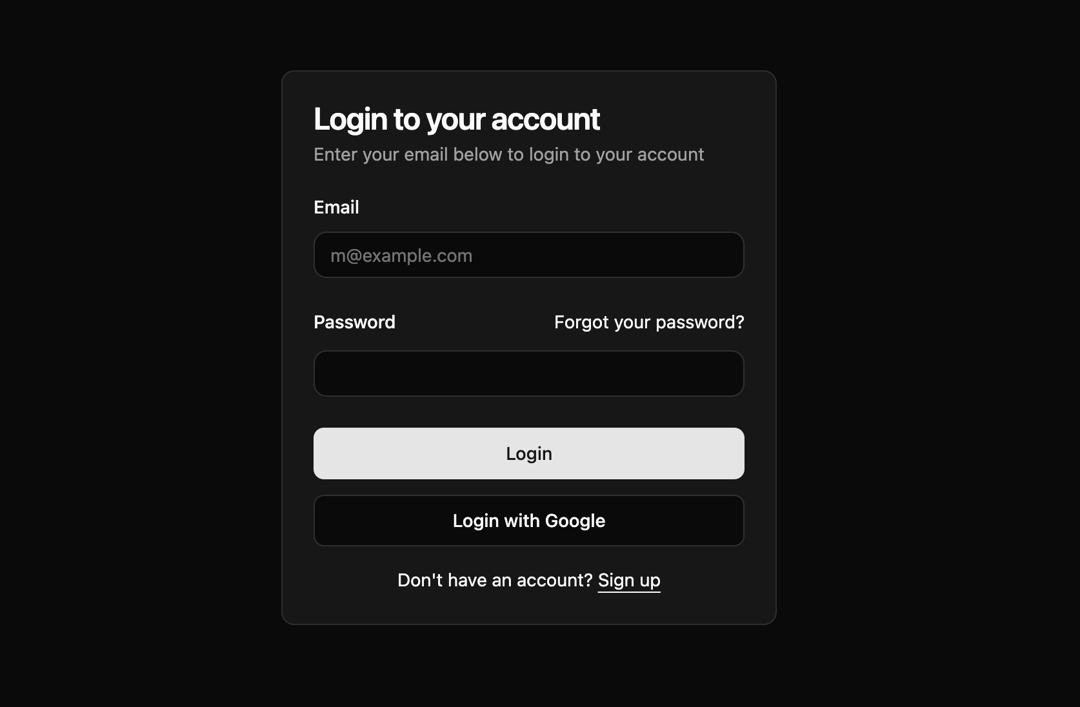
This React component implements a user login form with a clean and modern UI. It leverages reusable UI components for a structured and maintainable design. The form includes fields for email and password, a password reset link, and options for login via email or Google. **Problem Solved:** This component provides a pre-built, styled login form, saving developers time and effort in creating a user-friendly authentication interface. It promotes consistency in UI design across an application. **How it Works:** 1. **Imports:** The code imports necessary modules, including a utility function `cn` (likely for class name concatenation), and various UI components (Button, Card, Input, Label) from a component library. 2. **Component Structure:** The `LoginForm` component uses a card layout to visually group form elements. It employs a flexible grid system (likely Tailwind CSS) for responsive layout. 3. **Form Elements:** Standard HTML form elements (input fields for email and password) are used within the component. Labels are associated with each input using the `htmlFor` attribute. 4. **Styling:** The `cn` function likely handles combining CSS classes for styling, allowing for flexibility in applying custom styles or themes. The component uses a column-based layout (`flex flex-col`) and spacing utilities (`gap-6`, `gap-3`). 5. **Functionality:** The form itself is handled by standard HTML form submission. The `type="submit"` attribute on the button triggers the form submission. No specific backend integration is shown in this snippet. 6. **Password Reset and Signup:** Links are provided for users to reset their passwords or sign up for an account (these likely navigate to other parts of the application). **Libraries/Frameworks:** The code utilizes a component library for reusable UI elements (Button, Card, Input, Label), and a utility function for class name manipulation. A CSS framework (likely Tailwind CSS, based on the class names) is used for styling and layout. **Example Scenarios:** This component can be used in various applications requiring user authentication, such as web apps, dashboards, or SaaS platforms. It enhances the user experience by providing a visually appealing and easy-to-use login interface. **Note:** This code snippet focuses on the front-end UI; backend integration for handling login requests is not included.
Built with React and Tailwind. Copy the prompt and paste it into Claude Code, Cursor or Lovable: your agent adds Moder Login Form to your project and fits it to your theme.
Code
How Moder Login Form is used: the demo's code. The component's own source comes with a free account.
Usage.tsx
import { LoginForm } from "@/components/ui/moder-login-form";

export default function DemoOne() {
  return (
    <div className="flex min-h-svh w-full items-center justify-center p-6 md:p-10">
      <div className="w-full max-w-sm">
        <LoginForm />
      </div>
    </div>
  )
}
More by Sonu kumar
View all
Dashboard with Collapsible Sidebar
2.4K
Modern Hero
1.4K
Text Parallax Content (scroll)
1.2K
About Us section
1.2K
Modern Animated Hero Section
1.1K
Animated Hero Section
689
Cuisine Selector Chips
585
Bounce card features
573
More in Cards
View all
Stats cards with links
33

Course Design Cards
1.1K

Card
70
Statistics Card 2
264
Statistics Card 10
263

Card
17

Card Studio
9
The Item one
3
