
About
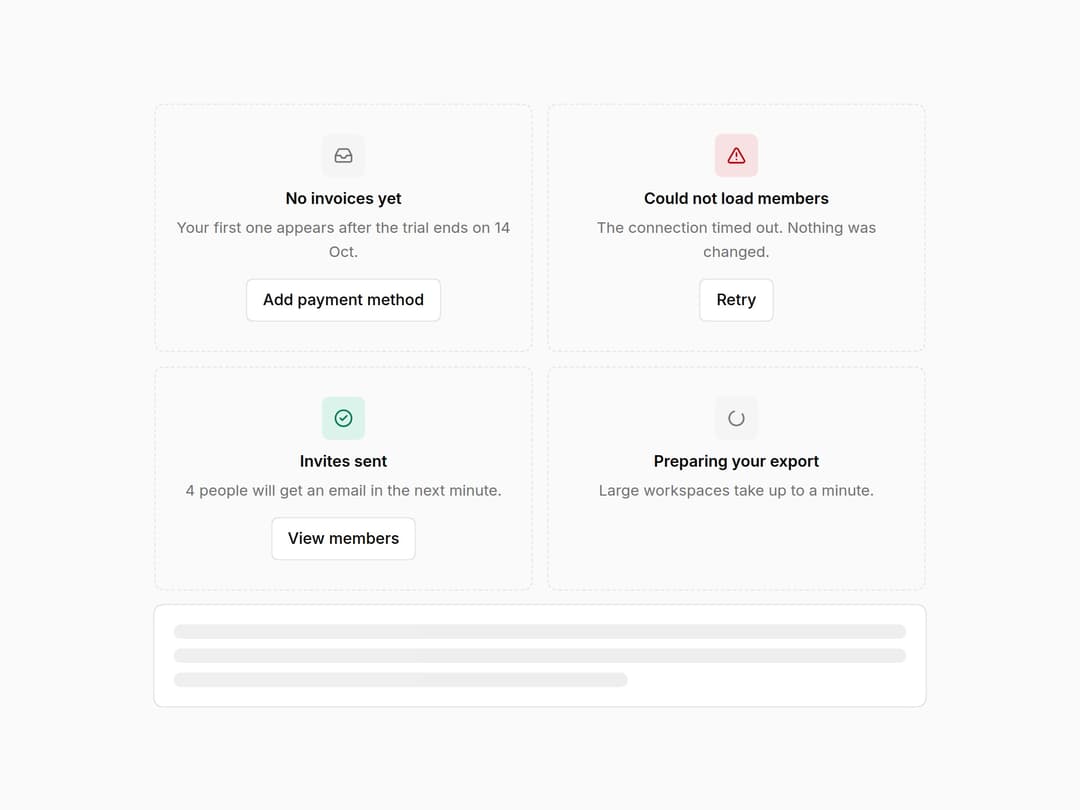
Empty, error, success and loading states with one action each, plus skeletons that hold the space while data loads. Part of the Layro System: layro.vercel.app.
Built with React and Tailwind. Copy the prompt and paste it into Claude Code, Cursor or Lovable: your agent adds Empty & Loading States to your project and fits it to your theme.
Code
How Empty & Loading States is used: the demo's code. The component's own source comes with a free account.
Usage.tsx
import * as React from "react";
import { Skeleton, State } from "@/components/ui/ayro-states";

/* The four states every screen has and most designs forget: nothing
   yet, it failed, it worked, it is working. Each has a sentence and one
   action. Skeletons hold the space while data loads. */

export default function StateDemo() {
  return (
    <div className="flex min-h-screen w-full items-center justify-center bg-background p-6">
      <div className="grid w-full max-w-[640px] min-w-0 gap-3 sm:grid-cols-2">
        <State framed size="sm" title="No invoices yet" description="Your first one appears after the trial ends on 14 Oct." action={<button type="button" className="inline-flex h-9 items-center gap-1.5 rounded-[10px] [corner-shape:squircle] bg-background px-3.5 text-[13px] font-medium ring-1 ring-inset ring-border outline-none hover:bg-accent focus-visible:ring-2 focus-visible:ring-ring">Add payment method</button>} />
        <State framed size="sm" kind="error" title="Could not load members" description="The connection timed out. Nothing was changed." action={<button type="button" className="inline-flex h-9 items-center gap-1.5 rounded-[10px] [corner-shape:squircle] bg-background px-3.5 text-[13px] font-medium ring-1 ring-inset ring-border outline-none hover:bg-accent focus-visible:ring-2 focus-visible:ring-ring">Retry</button>} />
        <State framed size="sm" kind="success" title="Invites sent" description="4 people will get an email in the next minute." action={<button type="button" className="inline-flex h-9 items-center gap-1.5 rounded-[10px] [corner-shape:squircle] bg-background px-3.5 text-[13px] font-medium ring-1 ring-inset ring-border outline-none hover:bg-accent focus-visible:ring-2 focus-visible:ring-ring">View members</button>} />
        <State framed size="sm" kind="loading" title="Preparing your export" description="Large workspaces take up to a minute." />
        <div className="rounded-[14px] [corner-shape:squircle] bg-card p-4 ring-1 ring-border sm:col-span-2"><Skeleton lines={3} /></div>
      </div>
    </div>
  );
}
Dependencies
More by Mohamed Uvaish
View all

Signature Pad
420
Folder Card
336
Share Dialog
308
Kanban Board
249
Notification Panel
102
Charts & KPI Cards
87
Rich Text Editor
44
Command Menu
35