
About
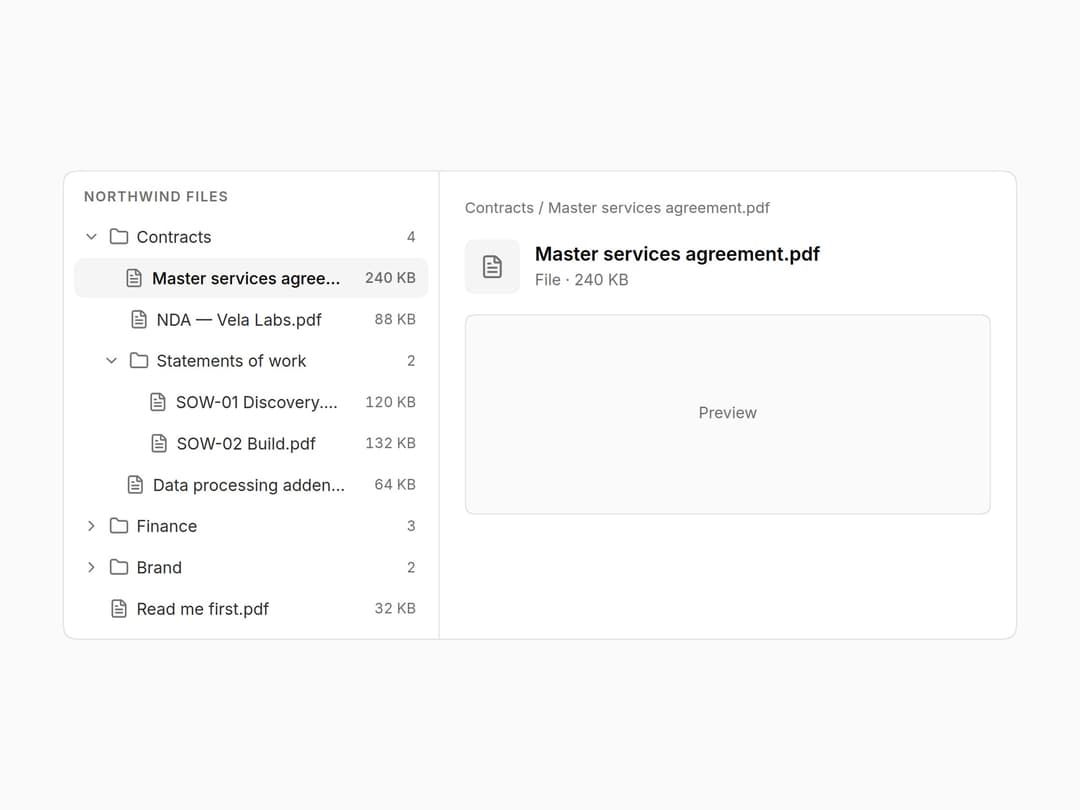
File and folder tree with the full ARIA tree keyboard model: arrows open, close and move, Home/End jump, type a letter to find, and the whole tree is one Tab stop. Sizes and counts on the right. Part of the Layro System: layro.vercel.app.
Built with React and Tailwind. Copy the prompt and paste it into Claude Code, Cursor or Lovable: your agent adds Tree View to your project and fits it to your theme.
Code
How Tree View is used: the demo's code. The component's own source comes with a free account.
Usage.tsx
import * as React from "react";
import { Tree, type TreeNode } from "@/components/ui/tree-view-file-browser";
import { FileText, Folder, Image as ImageIcon, Sheet } from "lucide-react";

/* A workspace file browser. Arrow keys move and open folders, typing a
   letter jumps to the next match, and the whole tree is one Tab stop.
   The panel on the right follows the selection. */

const FILES: TreeNode[] = [
  { id: "contracts", label: "Contracts", icon: <Folder />, meta: 4, children: [
    { id: "msa", label: "Master services agreement.pdf", icon: <FileText />, meta: "240 KB" },
    { id: "nda", label: "NDA — Vela Labs.pdf", icon: <FileText />, meta: "88 KB" },
    { id: "sow", label: "Statements of work", icon: <Folder />, meta: 2, children: [
      { id: "sow1", label: "SOW-01 Discovery.pdf", icon: <FileText />, meta: "120 KB" },
      { id: "sow2", label: "SOW-02 Build.pdf", icon: <FileText />, meta: "132 KB" },
    ] },
    { id: "dpa", label: "Data processing addendum.pdf", icon: <FileText />, meta: "64 KB" },
  ] },
  { id: "finance", label: "Finance", icon: <Folder />, meta: 3, children: [
    { id: "inv", label: "Invoices 2026.xlsx", icon: <Sheet />, meta: "1.2 MB" },
    { id: "forecast", label: "Forecast Q4.xlsx", icon: <Sheet />, meta: "420 KB" },
    { id: "vat", label: "VAT returns", icon: <FileText />, disabled: true },
  ] },
  { id: "brand", label: "Brand", icon: <Folder />, meta: 2, children: [
    { id: "logo", label: "Logo kit.zip", icon: <ImageIcon />, meta: "18 MB" },
    { id: "guide", label: "Brand guidelines.pdf", icon: <FileText />, meta: "6.4 MB" },
  ] },
  { id: "readme", label: "Read me first.pdf", icon: <FileText />, meta: "32 KB" },
];

function find(nodes: TreeNode[], id: string, trail: string[] = []): { node: TreeNode; path: string[] } | null {
  for (const n of nodes) {
    if (n.id === id) return { node: n, path: [...trail, n.label] };
    const hit = n.children && find(n.children, id, [...trail, n.label]);
    if (hit) return hit;
  }
  return null;
}

export default function TreeDemo() {
  const [selected, setSelected] = React.useState("msa");
  const hit = find(FILES, selected);
  return (
    <div className="flex min-h-screen w-full items-center justify-center bg-background p-6">
      <div className="grid w-full max-w-[760px] min-w-0 overflow-hidden rounded-[18px] [corner-shape:squircle] bg-card ring-1 ring-border sm:grid-cols-[minmax(0,300px)_minmax(0,1fr)]">
        <div className="border-b border-border p-2 sm:border-r sm:border-b-0">
          <p className="px-2 pt-1 pb-2 text-[11px] font-semibold tracking-[0.08em] text-muted-foreground uppercase">Northwind files</p>
          <Tree label="Files" items={FILES} defaultExpanded={["contracts", "sow"]} selected={selected} onSelect={setSelected} />
        </div>
        <div className="grid content-start gap-4 p-5" aria-live="polite">
          {hit && (
            <>
              <p className="truncate text-[12px] text-muted-foreground">{hit.path.join(" / ")}</p>
              <div className="flex items-center gap-3">
                <span className="grid size-11 place-items-center rounded-[12px] [corner-shape:squircle] bg-muted text-muted-foreground [&_svg]:size-5">{hit.node.icon}</span>
                <div className="min-w-0">
                  <p className="truncate text-[15px] font-semibold">{hit.node.label}</p>
                  <p className="text-[12.5px] text-muted-foreground">
                    {hit.node.children ? `Folder · ${hit.node.children.length} items` : `File · ${hit.node.meta ?? ""}`}
                  </p>
                </div>
              </div>
              <div className="grid h-40 place-items-center rounded-[12px] [corner-shape:squircle] bg-muted/50 text-[12.5px] text-muted-foreground ring-1 ring-inset ring-border">
                {hit.node.children ? "Open a file to preview it" : "Preview"}
              </div>
            </>
          )}
        </div>
      </div>
    </div>
  );
}
Dependencies
More by Mohamed Uvaish
View all

Signature Pad
420
Folder Card
336
Share Dialog
308
Kanban Board
249
Notification Panel
102
Charts & KPI Cards
86
Rich Text Editor
44
Command Menu
34
More in Navigation
View all

Sidebar
234

Tabs
60
Newsletter Signup Footer
16
Progress Bar Stepper
36

Footer 2
201
Navbar with Theme Toggle
43

Navbar
71

Pagination
86
