About
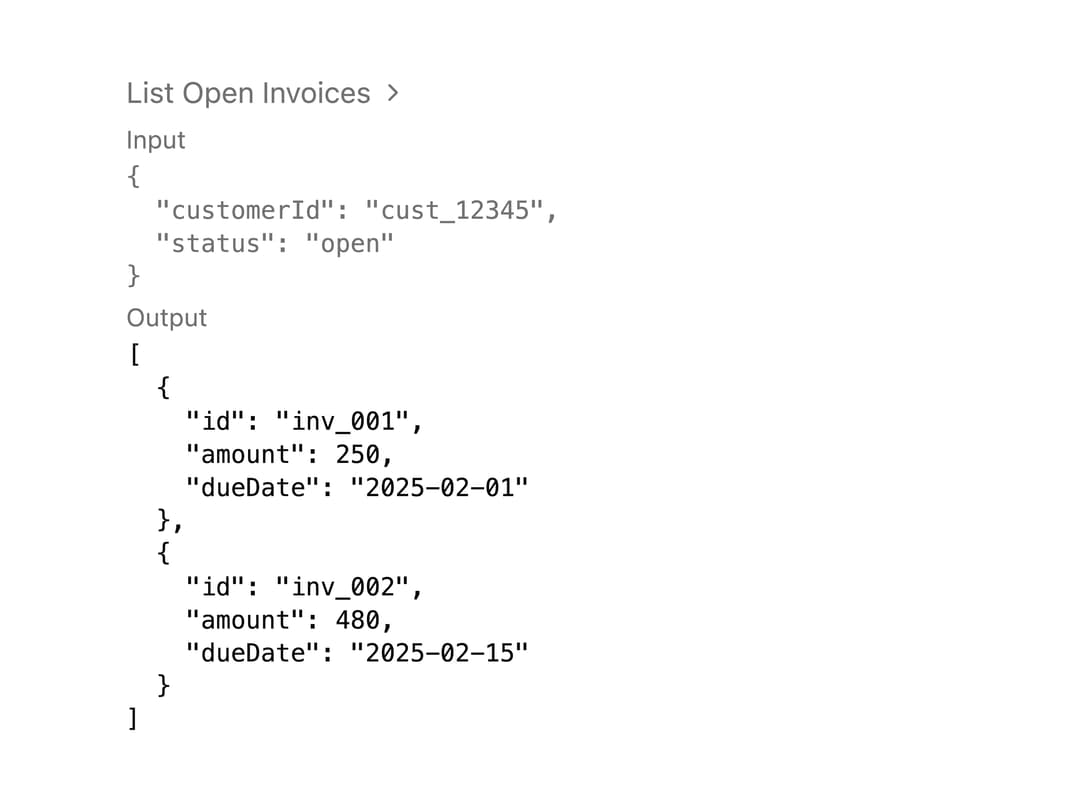
A collapsible row that displays an AI agent's tool call, showing its name, input parameters, and output or error in a quiet expandable panel.
Built with React and Tailwind. Copy the prompt and paste it into Claude Code, Cursor or Lovable: your agent adds Tool Call to your project and fits it to your theme.
Code
How Tool Call is used: the demo's code. The component's own source comes with a free account.
Usage.tsx
import {
  Tool,
  ToolContent,
  ToolHeader,
  ToolInput,
  ToolOutput,
} from "@/components/ui/tool";

const part = {
  toolName: "listOpenInvoices",
  state: "output-available" as const,
  input: { customerId: "cust_12345", status: "open" },
  output: [
    { id: "inv_001", amount: 250, dueDate: "2025-02-01" },
    { id: "inv_002", amount: 480, dueDate: "2025-02-15" },
  ],
  errorText: undefined as string | undefined,
};

export default function ToolDemo() {
  return (
    <div className="w-full max-w-md p-6">
      <Tool defaultOpen>
        <ToolHeader
          input={part.input}
          state={part.state}
          title={part.toolName}
          type={`tool-${part.toolName}`}
        />
        <ToolContent>
          <ToolInput input={part.input} />
          <ToolOutput errorText={part.errorText} output={part.output} />
        </ToolContent>
      </Tool>
    </div>
  );
}
Dependencies
More by Alwurts
View all
Chat Input
302
Tool Invocation
46
Model Selector
40
Chat Suggestions
13
Status Edge
7
Editable Handle
1
JSX Renderer
More in AI chats
View all

AI Actions
317
Agent Chat
17
Color Picker
73
Prompt with Model Picker
2
Approval Card
12

System Message
53

Message
48

AI Task List
158


