
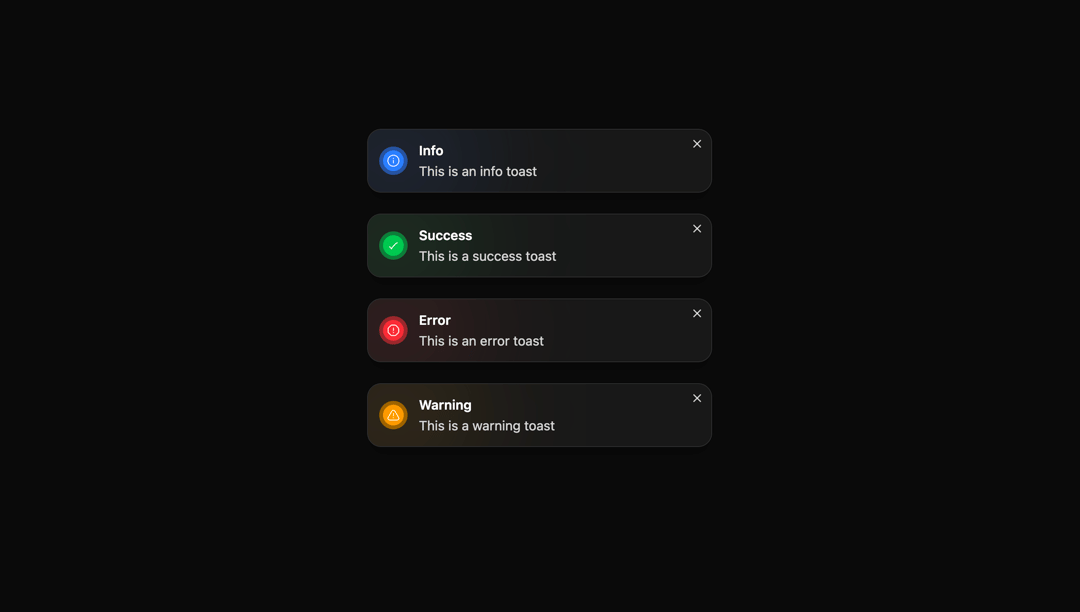
About
A minimal, dark-themed toast component with success, error, info, and warning variants using colored gradients and icons to convey status at a glance. It includes a close button and compact layout for non-intrusive, high-visibility notifications.
Built with React and Tailwind. Copy the prompt and paste it into Claude Code, Cursor or Lovable: your agent adds Toast to your project and fits it to your theme.
Code
How Toast is used: the demo's code. The component's own source comes with a free account.
Usage.tsx
import { Component } from "@/components/ui/toast";

export default function DemoOne() {
  return (
    <div className="flex flex-col gap-6">
      <Component id="info-toast" title="Info" description="This is an info toast" type="info" />
      <Component id="success-toast" title="Success" description="This is a success toast" type="success" />
      <Component id="error-toast" title="Error" description="This is an error toast" type="error" />
      <Component id="warning-toast" title="Warning" description="This is a warning toast" type="warning" />
    </div>
  );
}
Dependencies
More by Ayman Echakar
View all
Pricing Section
1.6K
User Dropdown
910
Blog Posts
363
Pricing Tab
192
Pricing Card
8
Authentication Modal
More in Buttons
View all
Button Save
46

Button
20

Eclipse Button
5

Button
32

Button
6

Button
14

Button Group
37
Split Button
32

