
About
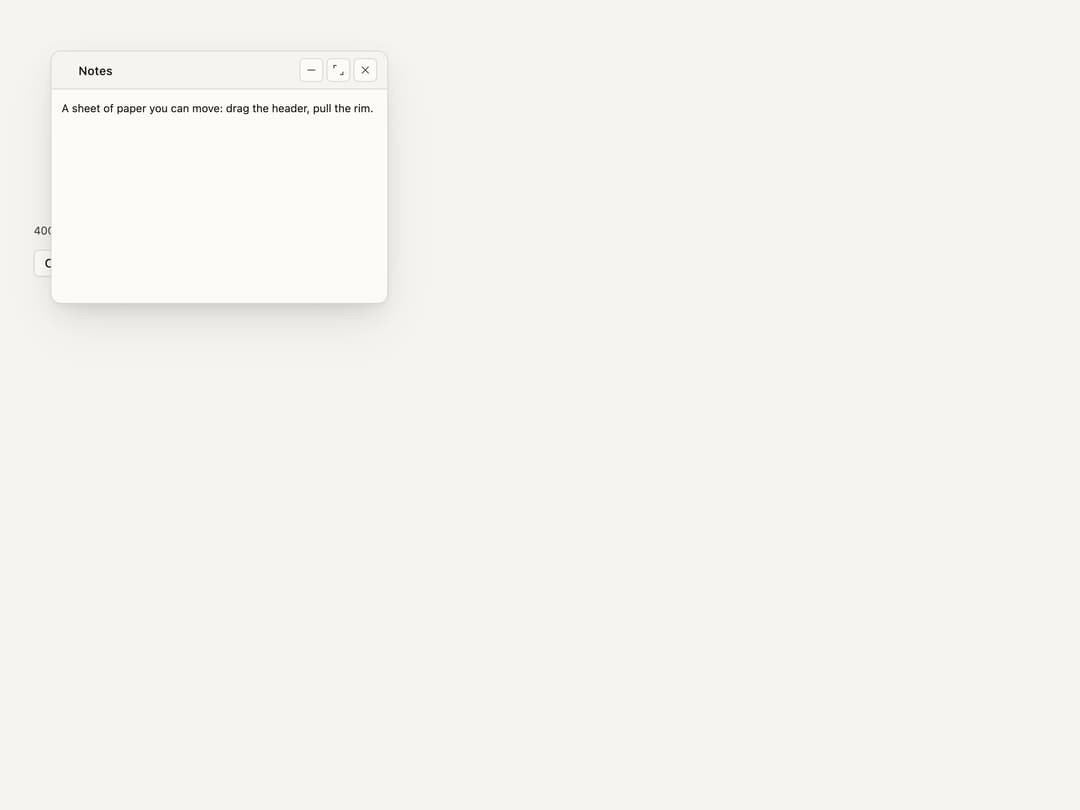
A draggable, resizable floating panel/sheet with a header handle, minimize/maximize/close controls, and eight resize edges — useful for notes widgets, inspectors, or any detachable window that floats above the page.
Built with React and Tailwind. Copy the prompt and paste it into Claude Code, Cursor or Lovable: your agent adds Floating Panel to your project and fits it to your theme.
Code
How Floating Panel is used: the demo's code. The component's own source comes with a free account.
Usage.tsx
import FloatingPanel from "@/components/ui/floating-panel";
import { useState } from "react";

const AXES = ["n", "e", "s", "w", "ne", "se", "sw", "nw"] as const;

function Glyph({ d }: { d: string }) {
  return (
    <svg
      width={12}
      height={12}
      viewBox="0 0 24 24"
      fill="none"
      stroke="currentColor"
      strokeWidth={1.75}
      aria-hidden="true"
    >
      <path d={d} />
    </svg>
  );
}

function Stage() {
  return (
    <FloatingPanel.Positioner>
      <FloatingPanel.Content>
        <FloatingPanel.DragTrigger>
          <FloatingPanel.Header>
            <FloatingPanel.Title>
              <Glyph d="M9 5h.01M9 12h.01M9 19h.01M15 5h.01M15 12h.01M15 19h.01" />
              Notes
            </FloatingPanel.Title>
            <FloatingPanel.Control>
              <FloatingPanel.StageTrigger stage="minimized">
                <Glyph d="M5 12h14" />
              </FloatingPanel.StageTrigger>
              <FloatingPanel.StageTrigger stage="maximized">
                <Glyph d="M4 9V4h5M20 15v5h-5" />
              </FloatingPanel.StageTrigger>
              <FloatingPanel.StageTrigger stage="default">
                <Glyph d="M15 15l-6-6M15 9v6H9" />
              </FloatingPanel.StageTrigger>
              <FloatingPanel.CloseTrigger>
                <Glyph d="M6 6l12 12M18 6L6 18" />
              </FloatingPanel.CloseTrigger>
            </FloatingPanel.Control>
          </FloatingPanel.Header>
        </FloatingPanel.DragTrigger>
        <FloatingPanel.Body>
          <p>A sheet of paper you can move: drag the header, pull the rim.</p>
        </FloatingPanel.Body>
        {AXES.map((axis) => (
          <FloatingPanel.ResizeTrigger key={axis} axis={axis} />
        ))}
      </FloatingPanel.Content>
    </FloatingPanel.Positioner>
  );
}

export default function FloatingPanelControlledSizeDemo() {
  const [size, setSize] = useState({ width: 400, height: 300 });
  return (
    <div
      className="relative flex h-[32rem] w-full flex-col items-start gap-3 p-10"
      style={{
        background: "var(--bs-color-surface-0)",
        color: "var(--bs-color-text-primary)",
      }}
    >
      <output
        style={{
          fontSize: "var(--bs-font-size-sm)",
          color: "var(--bs-color-text-secondary)",
        }}
      >
        {`${size.width} × ${size.height}`}
      </output>
      <FloatingPanel.Root
        size={size}
        onSizeChange={(e: { size: { width: number; height: number } }) =>
          setSize(e.size)
        }
      >
        <FloatingPanel.Trigger>Open panel</FloatingPanel.Trigger>
        <Stage />
      </FloatingPanel.Root>
    </div>
  );
}
Dependencies
More by bysages
View all
Switch
13
Avatar Group
5
Typography
4
Spinner
4
Grid
Float Button
Timeline
Ellipsis