
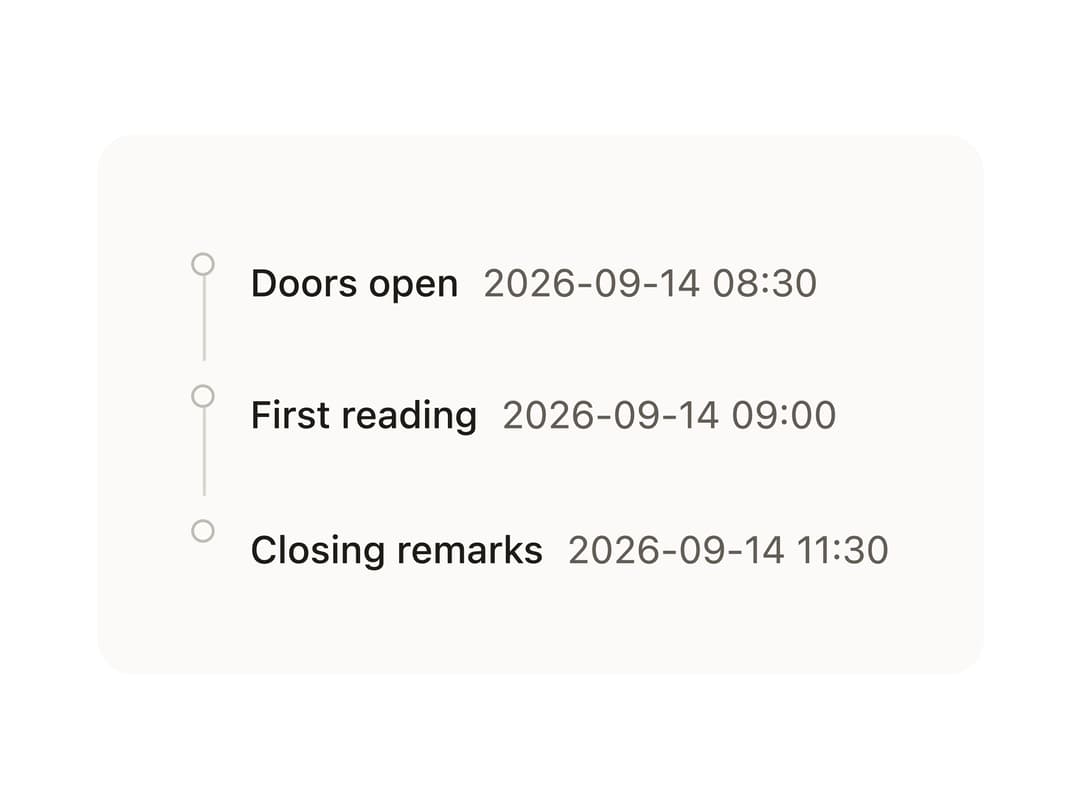
About
A vertical or horizontal timeline for listing a sequence of dated moments, each with a marker dot and freeform content.
Built with React and Tailwind. Copy the prompt and paste it into Claude Code, Cursor or Lovable: your agent adds Timeline to your project and fits it to your theme.
Code
How Timeline is used: the demo's code. The component's own source comes with a free account.
Usage.tsx
import Timeline from "@/components/ui/timeline";

const ink = {
  color: "var(--bs-color-text-primary)",
  fontWeight: "var(--bs-font-weight-medium)",
};
const time = {
  color: "var(--bs-color-text-tertiary)",
  fontSize: "var(--bs-font-size-sm)",
};

const schedule = [
  ["Doors open", "2026-09-14 08:30"],
  ["First reading", "2026-09-14 09:00"],
  ["Closing remarks", "2026-09-14 11:30"],
] as const;

export default function TimelineCompactDemo() {
  return (
    <div
      style={{
        background: "var(--bs-color-surface-1)",
        color: "var(--bs-color-text-primary)",
        padding: "2rem",
        borderRadius: "var(--bs-radius-lg)",
      }}
    >
      <Timeline.Root style={{ maxInlineSize: "24rem" }}>
        {schedule.map(([title, when]) => (
          <Timeline.Item key={title}>
            <Timeline.Marker />
            <Timeline.Content>
              <span style={ink}>{title}</span>
              <span style={{ ...time, marginInlineStart: "var(--bs-space-2)" }}>
                {when}
              </span>
            </Timeline.Content>
          </Timeline.Item>
        ))}
      </Timeline.Root>
    </div>
  );
}
Dependencies
More by bysages
View all
Switch
13
Avatar Group
5
Typography
4
Spinner
4
Grid
Float Button

Floating Panel
Ellipsis