
About
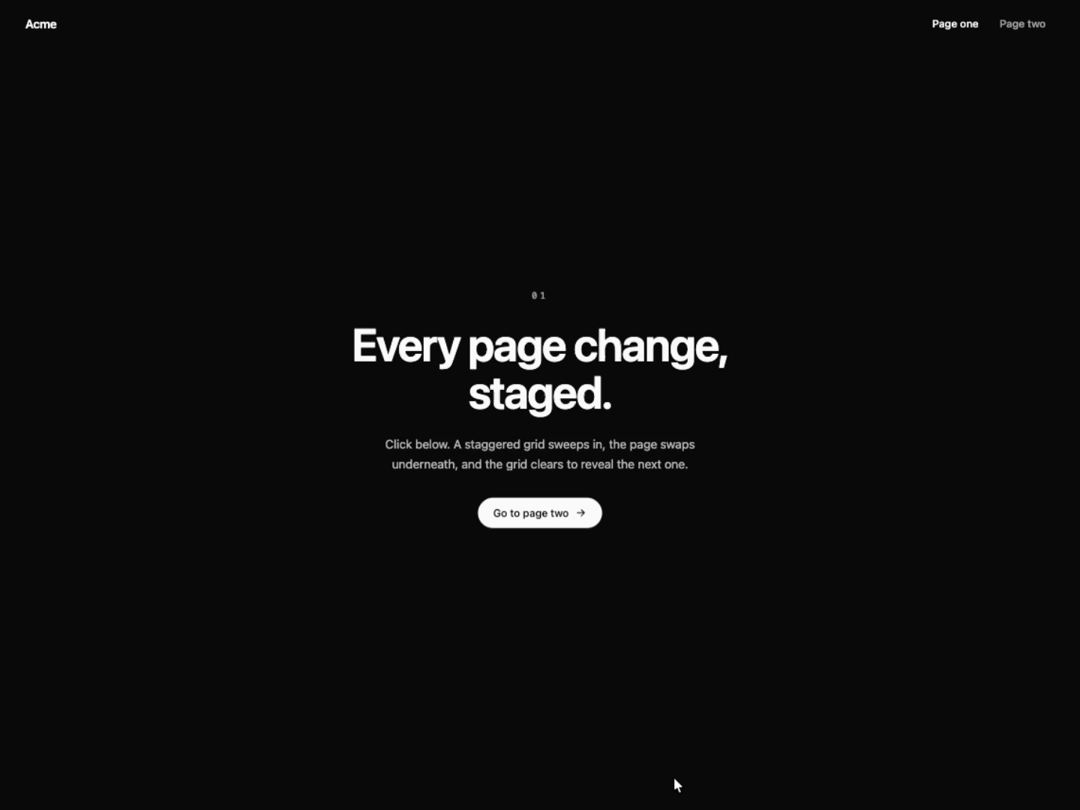
Staggered grid of blocks that sweeps across the screen, covers the view while its content swaps, then clears to reveal the next one. Trigger it from any button by changing a key. GSAP-driven, theme-aware default color, reduced-motion fade.
Built with React and Tailwind. Copy the prompt and paste it into Claude Code, Cursor or Lovable: your agent adds Chess Grid Transition to your project and fits it to your theme.
Code
How Chess Grid Transition is used: the demo's code. The component's own source comes with a free account.
Usage.tsx
"use client";

import { useState } from "react";
import ChessGridTransition from "@/components/ui/chess-grid-transition";

const settings = {
  duration: 1,
  gridSize: 8,
  color: "#ff5f00",
};

const PAGES = [
  {
    label: "Page one",
    eyebrow: "01",
    title: "Every page change, staged.",
    body: "Click below. A staggered grid sweeps in, the page swaps underneath, and the grid clears to reveal the next one.",
    cta: "Go to page two",
  },
  {
    label: "Page two",
    eyebrow: "02",
    title: "Welcome to the other side.",
    body: "Same component, new content. Head back to play the transition again.",
    cta: "Back to page one",
  },
];

function ArrowIcon() {
  return (
    <svg viewBox="0 0 24 24" fill="none" stroke="currentColor" strokeWidth={2} strokeLinecap="round" strokeLinejoin="round" aria-hidden="true" className="h-4 w-4">
      <path d="M5 12h14M13 6l6 6-6 6" />
    </svg>
  );
}

function Page({ index, onNavigate }: { index: number; onNavigate: (index: number) => void }) {
  const page = PAGES[index];
  // Page two is inverted so the swap reads clearly in both themes
  const inverted = index === 1;

  return (
    <div
      className={`flex min-h-screen w-full flex-col ${
        inverted ? "bg-foreground text-background" : "bg-background text-foreground"
      }`}
    >
      <header className="flex items-center justify-between px-6 py-5 sm:px-10">
        <span className="text-base font-semibold tracking-tight">Acme</span>
        <nav aria-label="Pages" className="flex gap-1">
          {PAGES.map((item, itemIndex) => (
            <button
              key={item.label}
              type="button"
              aria-current={itemIndex === index ? "page" : undefined}
              onClick={() => onNavigate(itemIndex)}
              className={`rounded-full px-3 py-1.5 text-sm font-medium outline-none transition-opacity focus-visible:ring-2 focus-visible:ring-ring ${
                itemIndex === index ? "opacity-100" : "opacity-60 hover:opacity-100"
              }`}
            >
              {item.label}
            </button>
          ))}
        </nav>
      </header>

      <main className="flex flex-1 flex-col items-center justify-center gap-6 px-6 pb-16 text-center">
        <span className="font-mono text-xs tracking-[0.3em] opacity-60">{page.eyebrow}</span>
        <h1 className="max-w-[16ch] text-4xl font-semibold leading-[1.05] tracking-tight sm:text-6xl">
          {page.title}
        </h1>
        <p className="max-w-md text-sm leading-relaxed opacity-70 sm:text-base">{page.body}</p>
        <button
          type="button"
          onClick={() => onNavigate(index === 0 ? 1 : 0)}
          className={`mt-2 inline-flex items-center gap-2 rounded-full px-5 py-2.5 text-sm font-medium outline-none transition-transform hover:scale-105 focus-visible:ring-2 focus-visible:ring-ring focus-visible:ring-offset-2 active:scale-95 ${
            inverted
              ? "bg-background text-foreground focus-visible:ring-offset-foreground"
              : "bg-foreground text-background focus-visible:ring-offset-background"
          }`}
        >
          {page.cta}
          <ArrowIcon />
        </button>
      </main>
    </div>
  );
}

export default function ChessGridTransitionDemo(props: Partial<typeof settings>) {
  const s = { ...settings, ...props };
  const [page, setPage] = useState(0);

  return (
    <ChessGridTransition
      transitionKey={page}
      duration={s.duration}
      gridSize={s.gridSize}
      color={s.color}
    >
      <Page index={page} onNavigate={setPage} />
    </ChessGridTransition>
  );
}
Dependencies
More by Hyperiux Vault
View all

Product Timeline
2.3K
Stack Spread
1.3K
Arrow Fill Button
910
Interactive List Preview
867
Shiny Button
741
Circular Split Roll
636
Zoom Slider
427
Stack Loader
371