
About
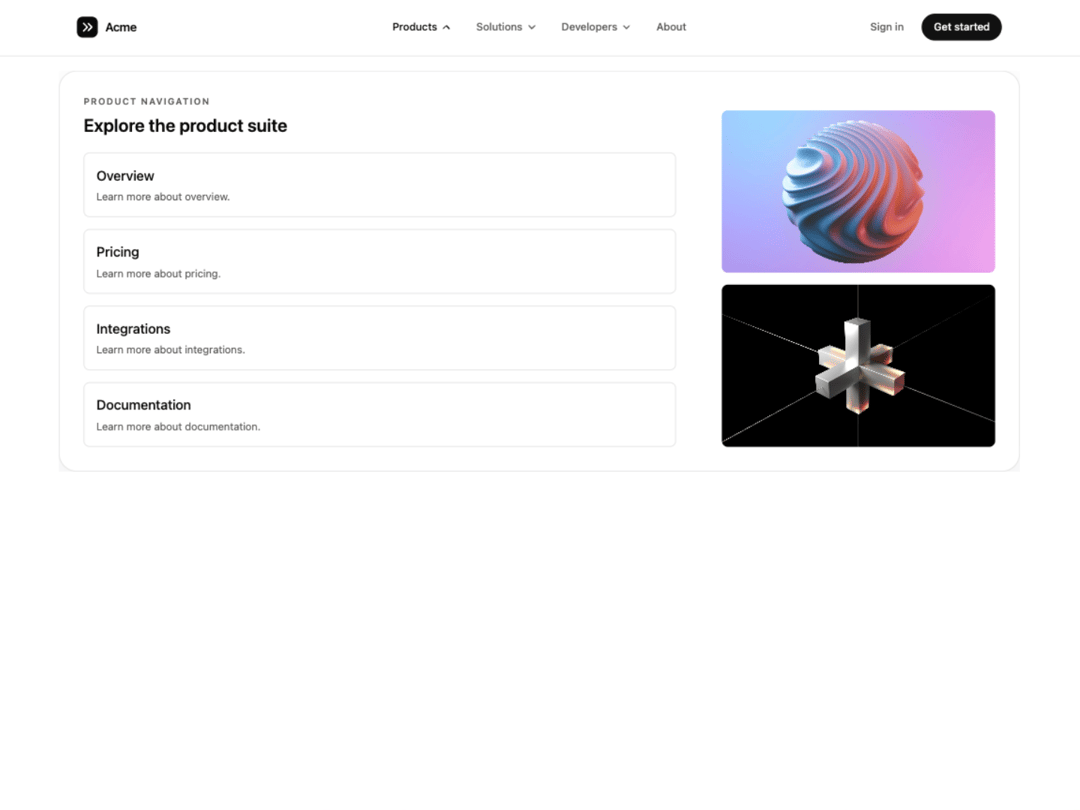
Mega menu where each panel slides in from the direction you move across the nav while the frame resizes to fit. GSAP-driven, keyboard accessible, follows light/dark theme tokens, respects reduced motion, and collapses to an accordion drawer on narrow layouts.
Built with React and Tailwind. Copy the prompt and paste it into Claude Code, Cursor or Lovable: your agent adds Directional Menu to your project and fits it to your theme.
Code
How Directional Menu is used: the demo's code. The component's own source comes with a free account.
Usage.tsx
"use client";
import DirectionalMenu, { type DirectionalMenuItem } from "@/components/ui/directional-menu";
const settings = {
duration: 0.35,
distance: 100,
closeDelay: 80,
panelGap: 20,
activeColor: "#0a0a0a",
inactiveColor: "#737373",
};
const PRODUCT_LINKS = [
{ label: "Overview", href: "#" },
{ label: "Pricing", href: "#" },
{ label: "Integrations", href: "#" },
{ label: "Documentation", href: "#" },
];
const PREVIEW_IMAGES = [
{
alt: "Dashboard preview",
src: "https://cdn.21st.dev/assets/mirror/1e/1e4a66a9c43bf24af52e65fb43602d5c497beb96ffc40fa4ad7b1eeabb879812.jpg",
},
{
alt: "Product showcase",
src: "https://cdn.21st.dev/assets/mirror/ef/ef696854debc5d2d40cbe03ea0c3a04e29689529cf2f4bfe90c1c5978f00579a.jpg",
},
];
const SOLUTION_BLOCKS = [
{
title: "Startups",
description:
"Launch faster with flexible infrastructure, simple onboarding, and scalable workflows.",
href: "#",
},
{
title: "Enterprise",
description:
"Bring governance, performance, and operational control to complex digital systems.",
href: "#",
},
{
title: "Agencies",
description:
"Build repeatable client delivery with modular systems, collaboration, and speed.",
href: "#",
},
];
const LINK_GROUPS = [
{
heading: "Documentation",
links: ["API Reference", "Guides", "Examples"],
},
{
heading: "Resources",
links: ["Changelog", "Community", "Support"],
},
{
heading: "Company",
links: ["About", "Careers", "Contact"],
},
];
const linkClassName =
"rounded-lg outline-none transition-colors duration-200 focus-visible:ring-2 focus-visible:ring-ring motion-reduce:transition-none";
function ProductsPanel() {
return (
<div className="flex flex-col gap-6 @4xl:flex-row @4xl:justify-between @4xl:gap-8">
<div className="flex flex-col gap-5 @4xl:w-[65%]">
<div className="flex flex-col gap-2">
<p className="text-xs font-semibold uppercase tracking-[0.14em] text-muted-foreground">
Product navigation
</p>
<h3 className="text-xl font-semibold text-foreground @3xl:text-2xl">
Explore the product suite
</h3>
</div>
<div className="grid grid-cols-1 gap-3 @2xl:grid-cols-2 @4xl:grid-cols-1 @4xl:gap-4">
{PRODUCT_LINKS.map((item) => (
<a
key={item.label}
href={item.href}
className={`${linkClassName} flex flex-col gap-1 border border-border p-4 hover:bg-accent`}
>
<span className="text-base font-medium text-foreground @3xl:text-lg">
{item.label}
</span>
<span className="text-sm text-muted-foreground">
Learn more about {item.label.toLowerCase()}.
</span>
</a>
))}
</div>
</div>
<div className="hidden flex-col justify-end gap-4 @4xl:flex @4xl:w-[30%]">
{PREVIEW_IMAGES.map((image) => (
<div key={image.src} className="h-54 overflow-hidden rounded-lg">
<img
src={image.src}
alt={image.alt}
width={600}
height={400}
className="h-full w-full object-cover"
/>
</div>
))}
</div>
</div>
);
}
function SolutionsPanel() {
return (
<div className="flex flex-col gap-6">
<div className="flex flex-col gap-2">
<p className="text-xs font-semibold uppercase tracking-[0.14em] text-muted-foreground">
Solutions
</p>
<h3 className="text-xl font-semibold text-foreground @3xl:text-2xl">
Built for different teams
</h3>
</div>
<div className="grid grid-cols-1 gap-3 @2xl:grid-cols-3 @2xl:gap-6">
{SOLUTION_BLOCKS.map((block) => (
<a
key={block.title}
href={block.href}
className={`${linkClassName} flex flex-col gap-2 border border-border p-4 hover:bg-accent @2xl:gap-3 @2xl:p-6`}
>
<h4 className="text-base font-semibold text-foreground @3xl:text-lg">
{block.title}
</h4>
<p className="text-sm leading-6 text-muted-foreground">{block.description}</p>
</a>
))}
</div>
</div>
);
}
function DevelopersPanel() {
return (
<div className="grid grid-cols-3 gap-6 @3xl:gap-10">
{LINK_GROUPS.map((group) => (
<div key={group.heading} className="flex flex-col gap-4">
<h4 className="text-xs font-semibold uppercase tracking-[0.08em] text-foreground @3xl:text-sm">
{group.heading}
</h4>
<div className="flex flex-col gap-3">
{group.links.map((label) => (
<a
key={label}
href="#"
className={`${linkClassName} block text-sm font-medium text-muted-foreground hover:text-foreground`}
>
{label}
</a>
))}
</div>
</div>
))}
</div>
);
}
const items: DirectionalMenuItem[] = [
{ label: "Products", customContent: <ProductsPanel /> },
{ label: "Solutions", customContent: <SolutionsPanel /> },
{ label: "Developers", customContent: <DevelopersPanel /> },
{ label: "About", href: "#" },
];
const logo = (
<a
href="#"
aria-label="Acme home"
className="flex items-center gap-2.5 rounded-md outline-none focus-visible:ring-2 focus-visible:ring-ring"
>
<svg viewBox="0 0 28 28" className="h-7 w-7" aria-hidden="true">
<rect width="28" height="28" rx="8" className="fill-foreground" />
<path
d="M9 9l5 5-5 5M15 9l5 5-5 5"
fill="none"
strokeWidth="2"
strokeLinecap="round"
strokeLinejoin="round"
className="stroke-background"
/>
</svg>
<span className="hidden text-base font-semibold tracking-tight text-foreground @3xl:inline">
Acme
</span>
</a>
);
const actions = (
<>
<a
href="#"
className="rounded-full px-4 py-2 text-sm font-medium text-muted-foreground outline-none transition-colors hover:text-foreground focus-visible:ring-2 focus-visible:ring-ring"
>
Sign in
</a>
<a
href="#"
className="rounded-full bg-primary px-4 py-2 text-sm font-medium text-primary-foreground outline-none transition-opacity hover:opacity-90 focus-visible:ring-2 focus-visible:ring-ring focus-visible:ring-offset-2 focus-visible:ring-offset-background"
>
Get started
</a>
</>
);
export default function DirectionalMenuDemo(props: Partial<typeof settings>) {
const s = { ...settings, ...props };
// Hex keeps a color picker in the Controls panel; until a color is changed,
// the component's own theme-aware default is used.
const themed = (key: "activeColor" | "inactiveColor") =>
s[key] === settings[key] ? undefined : s[key];
return (
<div className="@container min-h-screen w-full bg-background text-foreground">
<DirectionalMenu
items={items}
logo={logo}
actions={actions}
duration={s.duration}
distance={s.distance}
closeDelay={s.closeDelay}
panelGap={s.panelGap}
activeColor={themed("activeColor")}
inactiveColor={themed("inactiveColor")}
/>
<main className="mx-auto flex max-w-3xl flex-col items-center gap-5 px-6 pb-24 pt-28 text-center @3xl:pt-40">
<span className="rounded-full border border-border px-3 py-1 text-xs font-medium text-muted-foreground">
Directional mega menu
</span>
<h1 className="text-4xl font-semibold leading-[1.05] tracking-tight @3xl:text-6xl">
Menus that move the way you do.
</h1>
<p className="max-w-md text-sm leading-relaxed text-muted-foreground @3xl:text-base">
Hover across Products, Solutions and Developers. Each panel slides in
from the side you're heading toward while the frame resizes to fit.
</p>
</main>
</div>
);
}
Dependencies
More by Hyperiux Vault
View all

Product Timeline
2.3K
Stack Spread
1.3K
Arrow Fill Button
912
Interactive List Preview
867
Shiny Button
742
Circular Split Roll
637
Zoom Slider
429
Stack Loader
371
More in Navigation
View all

Sidebar
231

Tabs
60
Progress Bar Stepper
36
Newsletter Signup Footer
15

Footer 2
200
Navbar with Theme Toggle
43
Numberless Pagination with Text
11

Navbar
71
