
About
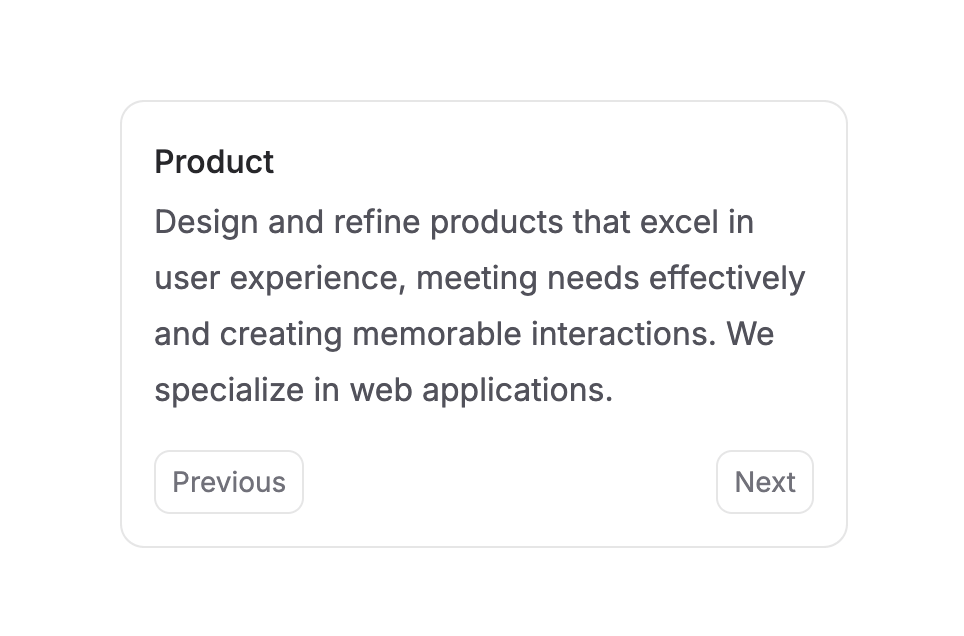
Easy way to switch between different pieces of content with enter and exit animations. It's perfect for enhancing user experience in areas such as onboarding card, settings adjustments, or any interactive content that requires a visual transition between states.
Built with React and Tailwind. Copy the prompt and paste it into Claude Code, Cursor or Lovable: your agent adds Transition Panel to your project and fits it to your theme.
Code
How Transition Panel is used: the demo's code. The component's own source comes with a free account.
Usage.tsx
"use client";

import React, { useEffect, useState } from "react";
import { TransitionPanel } from "@/components/ui/transition-panel";
import useMeasure from "react-use-measure";

function Button({
  onClick,
  children,
}: {
  onClick: () => void,
  children: React.ReactNode,
}) {
  return (
    <button
      onClick={onClick}
      type="button"
      className="relative flex h-8 shrink-0 scale-100 select-none appearance-none items-center justify-center rounded-lg border border-zinc-950/10 bg-transparent px-2 text-sm text-zinc-500 transition-colors hover:bg-zinc-100 hover:text-zinc-800 focus-visible:ring-2 active:scale-[0.98] dark:border-zinc-50/10 dark:text-zinc-50 dark:hover:bg-zinc-800"
    >
      {children}
    </button>
  );
}

export function TransitionPanelCard() {
  const [activeIndex, setActiveIndex] = useState(0);
  const [direction, setDirection] = useState(1);
  const [ref, bounds] = useMeasure();

  const FEATURES = [
    {
      title: "Brand",
      description:
        "Develop a distinctive brand identity with tailored logos and guidelines to ensure consistent messaging across all platforms.",
    },
    {
      title: "Product",
      description:
        "Design and refine products that excel in user experience, meeting needs effectively and creating memorable interactions. We specialize in web applications.",
    },
    {
      title: "Website",
      description:
        "Create impactful websites that combine beautiful aesthetics with functional design, ensuring a superior online presence.",
    },
    {
      title: "Design System",
      description:
        "Develop a design system that unifies your brand identity, ensuring consistency across all platforms and products.",
    },
  ];

  const handleSetActiveIndex = (newIndex: number) => {
    setDirection(newIndex > activeIndex ? 1 : -1);
    setActiveIndex(newIndex);
  };

  useEffect(() => {
    if (activeIndex < 0) setActiveIndex(0);
    if (activeIndex >= FEATURES.length) setActiveIndex(FEATURES.length - 1);
  }, [activeIndex]);

  const variants = {
    enter: (direction: number) => ({
      x: direction > 0 ? 364 : -364,
      opacity: 0,
    }),
    center: {
      zIndex: 1,
      x: 0,
      opacity: 1,
    },
    exit: (direction: number) => ({
      zIndex: 0,
      x: direction < 0 ? 364 : -364,
      opacity: 0,
      position: "absolute",
      top: 0,
      left: 0,
      width: "100%",
    }),
  };

  return (
    <div className="w-[364px] overflow-hidden rounded-xl border border-zinc-950/10 bg-white dark:bg-zinc-700">
      <TransitionPanel
        activeIndex={activeIndex}
        variants={{
          enter: (direction) => ({
            x: direction > 0 ? 364 : -364,
            opacity: 0,
            height: bounds.height > 0 ? bounds.height : "auto",
            position: "initial",
          }),
          center: {
            zIndex: 1,
            x: 0,
            opacity: 1,
            height: bounds.height > 0 ? bounds.height : "auto",
          },
          exit: (direction) => ({
            zIndex: 0,
            x: direction < 0 ? 364 : -364,
            opacity: 0,
            position: "absolute",
            top: 0,
            width: "100%",
          }),
        }}
        transition={{
          x: { type: "spring", stiffness: 300, damping: 30 },
          opacity: { duration: 0.2 },
        }}
        custom={direction}
      >
        {FEATURES.map((feature, index) => (
          <div key={index} className="px-4 pt-4" ref={ref}>
            <h3 className="mb-0.5 font-medium text-zinc-800 dark:text-zinc-100">
              {feature.title}
            </h3>
            <p className="text-zinc-600 dark:text-zinc-400">
              {feature.description}
            </p>
          </div>
        ))}
      </TransitionPanel>
      <div className="flex justify-between p-4">
        {activeIndex > 0 ? (
          <Button onClick={() => handleSetActiveIndex(activeIndex - 1)}>
            Previous
          </Button>
        ) : (
          <div />
        )}
        <Button
          onClick={() =>
            activeIndex === FEATURES.length - 1
              ? null
              : handleSetActiveIndex(activeIndex + 1)
          }
        >
          {activeIndex === FEATURES.length - 1 ? "Close" : "Next"}
        </Button>
      </div>
    </div>
  );
}
Dependencies
More by Julien Thibeaut
View all

Dock
3.1K
Text Effect
1.6K
Infinite Slider
1.5K
Text Shimmer
1.3K
Text Scramble
1.1K
Progressive blur
683
Glow Effect
606
Tailwind CSS Background Snippet
532
More in Cards
View all
Stats cards with links
120

Course Design Cards
1.1K

Statistics Card 2
258
Card
55

Card Studio
9
Statistics Card 7
288
The Item one
3

Weather Card
52
