About
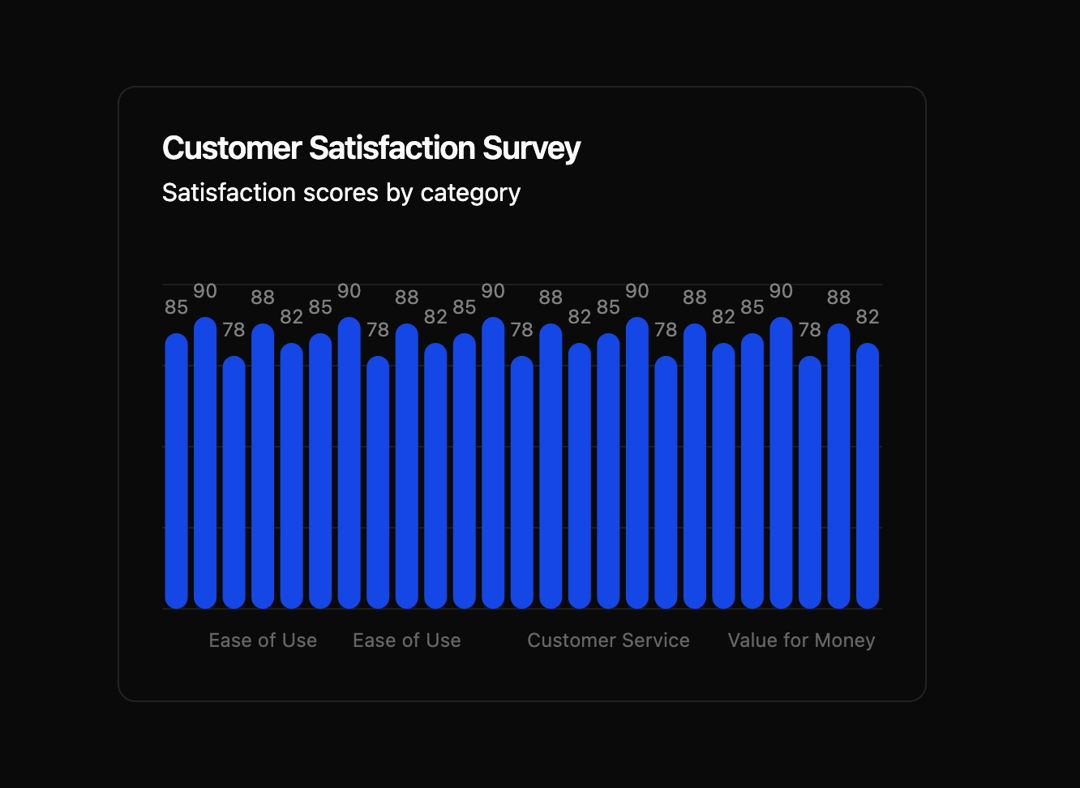
Here is Bar Chart component
Built with React and Tailwind. Copy the prompt and paste it into Claude Code, Cursor or Lovable: your agent adds Bar Chart to your project and fits it to your theme.
Code
How Bar Chart is used: the demo's code. The component's own source comes with a free account.
Usage.tsx
"use client"

import { Card } from "@/components/ui/card"
import { Chart, type ChartConfig, ChartTooltip, ChartTooltipContent } from "@/components/ui/bar-chart"
import { Bar, BarChart, CartesianGrid, LabelList, XAxis } from "recharts"

const surveyData = [
  { category: "Customer Support", satisfaction: 85 },
  { category: "Product Quality", satisfaction: 90 },
  { category: "Delivery Speed", satisfaction: 78 },
  { category: "Ease of Use", satisfaction: 88 },
  { category: "Value for Money", satisfaction: 82 },
  { category: "Customer Service", satisfaction: 85 },
  { category: "Product Quality", satisfaction: 90 },
  { category: "Delivery Speed", satisfaction: 78 },
  { category: "Ease of Use", satisfaction: 88 },
  { category: "Value for Money", satisfaction: 82 },
  { category: "Customer Service", satisfaction: 85 },
  { category: "Product Quality", satisfaction: 90 },
  { category: "Delivery Speed", satisfaction: 78 },
  { category: "Ease of Use", satisfaction: 88 },
  { category: "Value for Money", satisfaction: 82 },
  { category: "Customer Service", satisfaction: 85 },
  { category: "Product Quality", satisfaction: 90 },
  { category: "Delivery Speed", satisfaction: 78 },
  { category: "Ease of Use", satisfaction: 88 },
  { category: "Value for Money", satisfaction: 82 },
  { category: "Customer Service", satisfaction: 85 },
  { category: "Product Quality", satisfaction: 90 },
  { category: "Delivery Speed", satisfaction: 78 },
  { category: "Ease of Use", satisfaction: 88 },
  { category: "Value for Money", satisfaction: 82 },
]

const chartConfig = {
  satisfaction: {
    label: "Satisfaction",
    color: "var(--chart-1)",
  },
} satisfies ChartConfig

export default function Component() {
  return (
    <Card>
      <Card.Header
        title="Customer Satisfaction Survey"
        description="Satisfaction scores by category"
      />
      <Card.Content>
        <Chart className="h-[250px] w-full" config={chartConfig}>
          <BarChart
            accessibilityLayer
            data={surveyData}
            margin={{
              top: 20,
            }}
          >
            <CartesianGrid vertical={false} />
            <XAxis dataKey="category" tickLine={false} tickMargin={10} axisLine={false} />
            <ChartTooltip cursor={false} content={<ChartTooltipContent hideLabel />} />
            <Bar dataKey="satisfaction" fill="var(--color-satisfaction)" radius={8}>
              <LabelList position="top" offset={12} className="fill-fg" fontSize={12} />
            </Bar>
          </BarChart>
        </Chart>
      </Card.Content>
    </Card>
  )
}
Dependencies
More by Intent UI
View all

Radar Chart
218
Radial Chart
79
Pie Chart
31
Toggle Group
26
Loader
23
Progress Bar
19
Color Slider
13
File Trigger 13
10
More in Cards
View all

Card
56
Stats cards with links
80
Statistics Card 2
264

Course Design Cards
1.1K
Statistics Card 10
264

Card
17
The Item one
3

Card Studio
7
