
About
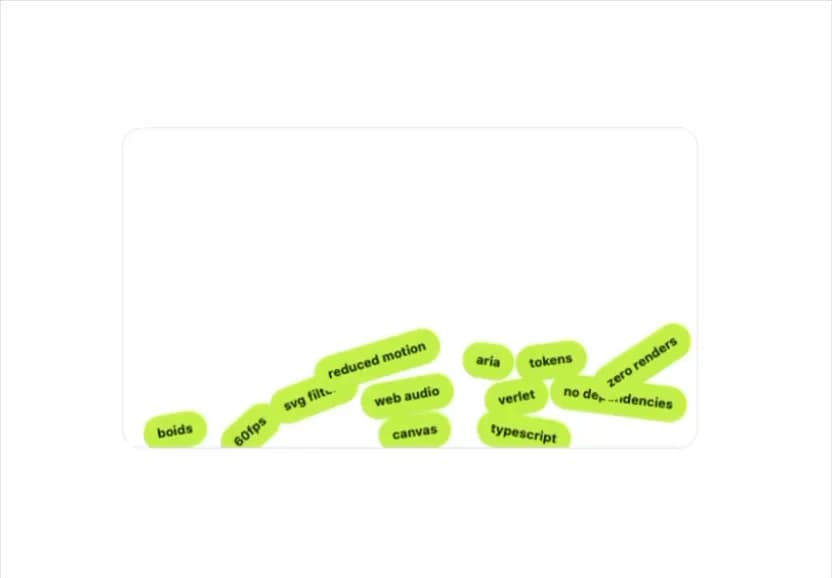
A pile of tag pills that fall under simulated gravity, collide, and stack at the bottom of a box, with the pointer able to push them around.
Built with React and Tailwind. Copy the prompt and paste it into Claude Code, Cursor or Lovable: your agent adds Gravity Tags to your project and fits it to your theme.
Code
How Gravity Tags is used: the demo's code. The component's own source comes with a free account.
Usage.tsx
"use client";

import { GravityTags } from "@/components/ui/gravity-tags";

export default function GravityTagsDemo() {
  const tags = [
    { id: "1", label: "typescript" },
    { id: "2", label: "canvas" },
    { id: "3", label: "web audio" },
    { id: "4", label: "verlet" },
    { id: "5", label: "svg filters" },
    { id: "6", label: "no dependencies" },
    { id: "7", label: "reduced motion" },
    { id: "8", label: "tokens" },
    { id: "9", label: "aria" },
    { id: "10", label: "boids" },
    { id: "11", label: "60fps" },
    { id: "12", label: "zero renders" },
  ];

  return (
    <div className="flex w-full items-center justify-center bg-background p-6 text-foreground">
      <GravityTags
        tags={tags}
        label="Things this library uses"
        className="max-w-xl"
      />
    </div>
  );
}
More by klyv-ui
View all
Gantt Chart
56
Klyv Animated Beam
47
Pareto Chart
40
Shader Canvas
35
Sunburst Chart
23
Morphing Text
21
Gooey Loader
19
Klyv Border Beam
12