
About
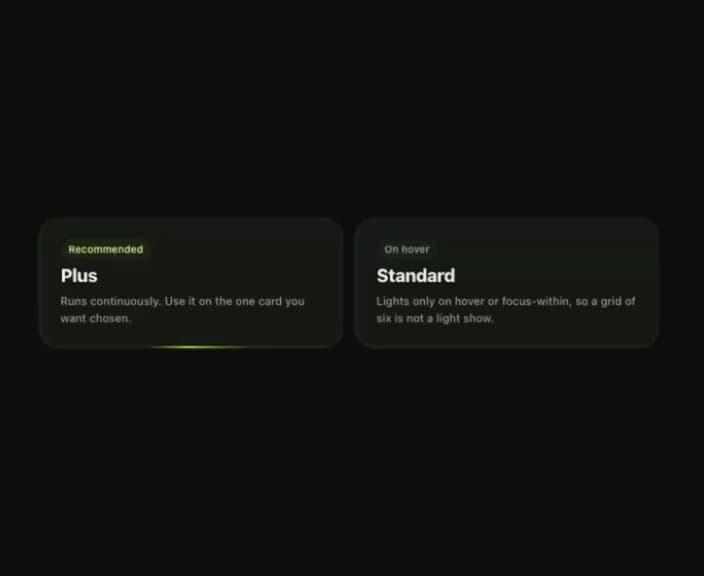
Light travelling round a border: one spinning conic gradient behind an inset opaque surface, so it holds at any aspect ratio.
Built with React and Tailwind. Copy the prompt and paste it into Claude Code, Cursor or Lovable: your agent adds Klyv Border Beam to your project and fits it to your theme.
Code
How Klyv Border Beam is used: the demo's code. The component's own source comes with a free account.
Usage.tsx
import { BorderBeam } from "@/components/ui/klyv-border-beam";
import { Tag } from "@/components/ui/klyv-border-beam-utils/components-Tag-Tag";
import { Text } from "@/components/ui/klyv-border-beam-utils/components-Text-Text";

const SourceExample = () => (
          <div className="grid w-full gap-3 sm:grid-cols-2">
            <BorderBeam duration={5} contentClassName="flex flex-col items-start gap-2 p-5">
              <Tag size="sm" tone="accent">
                Recommended
              </Tag>
              <Text size="subtitle">Plus</Text>
              <Text size="caption" tone="soft" leading="normal">
                Runs continuously. Use it on the one card you want chosen.
              </Text>
            </BorderBeam>
            <BorderBeam duration={5} delay={2.5} onHover contentClassName="flex flex-col items-start gap-2 p-5">
              <Tag size="sm">On hover</Tag>
              <Text size="subtitle">Standard</Text>
              <Text size="caption" tone="soft" leading="normal">
                Lights only on hover or focus-within, so a grid of six is not a light show.
              </Text>
            </BorderBeam>
          </div>
        );


export default function Demo(){return <div data-component-demo className="flex min-h-screen w-full items-center justify-center bg-canvas p-8 text-ink"><div className="w-full max-w-[620px]"><SourceExample /></div></div>}
More by klyv-ui
View all
Gantt Chart
56
Klyv Animated Beam
47
Pareto Chart
40
Shader Canvas
35
Sunburst Chart
23
Morphing Text
21
Gooey Loader
19
Gravity Tags
17