
About
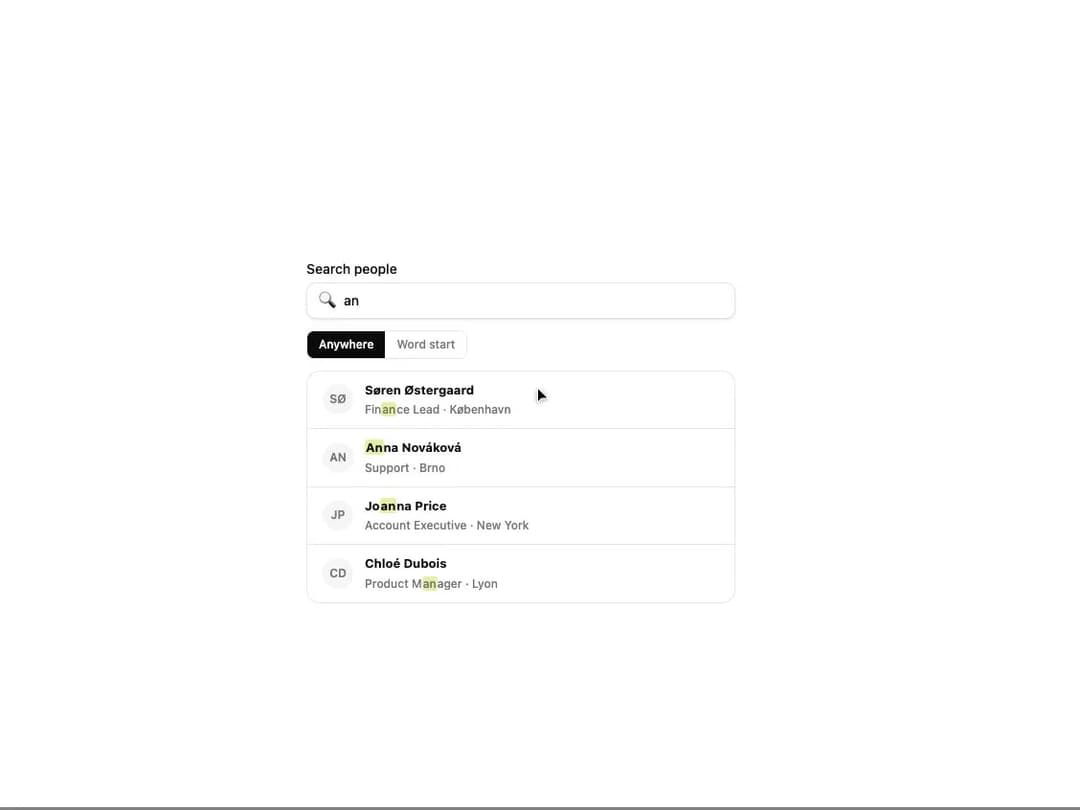
A text component that wraps the parts matching a search query in a <mark> tag, ignoring case and accent differences, for use in search results, comboboxes and filterable lists.
Built with React and Tailwind. Copy the prompt and paste it into Claude Code, Cursor or Lovable: your agent adds Highlight Match to your project and fits it to your theme.
Code
How Highlight Match is used: the demo's code. The component's own source comes with a free account.
Usage.tsx
import HighlightMatch from "@/components/ui/highlight-match";
import { useState } from "react";

const PEOPLE: [string, string][] = [
  ["Zoë Laurent", "Head of Design · Montréal"],
  ["José Álvarez", "Staff Engineer · Sevilla"],
  ["Søren Østergaard", "Finance Lead · København"],
  ["Anna Nováková", "Support · Brno"],
  ["Joanna Price", "Account Executive · New York"],
  ["Chloé Dubois", "Product Manager · Lyon"],
  ["Renée O’Connor", "Growth · Dublin"],
];

function initials(name: string) {
  return name
    .split(" ")
    .map((part) => part[0])
    .join("")
    .slice(0, 2)
    .toUpperCase();
}

function fold(value: string) {
  return value.normalize("NFD").replace(/\p{M}/gu, "").toLowerCase();
}

function highlightMatchFilter(text: string, words: string[]) {
  const haystack = fold(text);
  return words.every((word) => haystack.includes(fold(word)));
}

export default function HighlightMatchDemo() {
  const [query, setQuery] = useState("zoe montreal");
  const [wordStart, setWordStart] = useState<"anywhere" | "start">("anywhere");
  const words = query.trim().split(/\s+/).filter(Boolean);
  const results = PEOPLE.filter(
    ([name, role]) =>
      words.length === 0 || highlightMatchFilter(`${name} ${role}`, words),
  );

  return (
    <div className="flex w-full items-center justify-center bg-background p-8">
      <div className="flex w-full max-w-md flex-col gap-3">
        <label className="flex flex-col gap-1 text-sm font-medium text-foreground">
          Search people
          <span className="flex items-center gap-2 rounded-lg border border-border bg-card px-3 py-2 text-sm text-foreground shadow-sm">
            <span aria-hidden>🔍</span>
            <input
              value={query}
              onChange={(e) => setQuery(e.target.value)}
              placeholder='Try "an", "cafe", "("'
              className="w-full bg-transparent outline-none placeholder:text-muted-foreground"
            />
          </span>
        </label>

        <div className="flex self-start overflow-hidden rounded-md border border-border text-xs font-medium">
          {(["anywhere", "start"] as const).map((value) => (
            <button
              key={value}
              type="button"
              onClick={() => setWordStart(value)}
              className={
                "px-3 py-1.5 transition-colors " +
                (wordStart === value
                  ? "bg-foreground text-background"
                  : "bg-card text-muted-foreground hover:bg-accent")
              }
            >
              {value === "anywhere" ? "Anywhere" : "Word start"}
            </button>
          ))}
        </div>

        <ul
          aria-label="People"
          className="flex flex-col divide-y divide-border rounded-xl border border-border bg-card"
        >
          {results.map(([name, role]) => (
            <li key={name} className="flex items-center gap-3 px-4 py-2.5">
              <span className="flex h-8 w-8 shrink-0 items-center justify-center rounded-full bg-muted text-xs font-semibold text-muted-foreground">
                {initials(name)}
              </span>
              <div className="flex min-w-0 flex-col gap-0.5">
                <span className="text-[13px] font-bold text-foreground">
                  <HighlightMatch
                    text={name}
                    query={query}
                    wordStart={wordStart === "start"}
                  />
                </span>
                <span className="text-[12px] font-medium text-muted-foreground">
                  <HighlightMatch
                    text={role}
                    query={query}
                    wordStart={wordStart === "start"}
                  />
                </span>
              </div>
            </li>
          ))}
          {results.length === 0 && (
            <li className="px-4 py-6 text-center text-sm text-muted-foreground">
              No matches
            </li>
          )}
        </ul>
      </div>
    </div>
  );
}
More by klyv-ui
View all
Gantt Chart
56
Klyv Animated Beam
47
Pareto Chart
40
Shader Canvas
35
Sunburst Chart
23
Morphing Text
21
Gooey Loader
19
Gravity Tags
17
More in Text
View all
Motion Blur Text
36

Vertical Cut Reveal Characters
103

NeonRGBTextEffect
144
Text Reveal
27
Random Letter Swap
46

Rainbow Text Effect
47
Text Color
545

Blur Reveal
300