
About
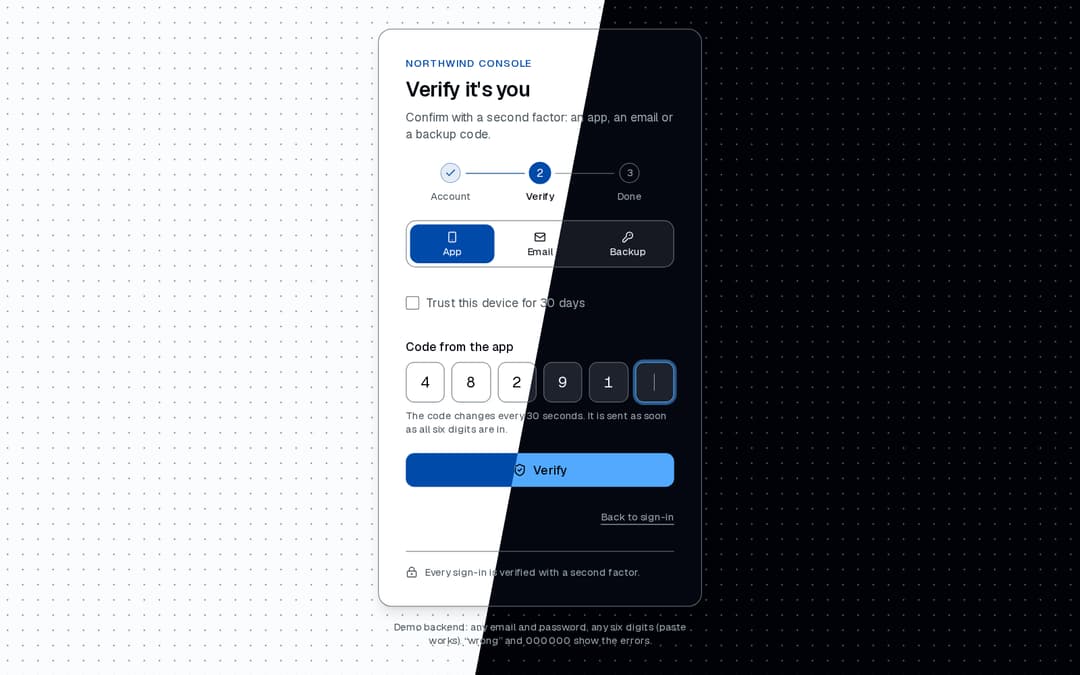
Complete sign-in flow: email and password with inline checks, a second factor with a six-cell code input (paste, autofill, auto-submit), an email resend timer and backup codes, then success. Promise-based handlers, keyboard and screen-reader friendly.
Built with React and Tailwind. Copy the prompt and paste it into Claude Code, Cursor or Lovable: your agent adds Stepper Login to your project and fits it to your theme.
Code
How Stepper Login is used: the demo's code. The component's own source comes with a free account.
Usage.tsx
"use client";

import { LockKeyhole } from "lucide-react";
import { useCallback, useState } from "react";
import {
  StepperLogin,
  StepperLoginError,
  type VerifyMethod,
} from "@/components/ui/stepper-login";

const settings = {
  brand: "Northwind Console",
  failCode: false,
  failPassword: false,
  latencyMs: 700,
  offerBackupCode: true,
  offerEmailCode: true,
  resendSeconds: 30,
  trustByDefault: false,
  trustDays: 30,
};

const wait = (ms: number) =>
  new Promise<void>((resolve) => {
    setTimeout(resolve, ms);
  });

/**
 * A mocked backend, no network: any email and password pass, any six digits or a xxxxx-xxxxx
 * backup code pass. "wrong" as the password and 000000 as the code fail; the Controls panel can
 * make every password or code fail. Expected failures throw `StepperLoginError`, so their text is
 * shown; anything else would show the card's generic line.
 */
export default function Demo(props: Partial<typeof settings>) {
  const s = { ...settings, ...props };
  const [run, setRun] = useState(0);
  const { failCode, failPassword, latencyMs } = s;
  const methods: VerifyMethod[] = [
    "app",
    ...(s.offerEmailCode ? (["email"] as const) : []),
    ...(s.offerBackupCode ? (["backup"] as const) : []),
  ];

  const restart = useCallback(() => setRun((value) => value + 1), []);
  const sendCode = useCallback(() => wait(latencyMs), [latencyMs]);
  const signIn = useCallback(
    async ({ password }: { password: string }) => {
      await wait(latencyMs);
      if (failPassword || password === "wrong") {
        throw new StepperLoginError(
          "Wrong email or password. Check both and try again."
        );
      }
    },
    [failPassword, latencyMs]
  );
  const verify = useCallback(
    async ({ code }: { code: string }) => {
      await wait(latencyMs);
      if (failCode || code === "000000") {
        throw new StepperLoginError(
          "That code has expired. Enter the latest one."
        );
      }
    },
    [failCode, latencyMs]
  );

  return (
    // Centred in the frame (21st's preview shows the frame's middle), with "safe" centring: a
    // frame shorter than the card starts at the card's top instead of cutting its title off.
    <div className="flex min-h-svh w-full flex-col items-center gap-4 bg-background bg-[radial-gradient(var(--color-border)_1px,transparent_1px)] bg-size-[18px_18px] px-6 py-8 text-foreground [justify-content:safe_center]">
      <StepperLogin
        brand={s.brand}
        defaultTrustDevice={s.trustByDefault}
        footer={
          <span className="flex items-center gap-2">
            <LockKeyhole aria-hidden="true" className="size-3.5 shrink-0" />
            Every sign-in is verified with a second factor.
          </span>
        }
        key={`${run}-${methods.join()}-${s.trustByDefault}`}
        methods={methods}
        onComplete={restart}
        onSendCode={sendCode}
        onSignIn={signIn}
        onVerify={verify}
        resendSeconds={s.resendSeconds}
        trustDays={s.trustDays}
      />
      <p className="max-w-sm text-center text-muted-foreground text-xs">
        Demo backend: any email and password, any six digits (paste works).
        “wrong” and 000000 show the errors.
      </p>
    </div>
  );
}
Dependencies
More by OSAGI
View all
AI Orb
83
KPI Tile
28
OTP Input
12
Reasoning Thread
8
Assistant Composer
8
Release Notes
Docs TOC
Docs Search
More in Forms
View all

Premium Auth
500

Login 1
52
Authentication Card
47

Book A Demo 3
83
Book A Demo 1
69

Contact Card
1K

Login Card
32

Login 2
7
