
About
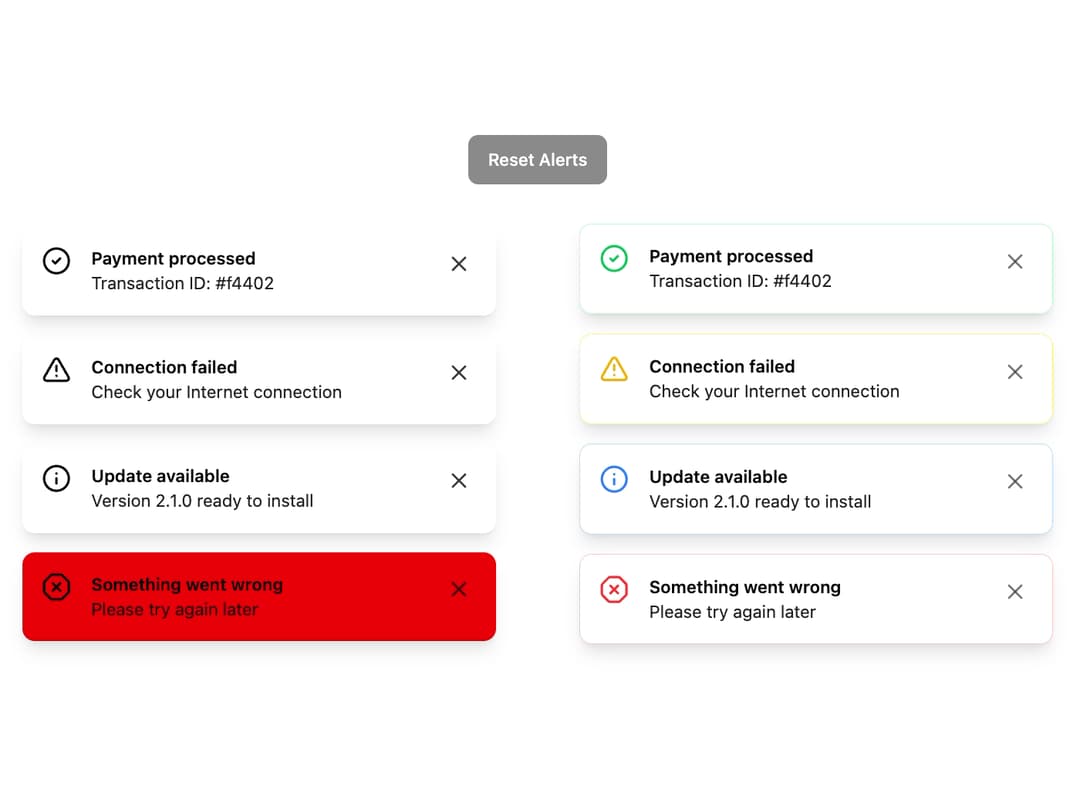
Alert Toast A responsive and theme-aware alert component designed to provide contextual feedback for different user actions. It includes variants for success, warning, info, and error states, with support for both filled and subtle visual styles.
Built with React and Tailwind. Copy the prompt and paste it into Claude Code, Cursor or Lovable: your agent adds Alert Toast to your project and fits it to your theme.
Code
How Alert Toast is used: the demo's code. The component's own source comes with a free account.
Usage.tsx
import * as React from "react";
import { AlertToast } from "@/components/ui/alert-toast"; // Adjust the import path
import { Button } from "@/components/ui/button";
import { AnimatePresence } from "framer-motion";

const initialAlerts = [
  { id: 1, styleVariant: 'filled', variant: 'success', title: 'Payment processed', description: 'Transaction ID: #f4402' },
  { id: 2, styleVariant: 'filled', variant: 'warning', title: 'Connection failed', description: 'Check your Internet connection' },
  { id: 3, styleVariant: 'filled', variant: 'info', title: 'Update available', description: 'Version 2.1.0 ready to install' },
  { id: 4, styleVariant: 'filled', variant: 'error', title: 'Something went wrong', description: 'Please try again later' },
  { id: 5, styleVariant: 'default', variant: 'success', title: 'Payment processed', description: 'Transaction ID: #f4402' },
  { id: 6, styleVariant: 'default', variant: 'warning', title: 'Connection failed', description: 'Check your Internet connection' },
  { id: 7, styleVariant: 'default', variant: 'info', title: 'Update available', description: 'Version 2.1.0 ready to install' },
  { id: 8, styleVariant: 'default', variant: 'error', title: 'Something went wrong', description: 'Please try again later' },
] as const;


export default function AlertToastDemo() {
  const [alerts, setAlerts] = React.useState(initialAlerts);

  const handleClose = (id: number) => {
    setAlerts((prevAlerts) => prevAlerts.filter((alert) => alert.id !== id));
  };

  const resetAlerts = () => {
    setAlerts(initialAlerts);
  }

  return (
    <div className="w-full space-y-8">
       <div className="flex justify-center">
            <Button onClick={resetAlerts} disabled={alerts.length === initialAlerts.length}>
                Reset Alerts
            </Button>
        </div>

        <div className="grid grid-cols-1 md:grid-cols-2 gap-6 place-items-center">
            {/* Filled Style Column */}
            <div className="space-y-4 w-full max-w-sm">
                <AnimatePresence>
                {alerts
                    .filter(a => a.styleVariant === 'filled')
                    .map(({ id, variant, title, description, styleVariant }) => (
                    <AlertToast
                        key={id}
                        variant={variant}
                        styleVariant={styleVariant}
                        title={title}
                        description={description}
                        onClose={() => handleClose(id)}
                    />
                    ))}
                </AnimatePresence>
            </div>

            {/* Default Style Column */}
            <div className="space-y-4 w-full max-w-sm">
                <AnimatePresence>
                {alerts
                    .filter(a => a.styleVariant === 'default')
                    .map(({ id, variant, title, description, styleVariant }) => (
                    <AlertToast
                        key={id}
                        variant={variant}
                        styleVariant={styleVariant}
                        title={title}
                        description={description}
                        onClose={() => handleClose(id)}
                    />
                    ))}
                </AnimatePresence>
            </div>
        </div>
    </div>
  );
}
Dependencies
More by LaviKatiyar
View all
Hero Section
801
Cards
564
Service Card
546
Card
505
Bento Grid
381
Freelancer Profile Card
358
Referral Card
289
Menu
264