
About
Built with React and Tailwind. Copy the prompt and paste it into Claude Code, Cursor or Lovable: your agent adds Bento Grid to your project and fits it to your theme.
Code
How Bento Grid is used: the demo's code. The component's own source comes with a free account.
Usage.tsx
import * as React from "react";
import {
  Card,
  CardContent,
  CardDescription,
  CardHeader,
  CardTitle,
} from "@/components/ui/card";
import { Badge } from "@/components/ui/badge";
import { Avatar, AvatarFallback, AvatarImage } from "@/components/ui/avatar";
import { BentoGridShowcase } from "@/components/ui/bento-grid";
import {
  Calendar,
  HeartPulse,
  Plus,
  Slack,
  Zap,
} from "lucide-react";

// --- Helper Components for the Demo ---
// These components represent the content for each slot.
// I've updated the image URLs to match your new layout.

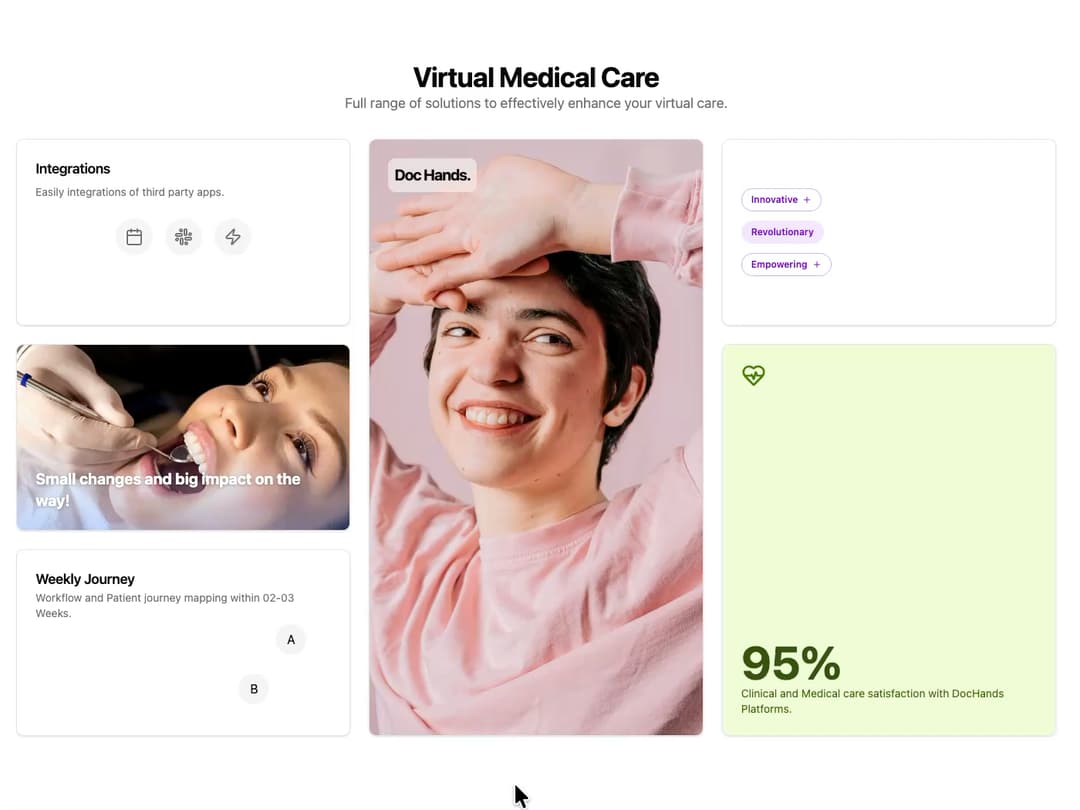
const IntegrationsCard = () => (
  <Card className="h-full">
    <CardHeader>
      <CardTitle className="text-lg">Integrations</CardTitle>
      <CardDescription>
        Easily integrations of third party apps.
      </CardDescription>
    </CardHeader>
    <CardContent className="flex items-center justify-center gap-4">
      <div className="flex h-12 w-12 items-center justify-center rounded-full bg-muted">
        <Calendar className="h-6 w-6 text-muted-foreground" />
      </div>
      <div className="flex h-12 w-12 items-center justify-center rounded-full bg-muted">
        <Slack className="h-6 w-6 text-muted-foreground" />
      </div>
      <div className="flex h-12 w-12 items-center justify-center rounded-full bg-muted">
        <Zap className="h-6 w-6 text-muted-foreground" />
      </div>
    </CardContent>
  </Card>
);

const FeatureTagsCard = () => (
  <Card className="h-full">
    <CardContent className="flex h-full flex-col justify-center gap-3 p-6">
      <Badge
        variant="outline"
        className="w-fit items-center gap-1.5 border-purple-300 py-1.5 px-3 text-purple-700 dark:border-purple-700 dark:text-purple-300"
      >
        Innovative <Plus className="h-3 w-3" />
      </Badge>
      <Badge
        variant="secondary"
        className="w-fit items-center gap-1.5 bg-purple-100 py-1.5 px-3 text-purple-700 hover:bg-purple-200 dark:bg-purple-900/50 dark:text-purple-300 dark:hover:bg-purple-900/80"
      >
        Revolutionary
      </Badge>
      <Badge
        variant="outline"
        className="w-fit items-center gap-1.5 border-purple-300 py-1.5 px-3 text-purple-700 dark:border-purple-700 dark:text-purple-300"
      >
        Empowering <Plus className="h-3 w-3" />
      </Badge>
    </CardContent>
  </Card>
);

const MainFeatureCard = () => (
  <Card className="relative h-full w-full overflow-hidden">
    <div className="absolute top-6 left-6 z-10 rounded-lg bg-background/50 p-2 backdrop-blur-sm">
      <p className="text-xl font-bold tracking-tighter">Doc Hands.</p>
    </div>
    <img
      src="https://cdn.21st.dev/assets/mirror/54/5421eb1c18b3b25f36c6da6c0e7dcffc078ae3c8f442ee1f7bcd2750be1c57fc.jpg"
      alt="Smiling woman in a pink traditional dress"
      className="h-full w-full object-cover"
    />
  </Card>
);

const StatCard = () => (
  <Card className="flex h-full flex-col justify-between bg-lime-100/80 p-6 dark:bg-lime-950/80">
    <HeartPulse className="h-8 w-8 text-lime-700 dark:text-lime-300" />
    <div>
      <p className="text-6xl font-bold text-lime-900 dark:text-lime-100">95%</p>
      <p className="text-sm text-lime-800 dark:text-lime-200">
        Clinical and Medical care satisfaction with DocHands Platforms.
      </p>
    </div>
  </Card>
);

const SecondaryFeatureCard = () => (
  <Card className="relative h-full w-full overflow-hidden">
    <img
      src="https://cdn.21st.dev/assets/mirror/c4/c420b1918658917672d574ab87cc6e76c290a7c611f2811a2ec0700352d5c375.jpg"
      alt="Close-up of a smiling woman"
      className="h-60 w-full object-cover"
    />
    <div className="absolute inset-0 bg-gradient-to-t from-blue-500/30 via-transparent to-transparent dark:from-blue-900/40" />
    <p className="absolute bottom-6 left-6 z-10 max-w-[80%] text-xl font-bold text-white [text-shadow:_0_1px_4px_rgb(0_0_0_/_30%)]">
      Small changes and big impact on the way!
    </p>
  </Card>
);

const JourneyCard = () => (
  <Card className="relative h-full w-full overflow-hidden p-6">
    <CardTitle className="text-lg">Weekly Journey</CardTitle>
    <CardDescription>
      Workflow and Patient journey mapping within 02-03 Weeks.
    </CardDescription>
    {/* Avatar constellation */}
    <div className="absolute -right-4 -bottom-4 h-48 w-48">
      <div className="absolute top-8 left-20">
        <Avatar>
          <AvatarImage src="https://api.uifaces.co/our-content/faces/49.jpg" />
          <AvatarFallback>A</AvatarFallback>
        </Avatar>
      </div>
      <div className="absolute top-24 left-8">
        <Avatar>
          <AvatarImage src="https://api.uifaces.co/our-content/faces/14.jpg" />
          <AvatarFallback>B</AvatarFallback>
        </Avatar>
      </div>
    </div>
  </Card>
);

// --- The Default Demo ---
export default function BentoGridShowcaseDemo() {
  return (
    <div className="w-full p-4 md:p-10">
      <div className="mb-8">
        <h1 className="text-center text-4xl font-bold tracking-tight">
          Virtual Medical Care
        </h1>
        <p className="text-center text-lg text-muted-foreground">
          Full range of solutions to effectively enhance your virtual care.
        </p>
      </div>

      <BentoGridShowcase
        integrations={<IntegrationsCard />}
        featureTags={<FeatureTagsCard />}
        mainFeature={<MainFeatureCard />}
        secondaryFeature={<SecondaryFeatureCard />}
        statistic={<StatCard />}
        journey={<JourneyCard />}
      />
    </div>
  );
}
Dependencies
More by LaviKatiyar
View all
Hero Section
799
Cards
558
Service Card
544
Card
500
Alert Toast
481
Freelancer Profile Card
357
Referral Card
289
Menu
260
More in Features
View all

Features 8
3K

Feature Sections
52

Grid Feature Cards
1.9K
Features Card
200
Feature with image
149
Feature Modern
20
Feature with advantages
278
Features 1
278


